Comparison
BatteryBud vs MacBookBatteryMonitor: per-app watts beyond the CPU
- Published
- Updated
Which is better, MacBookBatteryMonitor or BatteryBud?
If you want one menu bar list for every battery you own, BatteryBud is the better pick: it tracks this Mac, your other Macs, iPhone, iPad, AirPods, keyboard and mouse, with history and health. If you want to know which app drains your MacBook and by how many watts, MacBookBatteryMonitor: BatteryBud counts processor energy only, while MacBookBatteryMonitor counts each app's CPU and graphics work with 99.63% accurate power readings, limits an app's power, and costs $9 once as of October 2026, against $19 plus $9 a year for BatteryBud updates.
BatteryBud is a monitor for every battery you own, and it added a per-app Power flow view on 14 October 2026. Its app figures are processor energy only. MacBookBatteryMonitor counts each app's CPU and graphics work, and every app's share adds up to what your Mac actually drew, with 99.63% accurate power readings.
 vs
vs
Price
In US dollars, as of October 2026.
MacBookBatteryMonitor53% lessBatteryBudSide by side
How each app's watts are counted
BatteryBud counts processor energy per app and puts graphics, display, and radios in System. MacBookBatteryMonitor counts each app's CPU and graphics work and breaks your Mac's power into every part, with 99.63% accurate power readings.
MacBookBatteryMonitorWinner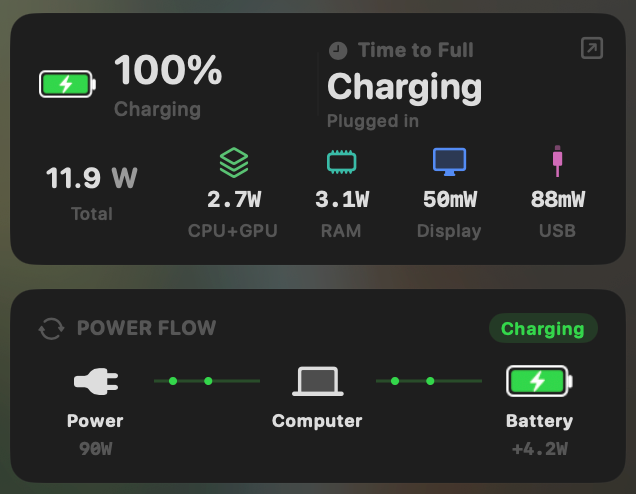
- Yes:Live per-app power draw · Process-level, real-time
- Yes:System total power draw · Live, in watts
- Yes:Power breakdown by component · CPU / GPU / RAM / Display / USB
BatteryBud- Partial:Live per-app power draw · Processor energy only
- Yes:System total power draw · Updates every minute
- Partial:Power breakdown by component · Apps / Devices / System, no CPU or GPU
Limiting an app's power without quitting it
BatteryBud has no app controls. MacBookBatteryMonitor caps an app's CPU from 10% to 100%, moves it onto the efficiency cores, applies the limit always, only on battery, or below a battery level you choose, and quits runaway apps in one click.
MacBookBatteryMonitorWinner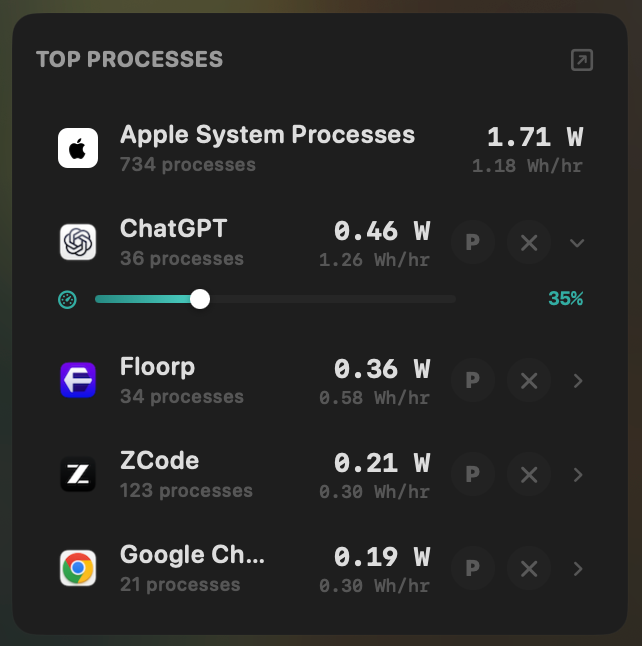
- Yes:Per-app CPU throttle · 10% to 100% slider
- Yes:E-core offload · Per-app toggle
- Yes:One-click kill · Runaway apps + subprocesses
- Yes:Hidden-workload detection · Docker, cloudflared, launchd
BatteryBud- No:Per-app CPU throttle
- No:E-core offload
- No:One-click kill
- No:Hidden-workload detection
Charge limit and Sailing Mode
BatteryBud does not limit charging. MacBookBatteryMonitor sets a 50% to 100% charge limit over SMC, sails down to it while plugged in, and switches on Low Power Mode by itself below a threshold you set.
MacBookBatteryMonitorWinner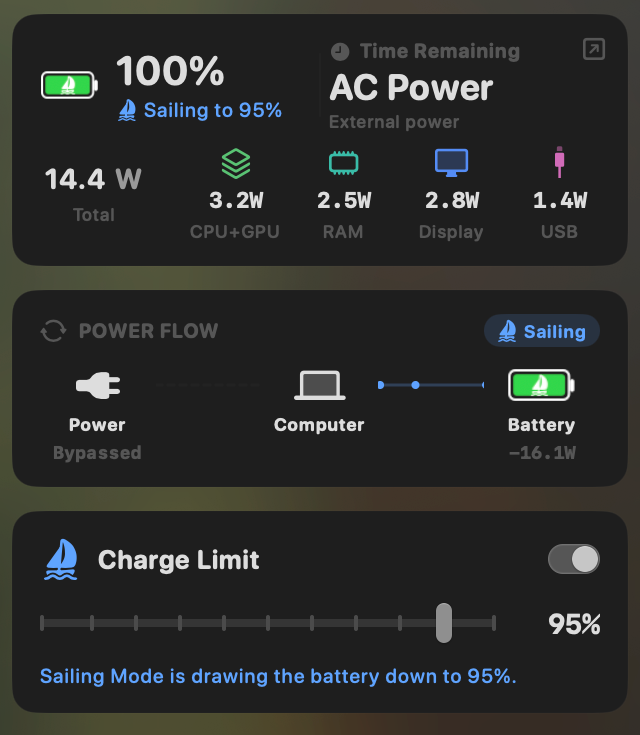
- Yes:Charge limit · 50% to 100% via SMC
- Yes:Sailing mode · Discharge while plugged in
- Yes:Low Power Mode automation · Auto below a threshold
BatteryBud- No:Charge limit
- No:Sailing mode
- No:Low Power Mode automation
Battery health
Both track health and cycle count over time. BatteryBud shows no battery temperature. MacBookBatteryMonitor shows temperature too, plus the design cycle limit and a condition label.
MacBookBatteryMonitorWinner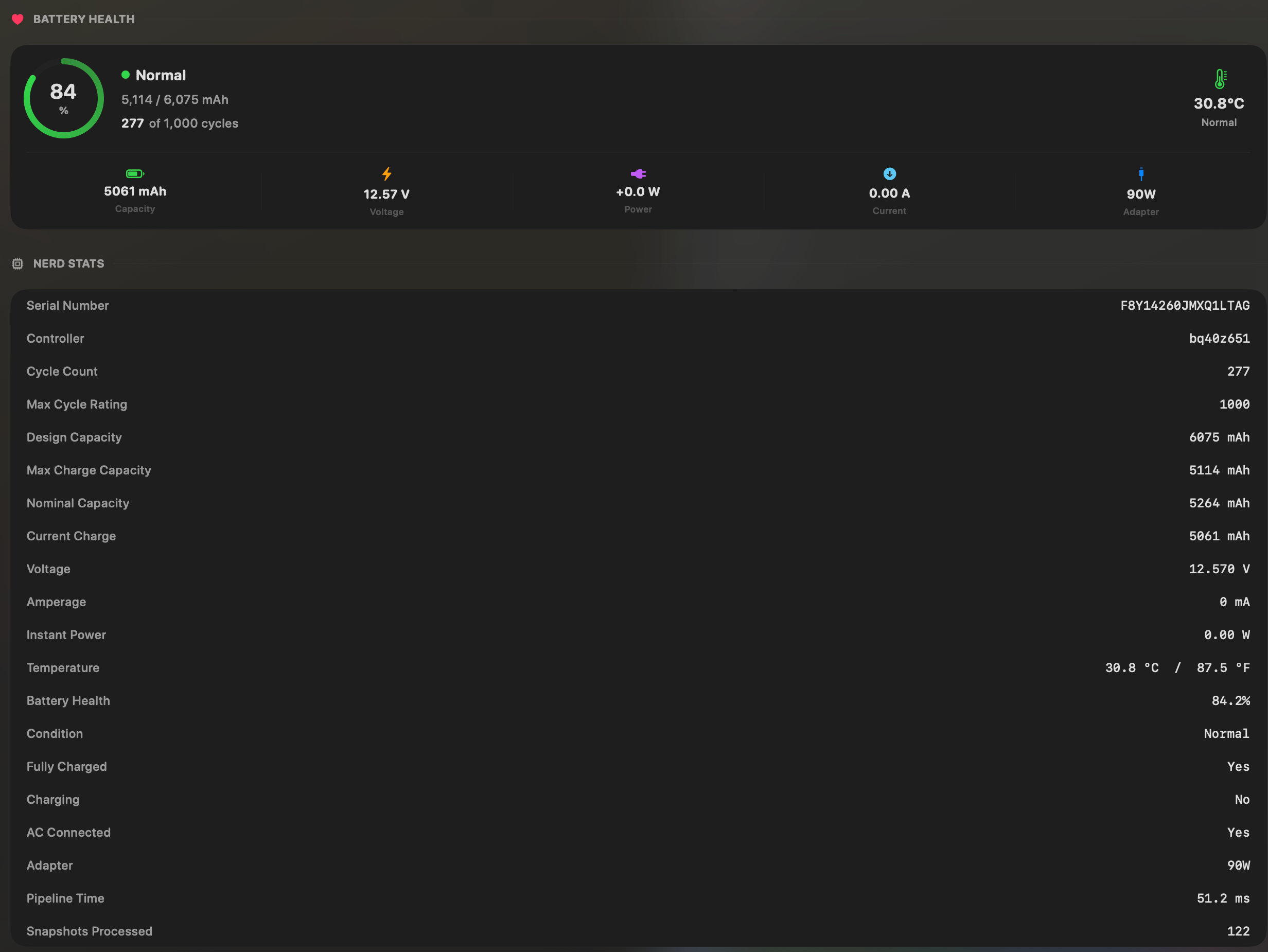
- Yes:Battery health % · Health % + condition label
- Yes:Cycle count · Cycles + design cycle count
- Yes:Battery temperature · °C / °F with status label
BatteryBud- Yes:Battery health %
- Yes:Cycle count
- No:Battery temperature · Not shown
Menu bar and history
Both live in the menu bar. BatteryBud lists the Mac alongside your iPhone, iPad, AirPods, and accessories. MacBookBatteryMonitor focuses on the MacBook, with per-app charts from 1 hour to 7 days, recorded on battery and on the charger.
MacBookBatteryMonitorDraw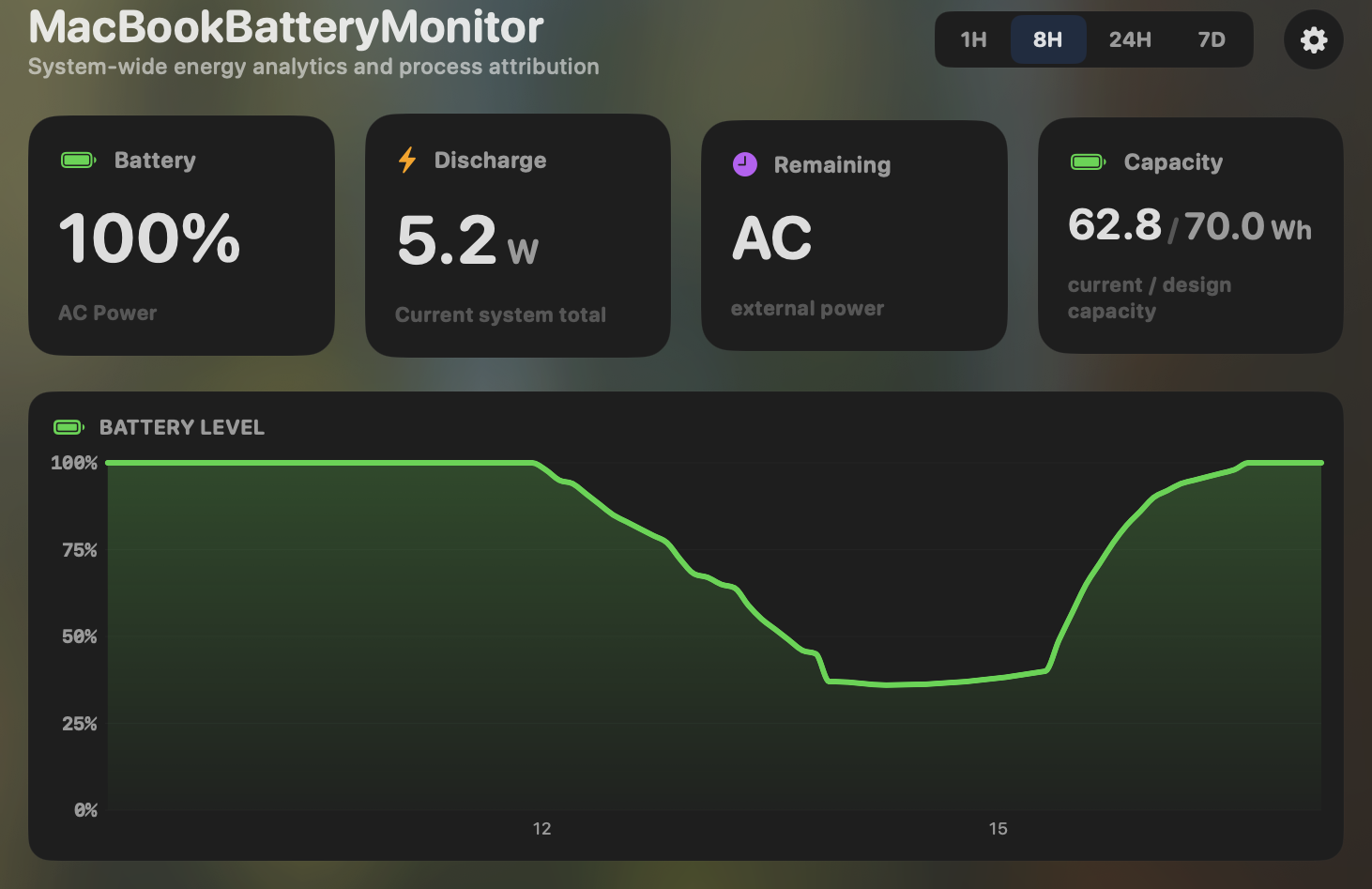
- Yes:Menu-bar first · Native, configurable icon
- Yes:History charts · 1h / 8h / 24h / 7d, per app
BatteryBudDraw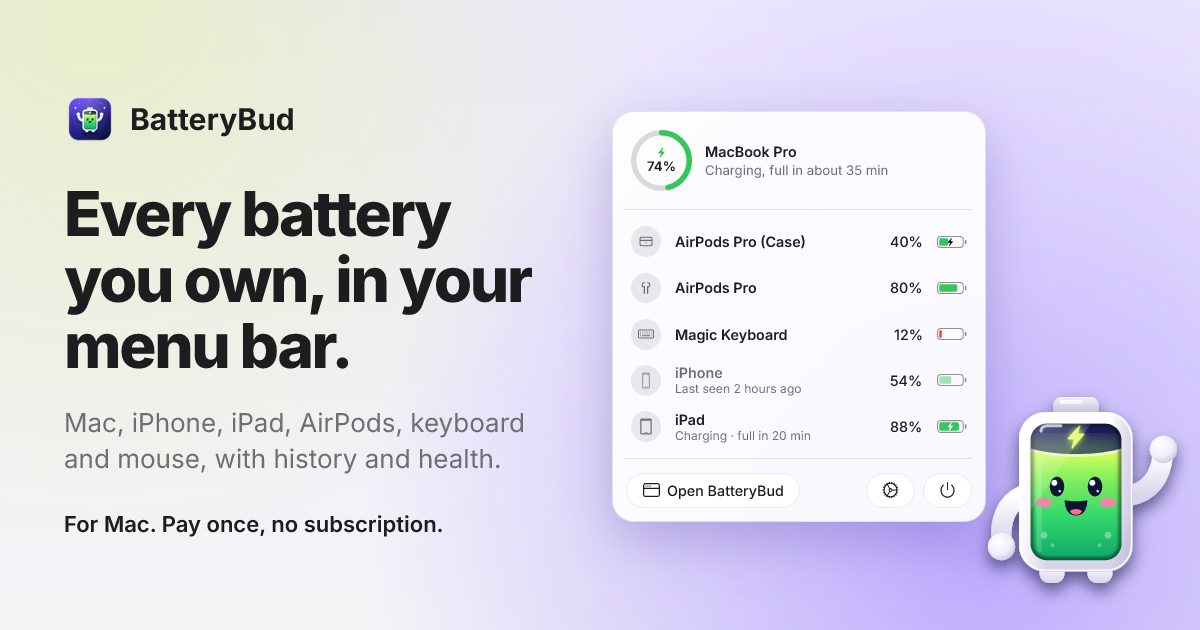
- Yes:Menu-bar first · Every device you own
- Yes:History charts · Day / week / month / year
Feature comparison
Features and prices as of October 2026.
MacBookBatteryMonitorWhy consider MacBookBatteryMonitor
See the drain, then do something about it
BatteryBud's app figures are processor energy only, with graphics, display, and radios left in System. MacBookBatteryMonitor counts each app's CPU and graphics work, has 99.63% accurate power readings, and limits an app's power. $9 once as of October 2026, against $19 plus $9 a year for updates.
What BatteryBud does
BatteryBud, from Climactic Infotech Private Limited, is a menu bar monitor for every battery you own: this Mac, your other Macs, iPhone, iPad, AirPods, keyboard, and mouse, with history, health, and charge cycles. Version 1.0 shipped on 2 October 2026, and version 1.3.0 added Power flow for MacBooks on 14 October 2026. Power flow maps the draw from the battery or adapter to Apps, Devices, System, and Charging, in two modes. Measured shows the processor energy macOS records for each app and puts everything else in System. As BatteryBud's own page puts it, "Display, graphics and radios are in System." The second mode splits the rest of the draw between apps in proportion to Activity Monitor's energy score, which has no unit. Neither mode attributes GPU energy to an app, and there is no CPU or GPU component breakdown. In BatteryBud's own light-load test, the apps' processor energy came to 0.5 W of a total of about 15 W. BatteryBud calls itself a monitor that reads batteries and does not control them: it has no charge limit, no battery temperature, and no way to limit an app. As of October 2026, it costs $19 once for one Mac with a year of updates, then $9 a year for further updates, and there is no free trial. It needs macOS 14 and Apple silicon, and Power flow works on MacBooks only.
What MacBookBatteryMonitor does
MacBookBatteryMonitor is built around one question: which app is using power, and how much. It measures your whole Mac's power every second, breaks it into 16 parts (CPU, GPU, Neural Engine, memory, display, SSD, network, USB and more) that add up to the total, and splits it between your apps by how much work each one does, so every app's share adds up to what your Mac actually drew. Its adaptive algorithm tunes itself to your exact Mac in the first 15 minutes, and from then on its power readings are 99.63% accurate across our lab runs on an M1 Max MacBook Pro and an M2 Mac mini, checked against power measured at the battery and at the device. Each app's share counts its CPU and its graphics work, so a game or a video editor carries its graphics load on its own row. Helpers roll up into their app, short-lived build workers are counted, and Docker, cloudflared, and launchd services are tied to the process hosting them. Per-app charts run from 1 hour to 7 days, and 30 days of every-process data stay on the Mac, on battery and on the charger. It also acts: cap any app's CPU from 10% to 100%, push it onto the efficiency cores, apply the rule always, only on battery, or below a battery level you pick, or quit a runaway app in one click. A 50% to 100% charge limit and Sailing Mode cover the battery itself. As of October 2026, it costs $9 once, with lifetime updates.
Which one should you pick?
If you want one menu bar list of every battery you own, from AirPods to an iPad, BatteryBud does that job. For which app is draining your MacBook, and by how many watts, MacBookBatteryMonitor is the clear pick. BatteryBud's app figures stop at processor energy, which its own test put at 0.5 W of a 15 W draw. A CPU-only figure sees less than chip readings like Apple's powermetrics, which saw 26.06% of the energy a 16-inch M1 Max MacBook Pro used in a real working session, and 44.81% across all our lab runs. MacBookBatteryMonitor saw 99.52% on that MacBook Pro, and its power readings are 99.63% accurate across every run. Add per-app GPU watts, a 16-component breakdown, per-app power limits, and a charge limit, all for $9 once against BatteryBud's $19 plus $9 a year for updates, as of October 2026.
Related guides
Frequently asked questions
Does BatteryBud show accurate per-app watts?
BatteryBud's Measured mode shows only the processor energy macOS records for each app. Graphics, display, and radios go into System, so an app's GPU work never appears on its row. MacBookBatteryMonitor counts each app's CPU and graphics work, and every app's share adds up to what your Mac actually drew, backed by 99.63% accurate power readings.
Can BatteryBud limit an app's power or cap charging?
No. BatteryBud reads batteries and does not control them. MacBookBatteryMonitor caps any app's CPU from 10% to 100%, moves apps onto the efficiency cores, applies those limits on battery or below a level you pick, and sets a 50% to 100% charge limit with Sailing Mode.
Is BatteryBud the same app as Battery Buddy?
No. BatteryBud (batterybud.app) is a paid monitor for all your devices from Climactic Infotech. Battery Buddy (batterybuddy.app) is a free app by Neil Sardesai that puts a face on the menu bar battery icon.
How much does BatteryBud cost compared with MacBookBatteryMonitor?
As of October 2026, BatteryBud is $19 once for one Mac with a year of updates, then $9 a year for further updates, with no free trial. MacBookBatteryMonitor is $9 once with lifetime updates and a 7-day free trial.
Sources
Feature and pricing claims on this page come from BatteryBud’s own documentation and Apple’s published guidance.