Looking for the app? See the MacBook battery monitor.
Buying Guide
Best Battery Apps for Mac & MacBook in 2026
“Battery app” is not one product category: health diagnostics, charge limits, drain diagnosis, runtime estimates, alerts, device batteries and system monitoring are different jobs. This guide matches each app, including Juicy, AlDente, coconutBattery, TurtleBar, iStat Menus, Stats, AirBattery and MacBookBatteryMonitor, to the job it actually performs, then links to the specialist guides for the detail.
Quick answer: the best battery app for each job
| Your job | Start with | Deeper comparison |
|---|---|---|
| Basic health and an 80% charge limit | macOS | Health-app guide |
| Advanced charge management | AlDente | Charge-limiter guide |
| Finding and controlling battery drain | Activity Monitor, then MacBookBatteryMonitor | Power-monitor guide |
| Runtime and automatic Low Power Mode | TurtleBar | Profile below |
| Custom alerts plus device batteries | Juicy | Profile below |
| Whole-system monitoring | iStat Menus or Stats | Profiles below |
| Battery levels across devices | AirBattery | Profile below |
| Paying nothing | macOS, Stats, AirBattery, coconutBattery Free | Free options |
This is deliberately not a one-to-nine ranking.
A Mac battery app that is excellent at monitoring AirPods is not automatically useful for diagnosing why Xcode consumes the MacBook battery. The right app follows from the job, and macOS itself is now the first candidate for several of those jobs.
What macOS already does without another battery app
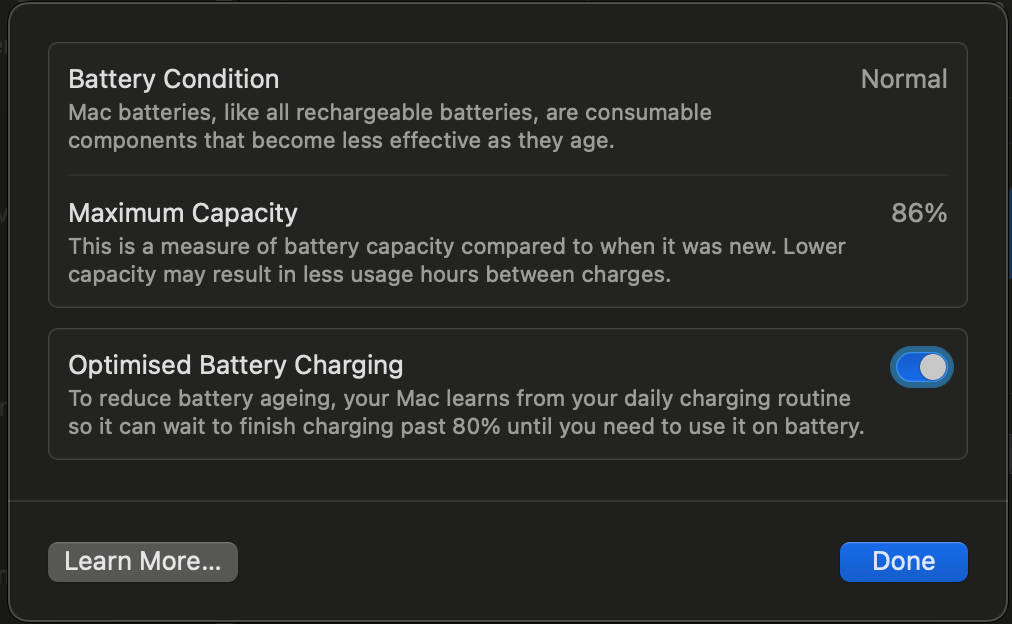
Before paying for Mac battery software, check the current built-in tools. A 2026 MacBook already provides:2
| Built-in feature | Where to find it |
|---|---|
| Battery Condition and Maximum Capacity | Battery settings |
| Cycle count | System Information |
| Current app Energy Impact | Activity Monitor, Energy tab |
| Recent app Energy Impact | Activity Monitor, 12 hr Power column |
| Apps using significant energy | Battery status menu |
| Battery usage history | Battery settings, Last 24 Hours and Last 10 Days |
| Low Power Mode | Battery settings and Control Centre |
| Optimized Battery Charging | Battery settings |
| Manual 80-100% Charge Limit | Battery settings on supported Apple silicon Macs |
| Temporary full charge | Charge to Full Now |
Apple added the manual Charge Limit in macOS Tahoe 26.4, and it requires Apple silicon, as documented in Apple's charging support page.1
You choose a ceiling between 80% and 100%.
Once the Mac reaches within a few percentage points of the selected limit, charging stops. If the battery level falls by more than five percentage points while connected to power, charging resumes toward the limit, and macOS occasionally charges to 100% to keep its state-of-charge estimate accurate.1
Low Power Mode is also configurable separately for battery and power-adapter use.3
One of the main historical reasons for installing a Mac battery manager is now built into macOS.
What macOS still does not do
The built-in tools are spread across several different places, and some gaps remain.
There is no native charge limit below 80%.
There is no multi-day per-process watt history.
There is no user-defined Low Power Mode threshold such as switching on automatically at 35%.
There is no single dashboard for Mac, iPhone, iPad, AirPods and Magic accessory batteries.
There is no persistent menu-bar time-remaining estimate.
Those gaps are what the apps below actually fill.
The best app for each job
Battery health: macOS, then coconutBattery
For an occasional check, open Battery settings and read Condition and Maximum Capacity. When you want capacity detail, cycle history and iPhone or iPad readings, coconutBattery remains the specialist: it has read Mac batteries since 2005, runs on macOS 12 or later, and its Plus edition adds saved health history, menu-bar readouts, Wi-Fi iOS support and a Lifetime Analyzer as a one-time purchase.10
The category comparison lives in Best Mac Battery Health Apps & Diagnostic Tools, and switching options are matched in Best coconutBattery Alternatives for Mac.
Charging: the native limit first, then AlDente
If your Mac is Apple silicon on Tahoe 26.4 or newer and an 80% ceiling is acceptable, the built-in Charge Limit already does the job. Choose a third-party charge manager when you need a lower target, temperature-triggered protection, calibration automation or Intel support.
AlDente is the charging specialist. Its free edition holds a charge limit and discharges manually; Pro, at EUR 11.49 per year or EUR 23.99 for a lifetime licence, adds Sailing Mode, Heat Protection, Calibration Mode, scheduling and Shortcuts integration.8,9
The full category comparison, including BatFi, BattOpt, batt and Energiza, lives in Best Mac Charge Limiter Apps. If you are leaving a specific tool, the AlDente alternatives and BatFi alternatives guides map each reason to switch to a replacement.
Drain diagnosis: Activity Monitor, then MacBookBatteryMonitor
Start free. Activity Monitor ranks current and recent app energy use with its relative Energy Impact score, and the battery status menu names applications using significant energy.
Move to a third-party tool when you need watts, history and the ability to act on a workload.
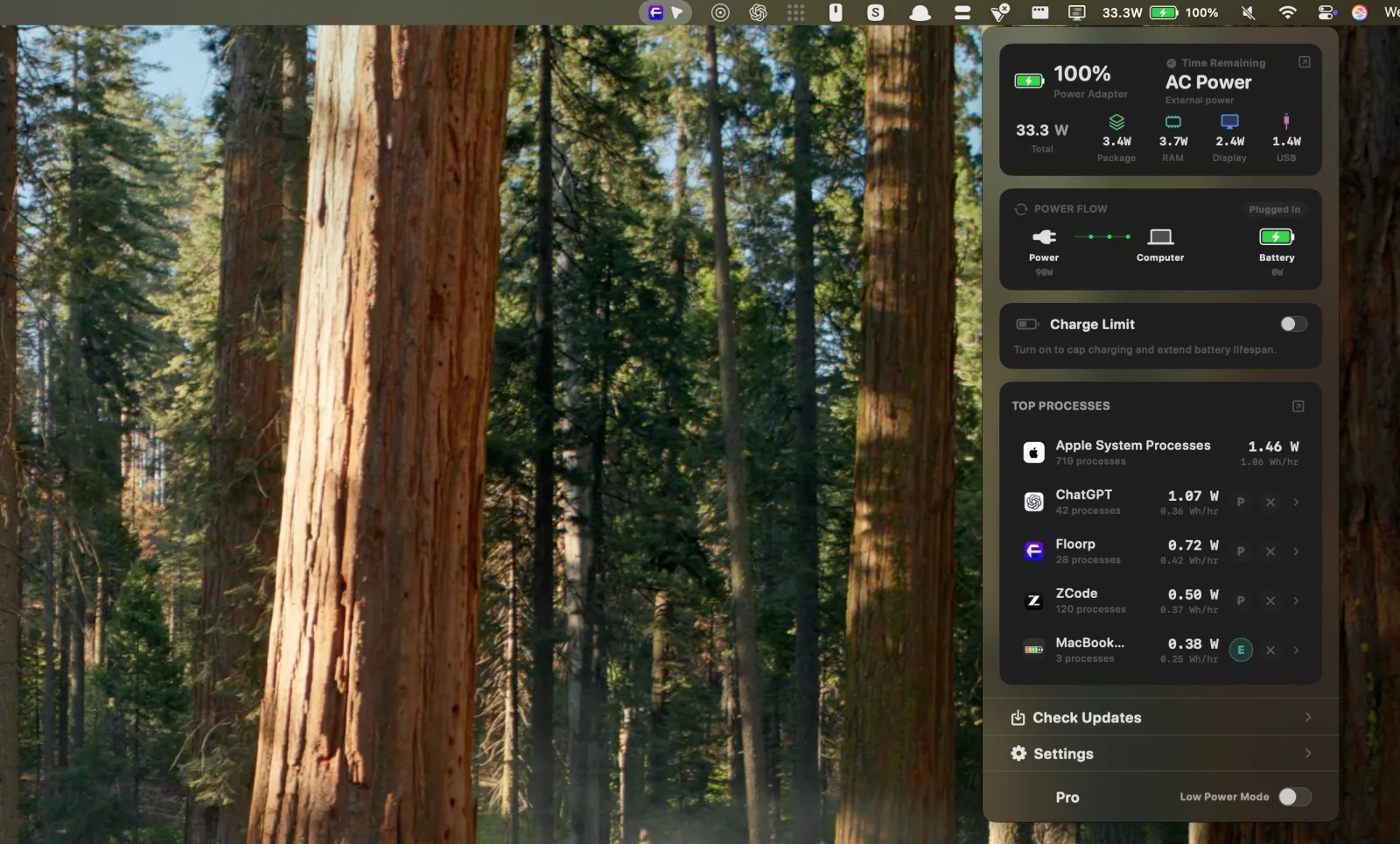
Disclosure: MacBookBatteryMonitor is our product, and it is built for that next step. It measures whole-system power consumption in watts, then attributes an estimated share of that power to each running process. Those per-process figures are attributed estimates, not direct physical measurements taken at each application, so treat them as a ranked diagnosis of where measured whole-system power is going rather than as metered readings per app.7
Around that attribution the app groups background workloads such as Docker, tunnels and launch agents, breaks system power down across CPU, GPU, RAM, display and USB, keeps multi-day system and per-app history, and adds a 50-100% charge limit with Sailing Mode, Low Power Mode automation below a threshold you choose, and controls to throttle, offload or quit a high-use process. It requires an Apple silicon Mac on macOS 14.6 or later.7
For the measurement-by-measurement comparison of power and app-usage monitors, see Best Mac Power Monitor & Battery Usage Apps. Juicy also covers lighter app-energy insights inside its broader dashboard.
Runtime: TurtleBar
A battery percentage does not say how long the current workload will last.
TurtleBar answers that one question. It puts a continuously updated time-remaining estimate in the menu bar, toggles Low Power Mode automatically at battery percentages you choose, and applies app-based power-saving rules, for $4.99 once.11
It does not limit charging or analyze long-term battery health, and that narrow scope is the point: choose it when the missing information is how much useful time is left.
Alerts and other devices: Juicy
Juicy is the broad consumer option. It alerts at any percentage you choose, tracks health, cycles, temperature and voltage, shows a runtime estimate plus live and historical app-energy views, and displays batteries for iPhone, iPad, AirPods and Magic accessories beside the Mac's own.4
Its charge limit can be set anywhere from 50% to 100%, with 80% the recommended default, alongside Sailing Mode, automatic discharge and a one-tap top-up to 100%.5
A three-day trial covers the full feature set. The Pro licence costs $14.99 once with one year of updates, or $24.99 for lifetime updates, and both cover up to two Macs.6
Whole-system monitoring: iStat Menus or Stats
When battery drain is one symptom of a broader question about heat, fans or load, a general monitor fits better than a battery utility.
iStat Menus 7.3 monitors CPU, GPU, memory, disks, network, battery, temperatures, fans, sensors and Bluetooth devices, with notification rules across all of them, at $11.99 on the US Mac App Store and a 14-day trial on the direct version.12,13
Stats delivers a large share of that telemetry for free under an MIT licence on macOS 12 or later.14
Neither app enforces charge limits, and Stats documents that its own sensor sampling costs energy, so disable modules you do not need.
Device battery levels: AirBattery
If the real job is seeing battery levels for nearby devices rather than diagnosing the Mac, AirBattery does exactly that for free: Dock, menu-bar and widget readouts for supported devices, open source under AGPL-3.0, with a Nearcast feature that shares battery information between Macs on the same network.15
It is a level checker, not a health analyzer or a charge controller.
Best free battery apps for Mac
There is no reason to pay before checking whether the free options cover the job.
macOS itself handles health, usage history, Low Power Mode, Energy Impact and an 80-100% charge limit on supported machines. coconutBattery Free adds deeper health readings and iPhone or iPad inspection. Stats provides open-source system monitoring, AirBattery covers device battery levels, and AlDente Free includes third-party charge control with its Charge Limiter and manual Discharge.
“Free battery app” therefore describes several products that barely compete with one another. Define the job before comparing the price.
How to choose a Mac battery app
Does macOS already do the job?
This changed substantially in 2026 because of the native Charge Limit. Read current Apple documentation rather than assuming advice from 2024 is still accurate.
Mac App Store and direct editions differ
Mac App Store sandboxing can prevent low-level features, so Juicy, iStat Menus and AlDente each differ between distribution channels. Verify that the feature you are buying exists in the edition you can install.
Know what is being measured
Energy Impact, watts and battery health answer different questions.
Activity Monitor's Energy Impact is a relative score with no unit.
A watt is a physical unit, and whole-system power can be measured directly. Per-app watt figures in third-party tools, including MacBookBatteryMonitor's, are attributed estimates of that measured total rather than independent meter readings.
A health percentage describes ageing, not current workload.
Check the history you need
Current data cannot diagnose a past event. Health history, battery-level history, whole-system power history and per-app history are different datasets, so confirm the app stores the one your question needs.
The short version
Start with what macOS already does: health, usage history, Low Power Mode, app-energy warnings and an 80-100% manual charge limit on supported Apple silicon Macs.
Then buy for the gap. AlDente for charging control beyond the native range, coconutBattery for long-term health and iPhone or iPad diagnostics, TurtleBar for time remaining, Juicy for alerts and device batteries in one consumer app, iStat Menus or Stats for whole-system monitoring, AirBattery for device battery levels, and MacBookBatteryMonitor, our app, for diagnosing drain with measured whole-system watts, estimated per-process attribution, history and controls that act on the workload.
The useful question is not which app has the most battery features, but which battery question macOS cannot answer for you today. Install the app that answers that question.
FAQ
What is the best battery app for Mac?
There is no single best app for every battery task. macOS covers basic health and an 80-100% charge limit on supported Macs. coconutBattery specializes in long-term battery health, AlDente in charging, TurtleBar in runtime, Juicy in a broad consumer workflow with alerts and device batteries, and iStat Menus and Stats in system-wide monitoring. MacBookBatteryMonitor specializes in drain: it measures whole-system power in watts and attributes estimated per-process shares you can act on.
Does a MacBook need a battery app?
Not always. macOS already includes Battery Health, Maximum Capacity, cycle count, Low Power Mode, Activity Monitor, usage history, Optimized Battery Charging and, on Apple silicon Macs running Tahoe 26.4 or later, a manual Charge Limit from 80% to 100%. Install something extra only when you need a capability macOS lacks, such as a lower charge limit, longer history or per-app power attribution.
What is the best free battery app for Mac?
Start with macOS itself, then pick the free tool that matches the job: coconutBattery Free for deeper health readings, Stats for open-source system monitoring, AirBattery for battery levels across nearby devices, and AlDente Free for third-party charge control.
Which Mac battery app shows battery health?
macOS, coconutBattery, Juicy, iStat Menus and MacBookBatteryMonitor all show battery-health information in different forms. Use macOS Battery Health for the Apple service-level condition, and the dedicated health-app guide on this site for the full comparison.
Which Mac battery app limits charging?
On Apple silicon Macs running macOS Tahoe 26.4 or later, macOS limits charging from 80% to 100% on its own. Third-party charge managers include AlDente, BatFi, BattOpt, batt, Energiza, Juicy and MacBookBatteryMonitor.
Which Mac battery app can limit charging below 80%?
The native slider cannot go below 80%. Several third-party charge managers support lower targets, including AlDente, BatFi, BattOpt, batt, Energiza, Juicy (50-100%) and MacBookBatteryMonitor (50-100%). The charge-limiter guide on this site compares their current ranges, hardware support and sleep behaviour.
Which Mac battery app shows what's draining the battery?
Activity Monitor ranks apps with its free, relative Energy Impact score. Juicy adds app-energy insights and history. MacBookBatteryMonitor measures whole-system power in watts, attributes an estimated share of that power to each process, keeps history and can throttle or quit a high-drain app. The per-process figures are estimates rather than metered readings for each app.
Which Mac battery app shows time remaining?
TurtleBar is built around a persistent menu-bar time-remaining estimate, and Juicy shows a runtime estimate as part of its broader dashboard.
Which Mac battery app has custom alerts?
Juicy has highly configurable battery-percentage and lifecycle alerts with sounds and notification styles. iStat Menus can notify on rules across battery, power and many other system metrics. coconutBattery Plus also adds battery notifications.
Which battery app tracks iPhone, iPad and AirPods batteries?
coconutBattery inspects iPhone and iPad battery health, and its Plus edition adds Wi-Fi readings. Juicy shows connected-device batteries, including AirPods and Magic accessories, alongside its Mac battery management. AirBattery focuses on battery levels across many devices rather than deep diagnostics.
Which Mac battery app is open source?
Stats (MIT licence) and AirBattery (AGPL-3.0) are open-source downloads. Charge-management projects including batt and BattOpt are also open source. Open source does not always mean free-of-charge commercial distribution, so check each project current terms.
Can I run two Mac charge limiter apps together?
You generally should not. Two apps trying to control the same charging state can conflict, so let one tool own the charge policy and follow that developer guidance about Optimized Battery Charging and the native Charge Limit.
Should I use a battery app instead of Apple's built-in tools?
Use a third-party app when it provides a capability you actually need beyond macOS. If the Apple health information, Activity Monitor and the native Charge Limit already answer your question, installing another utility is optional.
Sources
Claims about each product were checked against current first-party documentation on 21 August 2026.
- About Optimized Battery Charging and Charge Limit on Mac (Apple Support). Apple silicon and Tahoe 26.4 requirements, the 80-100% limit range, the greater-than-five-point recharge threshold, Charge to Full Now and occasional full charges. Checked 21 August 2026.
- Change Battery settings on a Mac laptop (Apple Support). Battery settings locations for Condition, Maximum Capacity, Low Power Mode, usage history and Optimized Battery Charging. Checked 21 August 2026.
- About Power Modes on your Mac (Apple Support). Low Power Mode behaviour and separate battery and power-adapter configuration. Checked 21 August 2026.
- Juicy product page. Custom alerts, health, cycles, temperature, voltage, live wattage, runtime estimate, per-app energy views and connected-device batteries including AirPods and Magic accessories. Checked 21 August 2026.
- Limit battery charging on your MacBook (Juicy). The charge limit range of 50% to 100% with an 80% recommended default, plus Sailing Mode, automatic discharge and a one-tap top-up to 100%. Checked 21 August 2026.
- Juicy licence and pricing details. Three-day full-feature trial, the $14.99 Pro licence with one year of updates, the $24.99 lifetime licence and use on up to two Macs. Checked 21 August 2026.
- MacBookBatteryMonitor product page. Measured whole-system watts with estimated per-process attribution, the CPU, GPU, RAM, display and USB breakdown, system and per-app history, the 50-100% charge limit with Sailing Mode, Low Power Mode automation, CPU limits, efficiency-core offload and process termination; Apple silicon with macOS 14.6 or later. Checked 21 August 2026.
- AlDente pricing (AppHouseKitchen). AlDente Free scope, the EUR 11.49 yearly and EUR 23.99 lifetime Pro licences, Apple notarization and current Intel plus Apple silicon compatibility. Checked 21 August 2026.
- AlDente features (AppHouseKitchen). Charge Limiter and Discharge in the free edition, with Sailing Mode, Heat Protection, Calibration Mode, Top Up, Schedule and Shortcuts in Pro. Checked 21 August 2026.
- coconutBattery 4 (coconut-flavour). Mac, iPhone and iPad readings on macOS 12 or later, the current 4.3 release, and Plus features including saved history, menu-bar readouts, Wi-Fi iOS support, the Lifetime Analyzer and notifications as a one-time purchase. Checked 21 August 2026.
- TurtleBar product page. The $4.99 one-time price, the menu-bar time-remaining estimate, automatic Low Power Mode by battery percentage, app-based rules and Intel plus Apple silicon support. Checked 21 August 2026.
- iStat Menus 7 (Bjango). Current 7.3 release, macOS 11 or later, CPU, GPU, memory, disk, network, battery, sensor, fan and Bluetooth monitoring, notification rules and the 14-day direct trial. Checked 21 August 2026.
- iStat Menus 7 on the US Mac App Store. Current US base price of $11.99, excluding optional weather subscriptions. Checked 21 August 2026.
- Stats repository (exelban). MIT licence, macOS 12 or later, CPU, GPU, memory, disk, network, battery, Bluetooth and sensor modules, more than 40,000 GitHub stars, active 2026 updates and the documented monitoring overhead of resource-intensive modules. Checked 21 August 2026.
- AirBattery repository (lihaoyun6). AGPL-3.0 licence, macOS 11 or later, Dock, menu-bar and widget readouts and the Nearcast feature for sharing battery information between Macs. Checked 21 August 2026.