Looking for the app? See the MacBook battery monitor.
Buying Guide
Best Mac Charge Limiter Apps in 2026
The right question in 2026 is not which app limits charging, because macOS Tahoe 26.4 now does that natively. It is what each charge limiter can do that the built-in Charge Limit cannot: limits below 80%, sailing ranges, deliberate discharge, Heat Protection, calibration, time and location automation, Intel support, or power diagnosis. This guide compares every current option on those differences.
Quick answer
The best Mac charge limiter app depends on what you need beyond the charge limit itself.
If you have an Apple silicon Mac running macOS Tahoe 26.4 or later and simply want to stop charging at 80%, start with macOS. Apple now includes a native Charge Limit from 80% to 100%, so many MacBook owners no longer need another app for that job.1
Third-party charge limiters still matter when you want a ceiling below 80%, a configurable charging range, deliberate discharge while plugged in, Heat Protection, scheduled calibration, Intel Mac support, location-based limits, or battery and power monitoring.
There is no single best choice for every Mac. This table shows where each option fits.
| Option | Price model | Mac support | Charging model | Main reason to consider it |
|---|---|---|---|---|
| macOS Charge Limit | Free | Apple silicon, Tahoe 26.4+ | 80-100% native limit | No extra software |
| AlDente | Free + $14.99/year or $24.99 lifetime Pro | Intel + Apple silicon | Custom limit, Sailing Mode, discharge | Deepest established charging-specific feature set |
| BatFi | $15 once | Apple silicon | 50-90% regular limit + full-charge override | Time and location automation |
| BattOpt | Free + $5.99 lifetime Pro | Intel + Apple silicon | Upper/lower limits | Free calibration + Heat Protection; Pro location zones |
| batt | Free, open source | Apple silicon | Upper/lower limits | Powerful open-source GUI + CLI |
| Energiza Pro | Free monitoring + paid Pro | Intel + Apple silicon | Upper/lower limits | Heat Protection and older-macOS support |
| Juicy | $14.99/yr or $24.99 lifetime | Intel + Apple silicon, macOS 15+ | 50-100% limit (80% default), Sailing, discharge | Charge control plus alerts, devices and energy insights |
| MacBookBatteryMonitor | One-time purchase | Apple silicon, macOS 14.6+ | 50-100% + Sailing Mode | Charge control plus per-app power estimates |
| Battery Toolkit | Free, open source | Apple silicon | Upper/lower thresholds | Capable, but the original repository was archived in March 2026 |
Start with the built-in Mac charge limit
The biggest change to this category happened in 2026.
Apple added a manual Charge Limit to macOS Tahoe 26.4 for Apple silicon Macs, as documented on Apple's charging support page.1
The setting lets you choose a value from 80% to 100%.
Once the battery reaches within a few percentage points of that limit, macOS stops charging. If the charge falls more than five percentage points while the Mac remains connected to power, charging resumes toward the configured target.1
When you need a full battery, you can choose Charge to Full Now.
Apple also says the Mac may occasionally charge to 100% even when a lower limit is enabled so the battery-management system can maintain an accurate estimate of state of charge.1
That behaviour is expected.
When the native Mac battery charge limit is enough
The native feature covers a very common workflow:
My MacBook stays connected to a monitor most of the day and I want it to stop around 80%.
For that person, a third-party battery limiter adds another background service without necessarily solving another problem.
Apple's implementation is also part of the operating system itself. You do not need a privileged helper from another developer, a separate licence or another menu-bar icon.
That makes it the correct baseline for every 2026 comparison.
Where macOS stops
Apple's minimum is 80%.
You cannot set a 60% or 70% ceiling through the native Battery settings.
There is no user-configurable lower sailing boundary.
There is no built-in Heat Protection threshold.
There is no automated calibration workflow.
There is no BatFi-style location rule that says “keep 60% at my desk, then change to 90% before I leave.”
Intel Macs do not get the new manual Charge Limit at all.
Those are the reasons a third-party battery charge limiter for Mac can still make sense.
If you only need instructions for Apple's setting, our How to Limit MacBook Charging to 80% guide covers that workflow separately.
This page is about choosing software when the native control is not enough.
AlDente: the established specialist
AlDente is still the name most Mac users associate with charge limiting.
Its free version includes the core Charge Limiter and manual Discharge.2
That means you do not have to buy AlDente Pro merely to stop your MacBook below a selected percentage.
Pro is where AlDente becomes a much more specialized battery-care tool.
The current Pro feature set includes Automatic Discharge, Sailing Mode, Heat Protection, Calibration Mode, Top Up, scheduled battery actions, Shortcuts integration, clamshell discharge and MagSafe LED controls.3
Why AlDente still matters after Tahoe 26.4
Apple copied the most obvious part of the category: the manual limit.
It did not copy the whole AlDente workflow.
Sailing Mode lets the battery move inside a chosen range before charging resumes rather than trying to keep it close to one exact ceiling.3
Heat Protection can pause charging when battery temperature crosses a user-configurable threshold.
Calibration Mode automates a larger battery cycle intended to help keep the battery gauge's estimates aligned after long periods inside a narrow range.
Schedule can automatically change the limit, start calibration, pause charging, run Top Up or discharge toward a target.3
Those are concrete differences from Apple's slider.
AlDente also supports Intel MacBooks
This is one of AlDente's strongest advantages in 2026.
Apple's native Charge Limit requires Apple silicon.
BatFi and batt are also Apple-silicon-focused.
AlDente supports a long list of Intel MacBooks as well as Apple silicon and currently supports macOS 12 through macOS 26.2
For an Intel owner searching for a Mac battery limiter, AlDente therefore remains much more relevant than Apple's new feature.
AlDente pricing
AlDente Free costs nothing. AlDente Pro currently costs $14.99 per year or $24.99 for a lifetime licence.2
The lifetime licence costs less than two annual payments, so the yearly plan mainly makes sense when you want the lower initial cost.
Where AlDente is not the strongest fit
AlDente is focused primarily on charging behaviour. Its current dashboard has substantially more battery and power information than older releases, but it is not a process-level power profiler, and it does not currently provide BatFi's native map-and-radius location rules. If those are the features you care about, other apps below address the problem differently.
For a detailed purchase review, see AlDente Review: Free vs Pro and Is It Worth It?. If you are weighing a move away from AlDente, AlDente alternatives maps each reason to switch to a specific replacement.
BatFi: the charge limiter for time and location automation
BatFi's current product is much more capable than some older search results suggest.
The official packaged app now requires a $15 licence rather than being a free download.4
Its standard configurable charge range is 50-90%, with a separate one-click option to charge to 100% when you need a full battery.4
The standout feature is Automation by Time and Place.
A BatFi rule can define its own charge limit and activate according to a schedule, a location, or both.5
A desk routine could look like this:
| Situation | Example limit |
|---|---|
| Home desk | 60% |
| Weekday before leaving | 90% |
| Travel weekend | 100% override |
Locations can use map pins, address search, your current position and an adjustable radius.5
The rules are ordered, so BatFi applies the highest matching rule.
BatFi does more than charge limiting
BatFi can deliberately run the MacBook from its battery while the charger remains connected.
It has global controls for Low Power Mode, High Power Mode and Automatic.
Its menu shows battery health, cycle count, temperature, estimated remaining time and a power-usage graph.
It also identifies applications currently using significant energy.5
That makes BatFi more than a simple slider, even though charge control remains the main job.
What BatFi does not match
BatFi does not currently advertise a user-configurable Sailing Mode equivalent to AlDente's.
It provides calibration reminders rather than AlDente's automated Calibration Mode.
It does not list a temperature-triggered charging mode equivalent to AlDente Heat Protection.
And it requires Apple silicon.
The reason to choose BatFi is therefore not that it has the most battery-care modes.
It is that the limit itself can follow your routine.
For the direct comparison, see AlDente vs BatFi, and for replacements organized by the BatFi feature you would be leaving behind, see BatFi alternatives.
BattOpt: free upper/lower limits with unusually strong automation
BattOpt is a much newer entrant, launched in 2026.
It deserves attention because its feature mix overlaps with several paid competitors while keeping many controls in the free tier.
BattOpt supports both Intel and Apple silicon MacBooks.6
Its free edition includes upper and lower charge limits, manual calibration, scheduled calibration, reboot and Boot Camp support, and Overheat Protection.
Pro adds clamshell-mode support, Smart Resume for interrupted calibration and Zone Awareness.6
Upper and lower limits
Rather than configuring only a ceiling, BattOpt lets you define a charging range, for example a 60% lower limit with an 80% upper limit.
The point of that model is that charging does not have to restart the moment the battery falls one percentage point below the upper target. That is conceptually similar to the problem AlDente solves with Sailing Mode, although the implementation and controls differ.
Free scheduled calibration
Scheduled calibration is an unusual inclusion in BattOpt's free version.
BattOpt documents a full-cycle routine that can discharge toward 15%, charge to 100%, hold at full, then return toward the configured range.6
Overheat Protection is also free.
That makes BattOpt particularly interesting to somebody who was considering paying for an advanced battery-care utility largely for calibration or temperature-based charging control.
Zone Awareness
BattOpt Pro can assign different limits to Home, Work and Travel.6
Home and Work can be detected from configured Wi-Fi SSIDs.
This creates a similar outcome to BatFi's location automation:
Use a conservative limit at my desk but keep more battery available when I leave.
The implementation differs.
BatFi uses geographic locations, addresses and adjustable radii.
BattOpt primarily uses network context for Home and Work.
Price and maturity
BattOpt Pro currently costs $5.99 once, and provides a 90-day Pro trial.7
That price is attractive. The trade-off is maturity.
BattOpt's public repository had around 40 commits as of August 21, 2026 and the product only appeared in 2026, while AlDente and BatFi have substantially longer public histories.6
A younger project can still be technically good. It simply has less real-world history across years of macOS and firmware changes.
For BattOpt considered as an open-source AlDente alternative rather than a general charge limiter, see the BattOpt section of our AlDente alternatives guide.
batt: the free open-source MacBook charge limiter
batt is one of the strongest options for users who explicitly want a free open-source Mac charge limiter.
It is licensed under GPL-2.0 and is built for Apple silicon MacBooks.8
You can use it through either a native menu-bar GUI or a more powerful command-line interface.
The project supports an upper charge limit plus a configurable lower boundary.
It can also cut wall power while the adapter remains physically connected, which lets the MacBook deliberately discharge.
The CLI includes MagSafe LED control, temporary limit overrides and automatic battery calibration.8
batt is refreshingly clear about macOS 26.4
The project's own README says that if Apple's built-in 80-100% range already meets your needs, you probably do not need batt on macOS 26.4 or later.8
That is the correct 2026 framing.
batt remains useful if you want a limit below 80%, run older macOS, or want its lower-bound and command-line controls.
It is more technical than the commercial apps
The GUI makes batt accessible to more users, but many of its advanced controls remain CLI-oriented.
Installation can also involve Gatekeeper approval or Terminal commands depending on which package you use.8
For a technical user, that may be a benefit rather than a drawback.
The software is inspectable, scriptable and has no paid tier.
For somebody who just wants to drag an app into Applications and never think about it again, AlDente, BatFi or another polished GUI may be easier.
Sleep behaviour depends on firmware
The batt project has put significant work into charging behaviour around sleep.
On older firmware, the app uses mechanisms such as pre-sleep charge stopping and idle-sleep prevention.
Newer firmware can expose different charging mechanisms, so the current project documentation now distinguishes behaviour according to firmware generation.8
This detail is worth checking on your specific Mac rather than relying on an old Reddit setup guide.
Energiza Pro: a charge limiter with Heat Protection and broad OS support
Energiza Pro is less discussed than AlDente and BatFi, but it is a legitimate charging manager.
It supports macOS 10.13 or later, giving it one of the broadest operating-system ranges in this comparison.9
The app uses configurable charging limits and can automatically discharge toward an upper limit when a MacBook remains connected to power.
It also includes Heat Protection.
Energiza can monitor battery temperature and stop charging when the battery becomes too hot.9
Sleep handling
Energiza documents the same general challenge other third-party charge managers face: once the Mac sleeps, the application cannot continue monitoring normally.
Its default approach can stop charging before sleep and prevent automatic sleep while an active charging session still needs supervision.9
This is a reminder that third-party charge limiting is not identical to Apple's native firmware-integrated behaviour.
Pricing
Energiza currently offers three Pro plans: $1.49 monthly, $9.99 yearly and $19.99 once for the Forever plan, and all paid plans currently advertise a 30-day trial.9
Who Energiza fits
Energiza is worth considering when you want a focused charging utility with Heat Protection and need support for older macOS versions.
Its weakness against BatFi is location automation.
Its weakness against AlDente is the smaller collection of specialized charging modes and a smaller public footprint.
Its advantage is a relatively focused feature set and broad compatibility.
Juicy: charge limiting inside a broader battery app
Juicy started as a battery alert and monitoring app and expanded charge management substantially in version 1.5.10
The current first-party product pages describe a normal battery-care range from 50% to 80%, plus a one-tap Top Up to 100%.11
It also has Sailing Mode and Automatic Discharge.
That puts Juicy in the same functional category as dedicated charge limiters, but charging is only one part of the product.
What else Juicy includes
Juicy shows battery health, cycle count, temperature and voltage.
It has custom battery alerts.
It can track batteries for AirPods, iPhone, iPad and Magic accessories.
Its newer releases also have per-app energy information with live, 24-hour, 7-day and 30-day views.11
This makes it a better fit for someone who does not want separate utilities for charge management, device batteries and alerts.
The charging trade-off
Juicy's current normal charging range is narrower than several specialist tools.
If you want a normal 90% limit, BatFi can do that.
If you want a lower configurable range and more advanced charging modes, AlDente may fit better.
If you want detailed location rules, BatFi has the stronger model.
Juicy makes more sense when the battery app around the charge limiter is as important as the limiter itself.
Pricing
Juicy costs $14.99 per year or $24.99 for a lifetime licence, and both cover up to two Macs.12
For charge control, use the direct-download or Setapp edition rather than assuming every distribution channel has identical low-level capabilities.
MacBookBatteryMonitor: charge limiting plus power diagnosis
Disclosure: MacBookBatteryMonitor is our product.
It belongs in this comparison because it includes charge management, but charging was not the only problem we built it around.
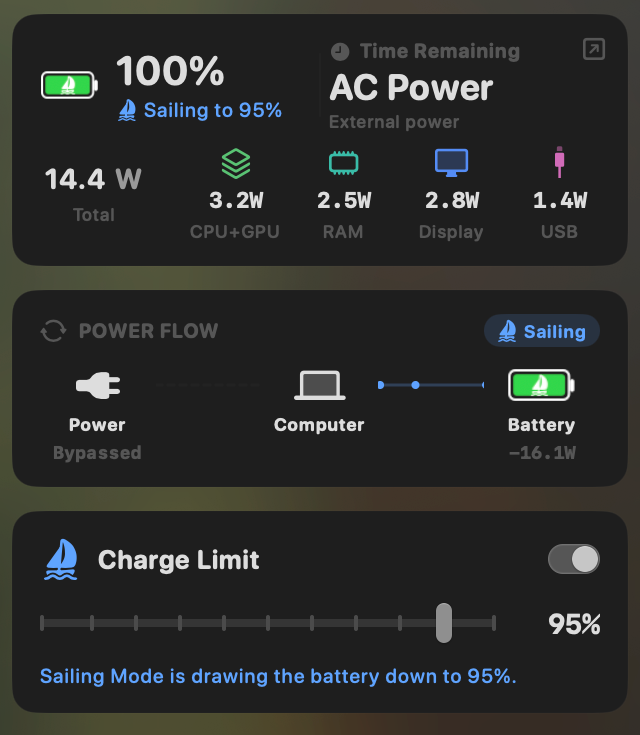
MacBookBatteryMonitor supports a 50-100% charge limit on Apple silicon Macs running macOS 14.6 or later.14
It also has Sailing Mode, which can discharge the MacBook toward the configured target while power remains connected.
The difference appears once you leave the charger.
MacBookBatteryMonitor measures total system power in watts and estimates how that whole-system power is attributed across running processes. Those per-app figures are attributed estimates, not direct physical measurements of each process.14
It also records system and per-app history and breaks system power into CPU, GPU, RAM, display and USB categories.14
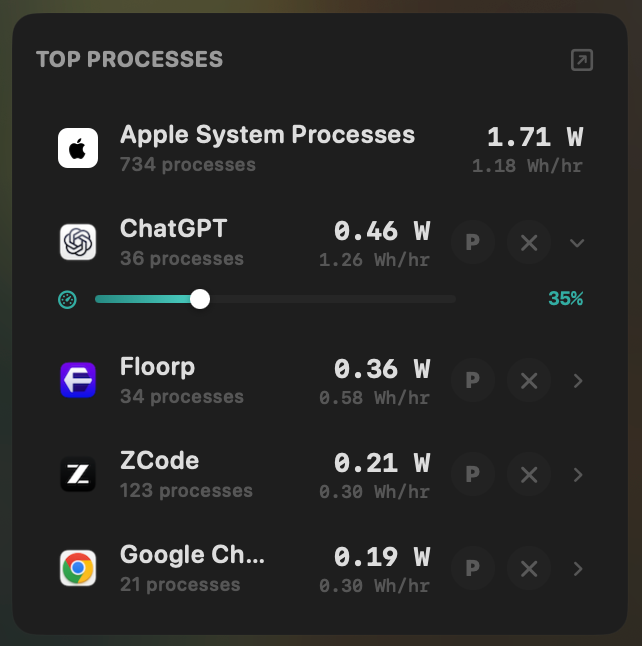
If an application is responsible for unusually high estimated consumption, the app includes controls to limit its CPU, move supported workloads toward efficiency cores or terminate the process and its subprocesses.
Where other charge limiters are stronger
MacBookBatteryMonitor does not have AlDente's Heat Protection or automated Calibration Mode.
It does not support Intel MacBooks.
Its charge limit bottoms out at 50%, while AlDente can operate lower.
It does not have BatFi's location-and-time charging rules.
Those are meaningful reasons to choose another product.
Where the product differs
Most charge limiter apps answer:
How far should the battery charge?
MacBookBatteryMonitor is also designed around:
What is consuming that battery after I unplug?
That distinction matters when charge control is only one part of why you are shopping for a battery utility.
The MacBook battery monitor page has the current product and licence details.
What about Battery Toolkit?
Battery Toolkit deserves a separate section because it still ranks prominently when people search for a Mac battery limiter app.
The project is free and open source under BSD-3-Clause.
It supports Apple silicon and lets you configure an upper charging threshold with a minimum of 50%, plus a separate lower threshold with a minimum of 20%.13
It can disable the power adapter, request a full charge and stop charging manually.
That is a useful feature set.
The issue in 2026 is maintenance.
Battery Toolkit's original GitHub repository was archived on March 21, 2026.13
The repository is now read-only.
That does not mean existing installations stopped working.
It does mean we would distinguish it from an actively maintained project when recommending software that depends on low-level Mac power-management behaviour.
For an existing Battery Toolkit user whose Mac is working correctly, there is no emergency reason to remove it.
For a new installation, batt, BattOpt and the actively maintained commercial apps deserve consideration before choosing an archived project.
Our AlDente vs Battery Toolkit article covers that decision in more detail.
How to choose a Mac battery limiter app
Start with the missing feature rather than a ranking.
| Your requirement | Options that specifically address it |
|---|---|
| I just want an 80% limit | macOS |
| I want below 80% | AlDente, BatFi, BattOpt, batt, Energiza, Juicy or MacBookBatteryMonitor |
| I want the deepest charging-specific feature set | AlDente Pro |
| I want the battery to sail in a range instead of hugging one number | AlDente Pro, Juicy or MacBookBatteryMonitor; BattOpt, batt and Battery Toolkit use separate upper and lower limits |
| I want scheduled or location-based limits | AlDente Pro, BatFi or BattOpt Pro |
| I want deliberate discharge while plugged in | AlDente, BatFi, BattOpt, batt, Energiza, Juicy or MacBookBatteryMonitor |
| I want a free GUI with upper/lower limits | BattOpt Free |
| I want free/open-source CLI control | batt |
| I need Heat Protection | AlDente Pro, BattOpt or Energiza |
| I want automated Calibration Mode | AlDente Pro, BattOpt or batt |
| I need an Intel Mac charge limiter | AlDente, BattOpt, Energiza or Juicy |
| I want battery alerts and accessory-device batteries too | Juicy |
| I want charge control plus per-app power estimates too | MacBookBatteryMonitor |
| I already use Battery Toolkit and it works | Keep using it if it meets your needs; remember the upstream repo is archived |
| I want the fewest moving parts | macOS |
This is the core of the buying decision. The word best only becomes useful once you define the job.
Feature questions in brief
The recurring feature questions behind this comparison, answered without repeating each product profile.
- Lowest limits: the native floor is 80%. AlDente supports custom limits below it, the regular BatFi range starts at 50%, BattOpt, batt and Energiza use configurable upper and lower thresholds, and the Battery Toolkit upper threshold minimum is 50% with a lower threshold down to 20%. A lower target leaves less unplugged energy, so it suits a docked Mac more than a mobile one. The useful question is how much runtime you need before you next see a charger, not how small the slider goes.13
- Micro-charging: the native limit already resumes charging only after the battery falls more than five percentage points below the target. AlDente Pro, Juicy and MacBookBatteryMonitor have named Sailing Mode; BattOpt, batt and Battery Toolkit use separate upper and lower thresholds toward the same end. The word Sailing does not guarantee an identical mechanism.1
- Discharge while plugged in: AlDente Pro (Automatic Discharge), BatFi (Run on Battery), BattOpt, batt, Energiza, Juicy and MacBookBatteryMonitor can all draw the battery down deliberately. The native control does not expose a discharge-now action. Compare lid-closed and sleep behaviour before choosing on this point.
- Heat Protection: AlDente Pro, BattOpt (free tier) and Energiza stop charging automatically when the battery gets too hot. Juicy and MacBookBatteryMonitor can display temperature, which is not the same protection.3,6,9
- Automation: AlDente Pro schedules battery actions, BatFi rules combine time and location, and BattOpt Pro zones Home and Work by Wi-Fi network. For scripting, batt has a CLI and AlDente exposes Shortcuts actions.
- Intel MacBooks: AlDente, BattOpt, Energiza and Juicy support Intel, subject to the macOS requirement of each app. macOS, BatFi, batt, MacBookBatteryMonitor and Battery Toolkit do not. Check hardware support before any other feature.
- Open source: batt (GPL-2.0) is the clearest actively developed option, the BattOpt code is public under MIT with a commercial Pro unlock, and Battery Toolkit is BSD-3-Clause but archived. The BatFi repository is public and MIT-licensed while the packaged app is paid, so source availability and commercial terms are different questions.
- Ease of installation: macOS needs nothing installed, and AlDente, BatFi, BattOpt, Energiza, Juicy and MacBookBatteryMonitor are conventional notarized graphical apps. The advanced controls of batt are CLI-oriented, and Battery Toolkit requires manual Gatekeeper approval because it is not notarized. Ease matters for software that needs privileged access to charging.13
Do charge limiter apps work while the Mac is asleep?
This needs a more careful answer than “yes” or “no.” Third-party applications do not continue running normally through every Mac sleep state, so each app works around the limitation differently: AlDente provides controls such as Stop Charging When Sleeping and Disable Sleep Until Charge Limit, BatFi can pause charging before sleep, batt has firmware-dependent pre-sleep and idle-sleep handling, Energiza can stop charging before sleep and prevent automatic sleep during supervised charging, and Battery Toolkit disables sleep while it needs to remain awake to stop at its target.13
Some modern firmware provides mechanisms that can continue enforcing certain limits without ordinary user-space execution, but behaviour varies by Mac and software.
This is one area where Apple's native Charge Limit has an inherent architectural advantage, because it is part of macOS and Apple's own charging system.
If sleep enforcement is critical to your workflow, read the current documentation for the exact app and Mac model rather than relying on an old forum post.
Should you use two charge limiter apps together?
No.
Do not run multiple third-party charge controllers and Apple's native limit with conflicting targets unless the developer explicitly documents that configuration.
Several charge-limiter developers instruct users to disable Apple's Optimized Battery Charging or set the native Charge Limit back to 100% while their software controls the battery.8,6
The reason is straightforward.
If macOS is trying to enforce one charging policy while another daemon is trying to enforce a different one, it becomes difficult to predict which state you will see.
Pick one system to own the charge-control decision.
You can still use separate read-only monitoring apps alongside it.
Do charge limiter apps actually preserve battery health?
The principle behind charge limiting is reasonable.
Apple itself says battery chemical ageing depends on a combination of factors including charging pattern and temperature history.1
Apple designed Optimized Battery Charging to reduce the time a Mac spends fully charged, specifically to reduce battery wear.
The new manual Charge Limit gives users even more direct control over that same factor.
What we cannot responsibly promise is a fixed outcome such as:
Setting 80% will give you exactly two extra years.
Real battery ageing depends on temperature, workload, time, charge state, discharge depth, manufacturing variation and other factors.
The benefit also depends on how you use the Mac.
A MacBook that spends twelve hours every day connected to a dock is a different case from one that runs on battery most of the day.
Use a charge limiter because you want to reduce unnecessary time near full charge.
Do not treat it as a guarantee of a specific future health percentage.
Final comparison
A MacBook charge limiter used to mean installing a third-party utility.
That is no longer true.
For an Apple silicon Mac running Tahoe 26.4 or later, Apple's native 80-100% Charge Limit should be the first thing you evaluate.
If 80% solves the problem, stop there.
AlDente remains one of the strongest specialist choices when you want more charging-specific controls, especially Sailing Mode, Heat Protection, Calibration Mode, scheduling or Intel support.
BatFi is unusually strong when the charge target should change according to time and physical location.
BattOpt is a promising new option with free upper/lower limits, free scheduled calibration and free Overheat Protection, while its inexpensive Pro tier adds location zones and clamshell features.
batt is an excellent fit for technical Apple silicon users who want free, open-source and scriptable charge control.
Energiza is worth considering for Heat Protection and support across older versions of macOS.
Juicy makes sense when charging is one part of a broader battery app that also needs alerts, accessory-device monitoring and app-energy information.
MacBookBatteryMonitor makes sense when you want charge control but the bigger problem is figuring out which applications are draining the battery once you disconnect from power.
Battery Toolkit still deserves respect as a capable open-source project, but a new buyer in 2026 should know that its original repository is now archived.
There is no reason to install the app with the longest feature list.
Install the one that adds the capability Apple's native charge limit is missing for your Mac.
FAQ
What is the best Mac charge limiter app?
There is no universal best option. On Apple silicon with macOS Tahoe 26.4 or later, start with the Apple built-in Charge Limit if 80-100% is enough. AlDente is stronger for advanced charging controls, BatFi for time/location automation, BattOpt for inexpensive upper/lower limits and calibration, batt for free open-source control, Juicy for alerts and device monitoring, and MacBookBatteryMonitor for charge control plus per-app power estimates.
Does Mac have a built-in charge limiter?
Yes. macOS Tahoe 26.4 or later has a native Charge Limit on Apple silicon Macs. You can choose a value between 80% and 100%.
Can I limit MacBook charging to 80% without an app?
Yes, if your Mac has Apple silicon and runs macOS Tahoe 26.4 or newer. Use the Charge Limit setting in Battery settings.
Can I limit MacBook charging below 80%?
Not with the Apple native setting. A third-party charge limiter is required for a target below 80%.
What Mac charge limiter works on Intel?
AlDente, BattOpt, Energiza and Juicy support Intel Macs under their respective operating-system requirements. The Apple native manual Charge Limit is Apple-silicon-only.
What is the best free Mac charge limiter?
If 80% is enough, macOS is the simplest free option. BattOpt Free provides upper/lower limits plus scheduled calibration and Overheat Protection. batt is another strong free and open-source option for Apple silicon.
What is the best open-source Mac charge limiter?
batt is one of the strongest actively developed open-source choices for Apple silicon. BattOpt is MIT licensed with a free tier and paid Pro unlock. Battery Toolkit is also open source but its original repository was archived in March 2026.
Is AlDente still needed after macOS Tahoe 26.4?
Not if all you need is an 80-100% manual limit on Apple silicon. AlDente remains relevant for lower limits, Sailing Mode, Heat Protection, Automatic Discharge, Calibration Mode, scheduled actions and Intel Mac support.
Is BatFi free?
The current official packaged version is paid. BatFi currently costs $15 as a one-time purchase. Older articles and directory pages that describe the current app simply as free are outdated.
What is the difference between a charge limit and Sailing Mode?
A charge limit defines the upper point where charging stops. Sailing Mode allows the battery to move within a wider range before charging resumes, reducing constant corrections near one fixed percentage.
Which Mac charge limiter has Sailing Mode?
AlDente Pro, Juicy and MacBookBatteryMonitor have named Sailing Mode features. Other tools such as BattOpt, batt and Battery Toolkit address similar range behaviour using separate upper and lower limits.
Which Mac battery limiter has Heat Protection?
AlDente Pro, BattOpt and Energiza provide automatic temperature-aware charging protection. Merely displaying battery temperature is not the same as automatically pausing charging because of it.
Which charge limiter can automatically change limits at home and work?
BatFi supports geographic time-and-location rules. BattOpt Pro supports Home, Work and Travel zones based primarily on configured Wi-Fi networks.
Which Mac charge limiter has Calibration Mode?
AlDente Pro has a dedicated automated Calibration Mode. BattOpt includes scheduled calibration, and batt has automatic calibration functionality for technical users.
Can a Mac charge limiter discharge the battery while plugged in?
Several can. AlDente has Discharge and Automatic Discharge, BatFi has Run on Battery, BattOpt has discharge controls, batt can cut wall power, Energiza supports automatic discharge, Juicy has Automatic Discharge, MacBookBatteryMonitor has Sailing Mode, and Battery Toolkit can disable the adapter.
Will a charge limiter work while my MacBook is asleep?
Behaviour varies by app, Mac and firmware. Third-party utilities use different approaches such as stopping charge before sleep, preventing idle sleep while finishing a charging session or relying on supported SMC behaviour. Check the current documentation for the specific app and Mac model.
Should I run AlDente and BatFi together?
No. Running two applications that both control charging can cause conflicting behaviour. Choose one charge-management system.
Should I disable Apple's Charge Limit when using a third-party limiter?
Follow the third-party developer current setup instructions. Several charge-limit projects recommend disabling the Apple competing charging optimization or setting the native manual limit to 100% so only one system controls the charging threshold.
Does limiting my MacBook to 80% guarantee better battery health?
No specific future battery-health percentage can be guaranteed. Apple says battery ageing is affected by factors including temperature history and charging pattern, and its own charging features reduce time spent fully charged. A charge limit addresses one ageing factor, not every factor.
Is Battery Toolkit still usable?
Yes, existing releases remain available and can continue working. Its original GitHub repository was archived in March 2026, so new users should factor the lack of active upstream maintenance into their decision.
Sources
Claims about each product were checked against current first-party documentation on 21 August 2026.
- Apple Support: About Optimized Battery Charging and Charge Limit on Mac. The Apple silicon and Tahoe 26.4 requirements, the 80-100% Charge Limit, charging resuming after a greater-than-five-point drop, Charge to Full Now, occasional charges to 100%, and the Apple explanation of battery chemical ageing. Checked 21 August 2026.
- AlDente Pricing (AppHouseKitchen). The Free versus Pro feature split, the $14.99 annual and $24.99 lifetime prices, notarization, and macOS 12 through 26 support including Intel MacBooks. Checked 21 August 2026.
- AlDente Features (AppHouseKitchen). Charge Limiter, Automatic Discharge, Sailing Mode, Heat Protection, Calibration Mode, Schedule, Top Up, Shortcuts, MagSafe controls and sleep-related options. Checked 21 August 2026.
- BatFi on Gumroad (Micropixels). The current $15 one-time price, the 50-90% regular charge range with a one-click 100% override, and current hardware and macOS requirements. Checked 21 August 2026.
- BatFi product page (Micropixels). The Apple silicon requirement, time-and-location Automation with ordered rules, Run on Battery, battery statistics, power modes and the power-usage graph. Checked 21 August 2026.
- BattOpt repository (GitHub). The MIT licence, Intel and Apple silicon support, free upper and lower limits with scheduled calibration and Overheat Protection, Pro Zone Awareness and clamshell features, notarization, and the 90-day Pro trial. Checked 21 August 2026.
- BattOpt product site. The current $5.99 lifetime Pro price. Checked 21 August 2026.
- batt repository (GitHub). The GPL-2.0 licence, Apple silicon focus, the GUI and CLI, upper and lower limits, adapter control, automatic calibration, sleep and firmware handling, and the developer note recommending the native 80-100% limit when that range is sufficient. Checked 21 August 2026.
- Energiza Pro product page (Appgineers). Charging limits, automatic discharge on Apple silicon, Heat Protection, sleep behaviour, the macOS 10.13 minimum, the $1.49 monthly, $9.99 yearly and $19.99 lifetime prices, and the 30-day trial. Checked 21 August 2026.
- Juicy changelog. Version 1.5 introduced the current Charge Limit, Sailing Mode and Automatic Discharge battery-care system and expanded the app-energy insights. Checked 21 August 2026.
- Juicy charge-limit feature page. A 50-100% charge limit with 80% as the recommended default and a one-tap Top Up to 100%, plus Sailing Mode, Automatic Discharge, battery health, accessory-device monitoring, per-app energy views, and the $14.99 and $24.99 licence options. Checked 21 August 2026.
- Juicy press kit. The direct-download licence terms behind the $14.99 yearly and $24.99 lifetime prices. Checked 21 August 2026.
- Battery Toolkit repository (GitHub). The BSD-3-Clause licence, Apple silicon support, the 50% minimum upper and 20% minimum lower thresholds, adapter control, the lack of notarization, and the March 21, 2026 archive date. Checked 21 August 2026.
- MacBookBatteryMonitor product page. The 50-100% charge limit with Sailing Mode, the Apple silicon and macOS 14.6 requirements, battery health, cycle and temperature readings, measured whole-system watts with per-app power estimates, history, and the CPU limit, E-core offload and process termination controls. Checked 21 August 2026.