Looking for the app? See the MacBook battery monitor.
Comparisons
Best BatFi Alternatives for Mac in 2026: Free, Open Source and Paid
Several pages ranking for BatFi alternatives are out of date: some still describe BatFi as free, some recommend an archived project first, and others list utilities that cannot control MacBook charging at all. This guide compares the current field, including BattOpt, batt and Energiza Pro, by the BatFi capability you are actually trying to replace.
Quick answer
The best BatFi alternative depends on which BatFi feature you are trying to replace.
If you only want your MacBook to stop charging around 80%, macOS Tahoe 26.4 may already be enough.
If you want a free charge manager with upper and lower thresholds, batt and BattOpt are stronger current options than many older search results suggest.
If you want BatFi's ability to change charging behaviour according to where you are, BattOpt Pro is the closest alternative we found, although its location model uses Home, Work and Travel zones rather than BatFi's map-and-radius rules.
If you want more specialised battery-care controls, AlDente Pro goes further with Sailing Mode, Heat Protection and automated Calibration Mode.
If you want charging controls together with app-level battery drain monitoring, Juicy and MacBookBatteryMonitor take the category in a broader direction.
The important part is that several pages currently ranking for batfi alternative are out of date. Some still describe BatFi as free, some recommend an archived project as the obvious first choice, and others list utilities that cannot control MacBook charging at all.
Here is the 2026 comparison.
If you are choosing a charge limiter for the first time rather than leaving BatFi, start with our guide to the best Mac charge limiter apps, which covers the whole category. This page stays focused on replacing BatFi itself.
BatFi alternatives compared
| Option | Price | Mac support | Charge control | Automation | Best matched to |
|---|---|---|---|---|---|
| macOS Charge Limit | Free | Apple silicon, Tahoe 26.4+ | 80-100% | Shortcuts support; no BatFi-style rule list | Simple native charge limiting |
| BattOpt | Free + $5.99 lifetime Pro | Intel + Apple silicon | Upper/lower limits | Pro Home/Work/Travel zones | Closest alternative for location-aware charging |
| AlDente | Free + $14.99/year or $24.99 lifetime | Intel + Apple silicon | Extensive | Time-based schedules | Advanced battery-care controls |
| batt | Free, open source | Apple silicon | Upper/lower limits | CLI automation | Technical users wanting free/open-source control |
| Energiza Pro | Up to $19.99 lifetime | Intel + Apple silicon | Upper/lower limits | No BatFi-style location rules | Threshold charging + Heat Protection |
| Juicy | $14.99/yr or $24.99 lifetime | Intel + Apple silicon, macOS 15+ | 50-100%, 80% default, plus Top Up | No BatFi-style location rules | Battery alerts, devices and energy insights |
| MacBookBatteryMonitor | One-time purchase | Apple silicon, macOS 14.6+ | 50-100% + Sailing | No time/location rule system | Charge control + estimated per-app power attribution |
| Battery Toolkit | Free, open source | Apple silicon | Upper/lower limits | No | Existing users; original repository is archived |
BatFi itself currently costs $15 once.2
Its strongest current feature is Automation: charge limits can change according to both a schedule and location.1
That is the capability an alternative needs to match if automation is the reason you use BatFi.
Why switch away from BatFi?
BatFi remains a strong option in 2026, so the reasons to switch are specific.
Switch for Intel support. BatFi requires Apple silicon, while AlDente, BattOpt, Energiza Pro and Juicy run on Intel MacBooks.
Switch for free software. macOS Charge Limit, BattOpt Free and batt cost nothing.
Switch for actively maintained open source. The actively developed open-source pick is batt, while BatFi's public code accompanies a paid packaged app.
Switch for battery-care modes. AlDente Pro and BattOpt lead on Sailing Mode, heat protection and automated calibration.
Switch for deeper power monitoring. Juicy and MacBookBatteryMonitor focus on app-level energy use, which BatFi only summarizes.
Or drop the third-party app entirely, because Apple's native 80-100% limit now covers the actual requirement for many MacBook owners.
The sections below match each of those reasons to a direct replacement.
What are you actually replacing from BatFi?
BatFi has changed substantially since many of the comparison pages currently ranking in Google were written.
The current BatFi 3.1 generation can:
- Set a custom charge limit
- Change limits automatically based on time
- Change limits automatically based on location
- Temporarily charge to 100%
- Run the Mac from battery while the charger remains connected
- Switch Low Power, High Power and Automatic power modes
- Show battery health, cycles and temperature
- Show a power-usage graph
- Surface applications using significant energy
- Remind you when it may be time to recalibrate the battery
BatFi's current seller page describes its normal configurable range as 50-90%, with a separate temporary full-charge override.2
Its time-and-place automation is particularly flexible.
A rule can have its own charge limit, days, time window and geographic condition. Locations can use a map picker, address search, current position and an adjustable radius.1
The app evaluates the rules in order and applies the highest matching rule.
That means an actual BatFi replacement depends on whether you need the whole system or only one part of it.
First check macOS: you may not need a BatFi alternative
Apple changed the Mac battery-manager market in April 2026.
On an Apple silicon Mac running macOS Tahoe 26.4 or newer, System Settings now includes a user-selectable Charge Limit from 80% to 100%, as documented in Apple's charging support page.5
The Mac charges to within a few percentage points of the selected limit and stops.
If charge falls by more than five percentage points while the Mac remains connected to power, charging resumes.
You can also select Charge to Full Now when you need 100%.5
Apple occasionally allows a full charge even with a lower limit enabled so the battery-management system can maintain an accurate state-of-charge estimate.
For this requirement:
I use BatFi because I do not want my MacBook sitting at 100% all day.
Apple's own feature may now be enough.
What macOS does not replace
Apple's Battery settings do not give you BatFi's ordered time-and-location rules.
The native range also stops at 80%. BatFi can go lower.
macOS 26.4 does add a Set Battery Charge Limit Shortcuts action, and macOS 26 supports personal automations triggered by events such as time of day.6
So a power user can automate more than the Battery settings panel suggests.
It is still not the same user experience as BatFi's built-in list of charging rules tied directly to schedules and places.
If all you need is 80%, start with macOS.
If you need 60% at a desk and 90% before you leave, keep reading.
BattOpt: the closest BatFi alternative for location-aware charging
BattOpt is the closest direct BatFi alternative for location-aware charging.
It supports both Intel and Apple silicon MacBooks and combines a native GUI with a command-line interface.7
Its free version already includes:
- Upper and lower charge limits
- Manual calibration
- Scheduled calibration
- Reboot and Boot Camp support
- Overheat Protection
BattOpt Pro adds:
- Clamshell-mode discharge and calibration
- Zone Awareness
- Smart Resume for interrupted calibration
- Android battery monitoring
The Pro lifetime licence currently costs $5.99.8
BattOpt's answer to BatFi Automation
BattOpt calls its location feature Zone Awareness.
You define Home and Work using Wi-Fi SSIDs, with a separate Travel mode. Each zone can use different upper and lower charging limits.7
For example:
| BattOpt zone | Example range |
|---|---|
| Home | 50-60% |
| Work | 60-80% |
| Travel | 80-100% |
BatFi's model is more flexible geographically.
BatFi can use map locations, address search, current location and an adjustable radius. Its rules can combine that location with a schedule.1
BattOpt identifies Home and Work primarily from network context.
So the two approaches are not identical.
If “when I connect to the office Wi-Fi, change my battery limits” describes your workflow, BattOpt is a very close alternative.
If you want arbitrary geographic radii and richer combinations of dates, times and places, BatFi still has the more developed location-rule interface.
BattOpt also goes beyond BatFi in other areas
Scheduled calibration is available in BattOpt's free tier.
The documented calibration cycle can discharge, charge fully, hold, then return to the configured limit.7
BattOpt also includes automatic overheat protection without requiring Pro.
BatFi shows battery temperature and offers calibration reminders, but its current product documentation does not advertise the same automated calibration sequence or user-configurable heat-triggered charging protection.
That makes BattOpt surprisingly competitive despite being much newer.
The caveat: BattOpt is a young project
BattOpt launched in 2026.
Its repository carried around 40 commits as of 21 August 2026, compared with years of development behind BatFi and AlDente.7
That does not make it unreliable.
It does mean there is less public history to examine.
For software that controls low-level charging behaviour, maturity is a reasonable factor to include in the decision.
BattOpt does offer a 90-day Pro trial without a credit card, so you can verify its behaviour on your own Mac before purchasing.8
For BattOpt measured against the wider AlDente-alternative field rather than BatFi specifically, see the BattOpt section of our AlDente alternatives guide.
AlDente: the BatFi alternative for deeper battery-care controls
AlDente is the obvious established competitor.
It predates BatFi and supports a much wider selection of Mac hardware, including many Intel MacBook models.9
AlDente Free includes Charge Limiter and manual Discharge.
AlDente Pro adds:
- Automatic Discharge
- Sailing Mode
- Heat Protection
- Calibration Mode
- Top Up
- Scheduled battery actions
- Apple Shortcuts
- MagSafe LED control
- Clamshell discharge
Pro costs $14.99 per year or $24.99 for a lifetime licence.9
Where AlDente is stronger than BatFi
AlDente has more controls dedicated specifically to battery charging.
Sailing Mode allows the battery to drift within a range instead of maintaining one fixed ceiling.10
Heat Protection can pause charging when battery temperature crosses a chosen threshold.
Calibration Mode automates a larger battery cycle.
Its Schedule system can trigger battery-specific actions such as Top Up, Discharge To, changing the charge limit or starting Calibration Mode.10
BatFi provides calibration reminders, temperature information and deliberate Run on Battery, but it does not currently advertise equivalents to several of those Pro modes.
Where BatFi is stronger
AlDente's scheduler is primarily time and action based.
BatFi's automation can depend on location as well as time.1
That makes BatFi especially good for a MacBook that regularly moves between predictable places.
We have a full AlDente vs BatFi comparison for readers choosing specifically between those two products.
If you already know you do not want BatFi and want to evaluate AlDente on its own merits, see our AlDente review.
batt: the strongest current free open-source option for technical users
If your search is specifically free BatFi alternative, batt deserves more attention than most alternatives directories give it.
batt is free and open source under GPL-2.0.11
It controls charging on Apple silicon MacBooks and can be used through either a native menu-bar app or a command-line interface.
Its core charging model supports upper and lower limits.
For example, you could configure an upper limit of 60% and a lower boundary five points below it. Between those limits, the Mac can retain its current charging state.11
The CLI can also:
- Cut wall power while the adapter remains connected
- Restore wall power
- Control the MagSafe LED on supported hardware
- Handle charging-related sleep behaviour
- Run battery calibration
- Temporarily disable a limit and automatically restore it later
The project has been developed across roughly 200 commits as of 21 August 2026 and is still receiving compatibility work.11
Why batt is not a direct replacement for BatFi Automation
batt is much more technical.
It does not give you BatFi's polished map-based rule editor.
A capable command-line user can automate it with scripts and system tools, but that is a different experience from selecting Home or a map radius in a GUI.
If you like Terminal, Homebrew and explicit configuration, batt is appealing.
If you chose BatFi because it hides complexity, it may be the wrong replacement.
batt itself now tells some users not to install it
The developer makes a refreshingly clear point in the current README.
If macOS 26.4's built-in 80-100% Charge Limit already does what you need, you do not need batt.11
The project remains useful when you run an older version of macOS or want a charge ceiling below 80%.
That is the right way to frame free charge-limit software in 2026.
Energiza Pro: upper/lower limits and Heat Protection
Energiza Pro is another genuine BatFi alternative that some broad alternatives pages mention but rarely explain.
Its charging model uses an upper and lower limit.12
Once the battery falls below the lower limit, charging can resume toward the upper target.
On Apple silicon, Energiza can also deliberately discharge the battery while the Mac remains connected to external power.12
It includes Heat Protection that can stop charging when temperature moves outside the configured range.
That gives Energiza a battery-care feature BatFi does not currently advertise as a direct equivalent.
Compatibility is a major Energiza advantage
Energiza supports MacBooks running macOS 10.13 or later, including Intel machines.12
The developer says the discharge function specifically requires Apple silicon, but the broader battery-management app supports older Intel Macs.
BatFi is Apple-silicon-only.
For someone with an older Intel MacBook, Energiza therefore belongs in the shortlist while BatFi itself does not.
Energiza pricing
Current pricing is:
| Energiza plan | Price |
|---|---|
| Monthly Pro | $1.49/month |
| Yearly Pro | $9.99/year |
| Forever Pro | $19.99 once |
Its biggest gap against BatFi is automation.
Energiza has configurable charge behaviour, notifications and heat controls, but it does not currently present the same BatFi-style time-and-location rules.
Juicy: a BatFi alternative for alerts, devices and app energy history
Juicy overlaps with BatFi on charge control but expands in a different direction.
The direct-download version can limit charging at any level from 50% to 100%, with 80% as the recommended default, and adds Sailing Mode, automatic discharge toward the limit and a temporary top up to 100%.13
It also has:
- Custom battery alerts at percentages you choose
- Battery-health tracking
- AirPods, iPhone, iPad and peripheral battery visibility
- Per-app energy insights
- Live and historical energy views
- A power-flow diagram
- Battery lifecycle notifications
Juicy supports Intel and Apple silicon Macs running macOS 15 or later.13
That makes it relevant to people who like BatFi's menu-bar battery information but want a more general battery dashboard.
Where Juicy differs from BatFi
BatFi is better matched to changing the charge limit according to where and when you work.
Juicy does not currently advertise an equivalent location-aware rule engine.
Juicy instead puts much more emphasis on alerts, connected-device batteries and historical energy usage.
Both apps cover a similar charge range, so the practical difference is automation: BatFi changes the limit by time and place, while Juicy does not currently advertise an equivalent location-aware rule engine.
Juicy pricing
Juicy's direct-download version costs $14.99 per year or $24.99 for a lifetime licence.13
There is also an App Store edition, but the App Store sandbox prevents that version from including the same low-level charging controls and per-app energy features.14
For a BatFi replacement, compare against the direct-download version.
MacBookBatteryMonitor: the alternative when battery drain is the bigger problem
Disclosure: MacBookBatteryMonitor is our app.
It overlaps with BatFi on charge management but has a different centre of gravity.
MacBookBatteryMonitor can set a 50-100% charge limit and use Sailing Mode for controlled discharge while plugged in.16
It also shows battery health, cycle count and temperature.
The larger difference is what happens after the MacBook leaves the charger.
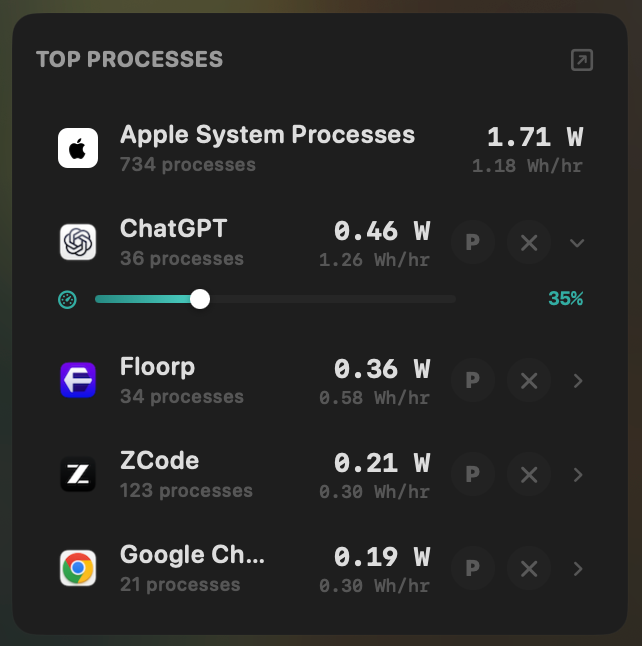
MacBookBatteryMonitor measures whole-system power use in watts and estimates how that whole-system power is attributed across running processes. It records system and per-app history and breaks estimated system power into components including CPU, GPU, RAM, display and USB.16
The per-process watt figures are attributed estimates rather than direct physical measurements of each app's draw, so treat them as a ranked guide to where the measured whole-system power is going.
After identifying a runaway app, you can limit its CPU use, move supported work toward efficiency cores or terminate the application and its subprocesses.
Where BatFi is better
BatFi has time-and-location charging automation.
MacBookBatteryMonitor does not currently have an equivalent rule system.
If your requirement is:
Keep me at 60% at the office, then automatically move to 90% before I leave.
BatFi is the stronger match.
Where MacBookBatteryMonitor differs
If your requirement is:
My battery is draining quickly and I need to know which process is responsible.
Estimated per-process power attribution becomes more important than location-aware charging.
BatFi does surface applications using significant energy, which is useful.
MacBookBatteryMonitor is built more heavily around estimating that consumption, preserving its history and giving you controls to act on the offending process.
For the diagnostic side, see Mac apps that show per-app power draw.
The MacBook battery monitor product page covers the current feature set.
Battery Toolkit: still capable, but no longer the obvious free recommendation
Many older alternatives pages still name Battery Toolkit first.
That needs context.
Battery Toolkit is free and open source under BSD-3-Clause.
It supports Apple silicon and provides:
- An upper charge threshold with a 50% minimum
- A separate lower threshold with a 20% minimum
- Adapter disabling
- Full-charge commands
- Immediate stop-charging commands
- Background charge management
Its feature set remains useful.15
The problem is maintenance.
The project's owner archived the GitHub repository in March 2026.15
The repository is now read-only.
Archived does not mean broken
An existing Battery Toolkit installation may continue working correctly.
The final releases also included compatibility work for current macOS versions.
Archiving does not magically break installed software.
It does mean a new user should not assume future macOS or firmware changes will receive an upstream fix.
That matters more for a charging utility than for a static calculator or text editor because the app depends on low-level power-management behaviour.
Why batt is easier to recommend to a new open-source user
Both Battery Toolkit and batt are free and open source.
Battery Toolkit has the cleaner upper/lower threshold GUI for many users.
batt remains actively developed and is adapting to current Apple firmware.
For a new installation in 2026, ongoing maintenance deserves weight.
For an existing Battery Toolkit user whose setup works, there is no urgent reason to uninstall it simply because the repository was archived.
Is BatFi itself still open source?
This is one reason current search results are confusing.
BatFi has a public GitHub repository under the MIT licence.4
So describing the project as open source is not automatically wrong.
The current official packaged app is not free, though.
Micropixels' current product page says a licence is required, and the current Gumroad listing sells BatFi for $15.1,2
The public GitHub releases also do not mirror the current 3.1 product release history one-for-one.
The official product site and current seller page are therefore the better sources for the capabilities and commercial terms of the packaged app.
This distinction explains why older directory pages can simultaneously say “BatFi is free and open source” while somebody downloading the current official application encounters a licence requirement.
If the thing you are trying to replace is the current supported BatFi app, compare against the current $15 product.
Best free BatFi alternatives
If zero cost is the requirement, start by removing options you do not need.
macOS
Use macOS Charge Limit if:
- You have Apple silicon
- You run Tahoe 26.4+
- 80-100% is sufficient
- You do not need third-party automation
It is the lowest-friction choice.
BattOpt Free
Use BattOpt Free if you want:
- Upper and lower limits
- Intel or Apple silicon support
- Scheduled calibration
- Overheat Protection
- A native GUI plus CLI
Zone Awareness requires Pro, but Pro currently costs only $5.99 once.
batt
Use batt if you want:
- Free/open-source software
- Apple silicon
- Limits below 80%
- Upper and lower bounds
- CLI control
- Scripting
- Ongoing open-source development
Battery Toolkit
Battery Toolkit remains free and open source, but new users should factor in that its original repository is archived.
That is why a 2026 alternatives guide should not simply copy the older ranking that names it the automatic first choice.
Which BatFi alternative has location-aware charging?
BattOpt Pro is the closest direct alternative in this list.
It can change limits according to Home, Work and Travel zones using Wi-Fi SSIDs.7
BatFi's own system is richer in this specific area because it can use mapped locations, addresses, current position, geographic radius and schedules together.1
So if location automation is your favourite BatFi feature, switching may involve a trade-off rather than an upgrade.
The difference is:
BatFi: geographic rules plus schedules.
BattOpt: network-based Home/Work/Travel zones.
Both can accomplish “use a different charge policy at work,” but they identify that context differently.
Which BatFi alternative works on Intel Macs?
BatFi itself requires Apple silicon.1
Several alternatives support Intel:
| Alternative | Intel support |
|---|---|
| AlDente | Yes |
| BattOpt | Yes |
| Energiza Pro | Yes, with some controls Apple-silicon-only |
| Juicy | Yes, macOS 15+ |
| batt | No |
| Battery Toolkit | No |
| MacBookBatteryMonitor | No |
| macOS manual Charge Limit | No, Apple silicon required |
For older Intel hardware, this compatibility difference may decide the shortlist before features or price do.
Which alternative is closest to BatFi?
There are several answers depending on which part you mean.
| If you mainly use BatFi for... | Closest category match |
|---|---|
| A simple 80% limit | macOS |
| A free custom limit | BattOpt Free or batt |
| Home/Work charging behaviour | BattOpt Pro |
| Advanced battery-care modes | AlDente Pro |
| Upper/lower threshold control | BattOpt, batt or Energiza Pro |
| Heat-aware charging | AlDente, BattOpt or Energiza Pro |
| Battery alerts and connected devices | Juicy |
| Per-app power estimates and controls | MacBookBatteryMonitor or Juicy, depending on the depth needed |
| Intel support | AlDente, BattOpt, Energiza or Juicy |
| Open source | batt; Battery Toolkit remains open source but archived |
That table is more useful than a numerical ranking because BatFi itself combines several jobs.
There is no one replacement that inherits every BatFi advantage.
Should you replace BatFi at all?
BatFi remains a strong option in 2026.
Its $15 price is a one-time payment.
It is actively being updated.
Version 3.1 added one of the better charging-automation systems in the category.
Its menu gives you charge control, battery information, power-mode shortcuts, a power graph and high-energy application visibility without turning the app into a large system monitor.1
The reasons to switch are the specific ones at the top of this guide: Intel support, free software, maintained open source, battery-care modes, or deeper power monitoring.
Do not switch merely because an alternatives directory has put another product at number one.
BatFi alternatives by use case
| Requirement | Options worth evaluating |
|---|---|
| No extra app, basic 80% cap | macOS |
| Cheapest location-aware alternative | BattOpt Pro |
| Free with advanced battery-maintenance features | BattOpt Free |
| Free/open-source and actively developed | batt |
| Advanced charge management | AlDente Pro |
| Temperature-based charge protection | AlDente, BattOpt, Energiza Pro |
| Battery alerts and Apple-device tracking | Juicy |
| Estimated per-app power diagnosis and controls | MacBookBatteryMonitor |
| Older Intel MacBook | AlDente, BattOpt, Energiza Pro, Juicy |
| Existing Battery Toolkit setup | Keep using it if it works; monitor future compatibility |
| BatFi map/radius automation specifically | BatFi may still be the best fit for that exact workflow |
Final comparison
BatFi is harder to replace in 2026 than a basic alternatives page makes it look.
Its core charge limiter is easy to replace.
Apple now provides one.
Free open-source apps can go lower.
AlDente has more battery-care controls.
Juicy and MacBookBatteryMonitor provide broader battery and power information.
The part that narrows the field is BatFi's current time-and-location automation.
BattOpt Pro comes closest with Home, Work and Travel zones and costs much less, while also adding scheduled calibration and Heat Protection. BatFi retains the richer geographic-rule model and a longer product history.
AlDente remains the stronger choice when you want specialised controls such as Sailing Mode, Heat Protection and automated Calibration Mode rather than location rules.
batt is a strong free choice for technical users who value open source and explicit control.
Juicy fits users who want battery alerts, device tracking and energy history around the charging features.
MacBookBatteryMonitor fits users whose bigger concern is finding and acting on application-level battery drain, with per-app watts presented as attributed estimates.
Battery Toolkit still works as a historical free option, but its archived status now belongs in any honest 2026 recommendation.
And for a large group of current MacBook owners, the best BatFi alternative is already installed: macOS Charge Limit.
FAQ
What is the best BatFi alternative?
It depends on why you use BatFi. BattOpt Pro is the closest alternative for location-aware charge changes. AlDente Pro has deeper battery-care controls. batt is a strong free/open-source option. macOS is sufficient when you only need an 80-100% limit.
What is the best free BatFi alternative?
For a supported Apple silicon Mac where 80% is enough, use macOS Charge Limit. For more control, BattOpt Free provides upper/lower limits, calibration and Overheat Protection. batt is another free and open-source option for Apple silicon users comfortable with a more technical setup.
Is BatFi free?
The current official BatFi distribution is paid. Micropixels currently requires a licence and sells BatFi for $15 as a one-time purchase. Older versions and discussions describe BatFi as free because its commercial model changed over time.
Is BatFi open source?
BatFi has a public GitHub repository under the MIT licence. The current official packaged application still requires a paid licence. Older pages that describe BatFi simply as "free and open source" therefore miss an important distinction about the current distributed product.
Is there an open-source BatFi alternative?
Yes. batt is free and open source under GPL-2.0 and remains actively developed. Battery Toolkit is also open source under BSD-3-Clause, but its original repository was archived in March 2026. BattOpt project code is also publicly available under the MIT licence, with some features sold as a Pro upgrade.
What BatFi alternative has location automation?
BattOpt Pro is the closest. Its Zone Awareness can apply different charging limits at Home, Work and Travel based on Wi-Fi context. BatFi's own current implementation is more geographically flexible because it supports map locations, addresses and adjustable radii.
Is AlDente better than BatFi?
AlDente Pro has more specialised battery-care controls, including Sailing Mode, Heat Protection and automated Calibration Mode. BatFi has stronger built-in time-and-location automation. Which difference matters more depends on your routine.
Is BattOpt better than BatFi?
BattOpt has several advantages, including Intel support, scheduled calibration, Overheat Protection and a much cheaper Pro licence. BatFi has a more mature product history and a richer map-based location-rule system. BattOpt is especially interesting if Wi-Fi-based Home/Work zones fit your workflow.
Can macOS replace BatFi?
Yes for the simplest use case. Apple silicon Macs running Tahoe 26.4 or later can use a native 80-100% Charge Limit. macOS does not provide BatFi's integrated location-rule interface, lower limits, Run on Battery workflow or the same battery dashboard.
What is the cheapest paid BatFi alternative?
Among the current products checked for this article, BattOpt Pro is $5.99 lifetime.
Does BatFi work on Intel Macs?
No. BatFi current first-party product documentation requires an Apple silicon Mac.
Which BatFi alternatives work on Intel?
AlDente, BattOpt, Energiza Pro and Juicy support Intel Macs under their respective macOS requirements. Some low-level functions can differ between Intel and Apple silicon.
Is Battery Toolkit still a good BatFi alternative?
Battery Toolkit remains capable and may continue working well for existing users. Its original GitHub repository was archived in March 2026, so new users should factor the lack of active upstream maintenance into the decision.
Which BatFi alternative shows which apps are draining the battery?
Juicy provides live and historical per-app energy insights. MacBookBatteryMonitor measures whole-system power use in watts and estimates how that power is attributed across running processes, keeps the history, and can throttle or terminate a high-drain app. BatFi itself also lists apps currently using significant energy.
Which BatFi alternative has Heat Protection?
AlDente Pro has configurable Heat Protection. BattOpt includes Overheat Protection in its free tier. Energiza Pro also has temperature-based charging protection. BatFi shows battery temperature but does not currently document an equivalent user-configurable heat-triggered charging mode.
Which BatFi alternative has Calibration Mode?
AlDente Pro and BattOpt can automate battery calibration cycles. batt also has calibration functionality for technical users. BatFi currently provides calibration reminders rather than advertising the same automated full-cycle workflow.
Sources
Claims about each product were checked against current first-party documentation on 21 August 2026.
- BatFi product page (Micropixels). Apple silicon requirement, charge limiting, time-and-location Automation, Run on Battery, battery statistics, the power graph and high-energy app visibility. Checked 21 August 2026.
- BatFi on Gumroad (Micropixels). Current $15 one-time price and the seller description of the regular charge range with a temporary 100% override. Checked 21 August 2026.
- BatFi changelog (Micropixels). Current release 3.1.1, with Automation by schedule and location added in 3.1 and earlier 50% minimum limit, power modes, Run on Battery, calibration reminders and power graphs. Checked 21 August 2026.
- BatFi GitHub repository (rurza). Public BatFi source code under the MIT licence. Release history here does not mirror the current 3.x commercial changelog. Checked 21 August 2026.
- About Optimized Battery Charging and Charge Limit on Mac (Apple Support). Apple silicon and Tahoe 26.4 requirements, the 80-100% limit range, the greater-than-5-point recharge threshold, Charge to Full Now and occasional full charges. Checked 21 August 2026.
- What's new in Shortcuts (Apple Support). The Set Battery Charge Limit action available on macOS 26.4 and later, plus macOS personal automations. Checked 21 August 2026.
- BattOpt repository (js4jiang5). Intel and Apple silicon support, the free/Pro feature split, upper and lower limits, scheduled calibration, Overheat Protection, Zone Awareness using Wi-Fi SSIDs, and clamshell support. Checked 21 August 2026.
- BattOpt product site. Current BattOpt Pro lifetime price of $5.99, the 90-day Pro trial, Apple notarization and current product positioning. Checked 21 August 2026.
- AlDente pricing (AppHouseKitchen). AlDente Free scope, $14.99 yearly Pro, $24.99 lifetime Pro, Apple notarization, current macOS support and Intel plus Apple silicon compatibility. Checked 21 August 2026.
- AlDente features (AppHouseKitchen). Charge Limiter, Automatic Discharge, Sailing Mode, Heat Protection, Calibration Mode, Top Up, Schedule, Shortcuts and MagSafe controls. Checked 21 August 2026.
- batt repository (charlie0129). GPL-2.0 licence, Apple silicon support, GUI and CLI use, upper and lower limits, adapter control, automatic calibration, temporary overrides, firmware compatibility, and the developer note that the native 80-100% limit covers many needs on Tahoe 26.4. Checked 21 August 2026.
- Energiza Pro (Appgineers). Upper and lower charging limits, discharge support, heat protection, wattage information, macOS 10.13 and later compatibility, Intel support limits, and current pricing of $1.49 monthly, $9.99 yearly and $19.99 lifetime. Checked 21 August 2026.
- Juicy product page. Charge limiting at any level from 50% to 100% with an 80% recommended default, Sailing Mode, Automatic Discharge and Top Up, device batteries, alerts, per-app energy insights, and current pricing of $14.99 with one year of updates or $24.99 lifetime. Checked 21 August 2026.
- Juicy press kit. The difference between the direct-download and App Store builds: the App Store sandbox prevents charge control and per-app energy features from shipping in that edition. Checked 21 August 2026.
- Battery Toolkit repository (mhaeuser). Upper threshold with a 50% minimum, lower threshold with a 20% minimum, adapter control, Apple-silicon-only support, lack of notarization, BSD-3-Clause licence, and the archive status of the repository as of March 2026. Checked 21 August 2026.
- MacBookBatteryMonitor product page. 50-100% charge control, Sailing Mode, battery health, cycles and temperature, whole-system power, per-app power attribution, energy history, CPU throttling, E-core offload and process termination. Checked 21 August 2026.