Looking for the app? See the MacBook battery monitor.
Comparisons
Best AlDente Alternatives for Mac in 2026: Free, Open Source and Paid
AlDente is still a mature charging manager, but it is no longer the automatic answer: macOS Tahoe 26.4 now has its own charge limit and the open-source field changed shape in 2026. This guide compares every current alternative by the specific AlDente capability you are trying to replace. Prices are in US dollars, and prices and project status were re-checked against first-party sources on 26 September 2026.
- Published
- Last edited
If you are looking for an AlDente alternative, first decide which part of AlDente you are actually trying to replace.
For a simple 80-100% charge limit on a current Apple silicon Mac, you may not need another app at all. macOS Tahoe 26.4 added its own user-controlled Charge Limit.1
If you want a limit below 80%, more control over when charging starts again, automatic discharge, location-based rules, open-source software, Intel Mac support, or a way to see what is draining the battery after you unplug, third-party alternatives still offer substantially different capabilities.
Quick answer
Most AlDente alternatives only control charging. MacBookBatteryMonitor is the only app here that also shows what every app is drawing in watts and lets you throttle or quit the one draining your battery. At $9 for a lifetime licence, it costs less than half the price of an AlDente Pro or Juicy lifetime licence.
Swipe sideways to see every feature →
| App | Price (USD) | Maintained | Charge limit | Sailing / discharge | Health & cycles | Live system watts | Per-app watts | Throttle or quit apps |
|---|---|---|---|---|---|---|---|---|
| Al | Free$14.99/yr$24.99lifetime | Activev1.39.4, Sep 2026 | Yes20-100% | YesDischarge free, Sailing Pro | PartialPro only | PartialPower flow diagram | No | No |
| Mac | $9lifetime | Activev1.0.2, Sep 2026 | Yes50-100% | YesSailing Mode | YesHealth, cycles, temperature | YesPlus CPU/GPU/display breakdown | YesEvery process, in watts | YesCPU limit, E-core offload, quit |
| Bat | $15lifetime | Activev4.0.1, Sep 2026 | YesTime and location rules | YesRun on Battery | Yes | PartialPower graph | PartialList of high-energy apps | No |
| Energiza ProIntel + Apple silicon, macOS 10.13+ | $9.99/yr$19.99lifetime | No recent updatesLast release Nov 2025 | YesPro only | YesApple silicon | Yes | No | No | No |
| JuicyIntel + Apple silicon, Sequoia+ | $14.99/yr$24.99lifetime | Activev1.6.0, Sep 2026 | Yes50-80% band | Yes | Yes | Yes | YesPer-app energy | No |
| mac | Free | ActiveUpdated with macOS | Partial80-100% only | No | PartialBasic, in System Settings | No | PartialActivity Monitor score, not watts | No |
| Batt | Free$5.99lifetime | Activev1.2.3, Sep 2026 | YesUpper and lower | Yes | YesDaily health and cycle log | No | No | No |
| battOpen source · Apple silicon | Free | ActiveCode updated Sep 2026 | YesUpper and lower | YesCuts wall power | No | No | No | No |
| Charge | Free | No recent updatesLast release Jun 2026 | YesBelow 80% supported | No | No | YesWith local history | No | No |
| Open | Free | No recent updatesNo releases, last code May 2026 | Yes50-100% | Yes | Yes | Yes | No | No |
| Battery ToolkitOpen source · archived | Free | ArchivedArchived Mar 2026 | YesUpper and lower | YesDisables adapter | No | No | No | No |




If you only want a charge limit, the free options cover it. BattOpt and batt are the open-source picks that are still being updated, and macOS Charge Limit needs no app at all if 80% is low enough.
Why Battery Toolkit is not at the top of this list
Older Reddit threads and app directories still recommend Battery Toolkit as the free AlDente alternative. Its GitHub repository was archived on 21 March 2026, and the last release shipped in August 2025. If you want something free and open source that is still being updated, look at BattOpt (latest release 25 September 2026) and batt (latest release July 2026) first.16,4,6
First, do you still need an AlDente alternative on macOS 26.4?
Apple changed this comparison in April 2026.
On an Apple silicon Mac running macOS Tahoe 26.4 or later, System Settings now includes a Charge Limit setting between 80% and 100%. Once the Mac reaches roughly the selected level, charging stops. If the level falls more than five percentage points while connected to power, macOS resumes charging toward the limit. You can also choose Charge to Full Now when you need the full battery.1
Apple may occasionally charge the battery to 100% even when a lower limit is configured so macOS can maintain an accurate state-of-charge estimate.1
That makes the built-in option the simplest answer for someone whose entire requirement is:
Keep my MacBook around 80% while it sits on my desk.
A third-party app starts to make sense when the requirement becomes more specific.
You may want a ceiling below Apple's 80% minimum. You may want the battery to drift inside a range rather than immediately recharge after a small drop. You may want different limits at home and work. You may be using an Intel Mac. Or you may have started researching battery managers because your real problem is poor battery runtime rather than charging behaviour.
Those are the areas where the alternatives separate.
For a step-by-step explanation of Apple's setting and the other ways to cap charging, see How to Limit MacBook Charging to 80%.
What are you actually replacing from AlDente?
It helps to establish the baseline.
AlDente Free currently includes its Charge Limiter and manual Discharge. AlDente Pro adds Automatic Discharge, Sailing Mode, Heat Protection, Top Up, Calibration Mode, scheduling, Shortcuts integration and other charging controls.2,3
AlDente Pro currently costs $14.99 per year or $24.99 for a lifetime licence.2
AlDente also has unusually broad hardware support for this category. Its current compatibility list covers Apple silicon and a long list of Intel MacBooks, with current releases supporting macOS 12 Monterey through macOS 26 Tahoe.2
That means replacing AlDente Free's charge limiter is relatively easy.
Replacing the whole AlDente Pro workflow, including heat-aware charging, controlled discharge, calibration, scheduling and older Intel support, is a much narrower requirement.
macOS Charge Limit: the no-install alternative
The built-in macOS Charge Limit is the first option to check because it costs nothing, requires no background helper from another developer and is integrated with Apple's own charging system.
Its limits are also clear.
The feature requires an Apple silicon Mac and macOS Tahoe 26.4 or later. The selectable range is 80-100%. There is no user-configurable lower sailing threshold, no location-based charging rule and no third-party battery dashboard attached to it.1
For someone who used AlDente only to stop a docked MacBook charging to 100%, Apple's setting may now cover the whole job.
For someone who deliberately holds a desk-bound Mac at 60% or 70%, wants a lower recharge threshold, or uses AlDente's Pro modes, it does not.
That distinction is important because many older AlDente alternative discussions were written before Apple's manual charge limit existed.
BattOpt: open source with Intel and Apple silicon support
BattOpt is one of the more interesting open-source AlDente alternatives in 2026 because it supports both Intel and Apple silicon Macs.
Its developer, js4jiang5, publishes the code and documentation under the MIT licence on GitHub. Current builds are Apple-notarized and install from a release disk image or a Homebrew cask, with a separate install script covering the CLI on older Intel Macs, so BattOpt installs like a conventional Mac app.4
The project uses a hybrid native GUI and command-line interface. Its free tier includes upper and lower charge limits, manual calibration, scheduled calibration, reboot and Boot Camp support, and overheat protection. BattOpt Pro adds clamshell-mode support, smart calibration recovery and its Zone Awareness system.4
Zone Awareness lets you define different battery behaviour for places such as Home, Work and Travel. BattOpt can identify those zones from Wi-Fi network names, with up to four SSIDs configurable per zone, and apply a different charging range for each location.4
That gives BattOpt an unusual position in this comparison. BatFi also has location-aware automation, but it requires Apple silicon. BattOpt's current compatibility table lists its GUI on macOS 11+ for both Intel and Apple silicon, with its CLI reaching back to macOS 10.12 on Intel.4
New installations receive a 90-day trial of the Pro functions, with no credit card required, and a Pro licence currently costs $5.99 once.4,5
The main trade-off is that some of its most distinctive behaviour sits in Pro rather than the free tier. BattOpt also tells users to disable Apple's Optimized Battery Charging and set the native macOS 26.4 Charge Limit to 100% to avoid competing charge-management systems.4
The other trade-off is age. BattOpt launched in 2026, so it has a much shorter track record than AlDente or BatFi. It is, however, the most actively developed free option here: version 1.2.3 shipped on 25 September 2026, and the repository had about 75 GitHub stars at that point.4
BattOpt is therefore the strongest match for someone who wants a no-cost limiter with calibration and overheat protection included and accepts a shorter track record in exchange.
If Intel support is a hard requirement, BattOpt deserves attention because many newer alternatives have moved to Apple silicon only.
batt: free, open source and built for people who want control
batt is a long-running open-source battery charge controller for Apple silicon Macs.
It is free under the GPL-2.0 licence and supports both a native menu-bar GUI and a command-line interface. The project can maintain upper and lower charge bounds, control the MagSafe LED where supported, cut wall power so the Mac deliberately runs from battery, handle charging around sleep on supported firmware and automate battery calibration.6
The project itself now makes an important 2026 distinction: if you are on macOS 26.4 or newer and Apple's 80-100% built-in range already meets your needs, you probably do not need batt. It remains useful on older systems and when you want a limit below 80%.6
That is a good example of how the category has changed.
batt makes more sense when you want explicit control rather than a polished consumer battery suite. Its CLI exposes more of the underlying behaviour, while the GUI is intentionally simpler and is not as feature-complete as the command-line version.6
Installation is also more technical than downloading a notarized commercial utility. The project's documentation includes Homebrew, an installation script and, for the GUI, a quarantine-removal step that may be required before macOS will open the app.6
It is also Apple-silicon-only. If you need equivalent control on an Intel Mac, BattOpt or AlDente itself is a better compatibility match.
ChargeWatch: free charge limiting plus live wattage
ChargeWatch is a newer free and open-source option with a slightly different goal.
It combines a configurable Apple silicon charge limit with a real-time view of charging and system power. The menu-bar app shows battery power, system load and wall power, keeps local power history and can export that history as CSV.7
Its charge limiter can go below the 80% minimum of Apple's native setting. When the configured limit is reached, ChargeWatch says it stops battery charging while allowing the Mac to continue running from the adapter, keeping battery current near zero.7
The project is MIT licensed. Its power-monitoring side requires macOS 13 or later, while the charge-limiting function requires Apple silicon. The developer reports testing on macOS Tahoe 26.4 with Apple silicon.7
This makes ChargeWatch particularly relevant to someone who wants a free AlDente alternative but also cares about actual wattage.
There is an important maturity caveat. ChargeWatch is a small project compared with AlDente or batt, with 18 GitHub stars as of 26 September 2026. Its latest release, v0.7.0, shipped on 16 June 2026, and there have been no code changes since. That does not make the software bad, but a charging utility that stops receiving updates can fall behind macOS and firmware changes.7
For a low-level utility that changes charging behaviour, project maturity can reasonably be part of the decision.
BatFi: charge automation by time and place
BatFi is a paid Apple-silicon battery manager with one particularly clear strength: its charging rules can change automatically based on both time and location.
You can keep a Mac at one limit while it sits at a desk, raise the limit before leaving, use a different rule on weekends or trigger a rule only while you are within a configurable radius of a location. BatFi evaluates its ordered rules and applies the highest matching rule.9
It also supports a temporary charge to 100%, a Run on Battery mode, shortcuts for macOS power modes, battery health and cycle information, a power-usage graph and a view of apps currently using significant energy.9
BatFi currently requires macOS Sonoma or newer and an Apple silicon Mac. Its developer's site explicitly says a licence is required, and the current Gumroad listing is $15 as a one-time purchase.9,10
That current price matters because some third-party battery-app directories still describe BatFi as a free or open-source app. Those descriptions no longer match BatFi's current official product page.
BatFi also documents a charging limitation around sleep. The app can control charging while active, but the developer recommends enabling its option to pause charging as the Mac enters sleep if you want to prevent charging during that period.9
If your charging behaviour changes predictably with where you work and when you leave the desk, BatFi solves that problem more directly than a single fixed limit.
Energiza Pro: Heat Protection and the widest macOS support
Energiza Pro is a less talked-about charging manager, but it covers two things many alternatives do not: Intel Macs and older versions of macOS. It runs on macOS 10.13 or later on both Intel and Apple silicon.8
It uses upper and lower charging limits, can automatically discharge toward the upper limit while the Mac stays plugged in on Apple silicon, and includes Heat Protection, which stops charging when the battery gets too hot.8
The free version shows battery information, but charge limiting needs Pro. Pro costs $1.49 a month, $9.99 a year or $19.99 for a lifetime licence.8
Energiza makes sense if you want AlDente-style Heat Protection on an Intel Mac or an older macOS release. It does not have BatFi's location rules or AlDente Pro's wider set of charging modes.
Juicy: an AlDente alternative for people who want a broader battery app
Juicy takes a broader approach than a dedicated charge limiter.
Its direct-download version includes battery charge controls, Sailing Mode, Automatic Discharge and a one-tap top-up, alongside custom battery alerts, battery-health tracking, connected-device battery information and per-app energy insights with 24-hour, 7-day and 30-day history.11,12
Juicy supports both Intel and Apple silicon Macs running macOS 15 Sequoia or later.11
Juicy costs $14.99 per year or $24.99 for a lifetime licence. Its charge limit works within a 50% to 80% band, rather than letting you pick any ceiling up to 100%.11,12
There is one important version distinction. Juicy's Mac App Store build cannot include charge limiting or per-app energy insights because those functions need access that the App Store sandbox does not allow. If you are considering Juicy specifically as an AlDente replacement, the direct-download version is the relevant comparison.13
Juicy therefore makes more sense when charge limiting is one part of what you want from a battery app. Its custom alerts, nearby-device information and battery-health presentation are a larger part of the product than they are in AlDente.
If your search is strictly for the most specialised charging controls, compare the charging functions themselves rather than treating those extra features as automatic advantages.
For a feature-by-feature look at Juicy against MacBookBatteryMonitor, see Juicy vs MacBookBatteryMonitor.
MacBookBatteryMonitor: charge control plus per-app battery drain diagnosis
MacBookBatteryMonitor overlaps with AlDente on battery management, but it was built around a different question: what is actually draining the MacBook?
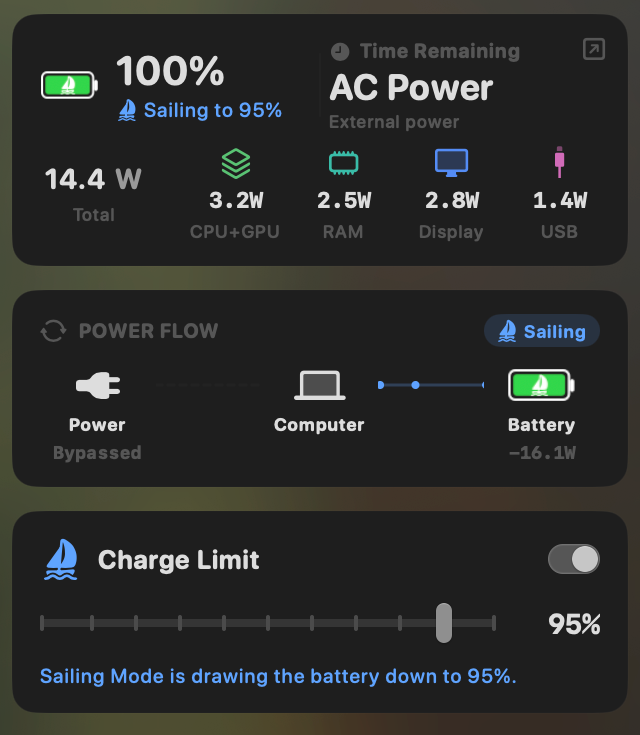
MacBookBatteryMonitor costs $9 for a lifetime licence. It can set a charge limit from 50% to 100% and has Sailing Mode for controlled discharge while connected to power. It also shows battery health, cycle count and temperature.14
The larger difference is power attribution.
MacBookBatteryMonitor measures whole-system power draw in watts and shows a component breakdown across areas such as CPU, GPU, RAM, display and USB. For individual apps, it estimates how that measured whole-system power is attributed across running processes rather than metering each app separately. Its history views record both overall and per-app usage so you can go back and see which workload was responsible for a drain event.14
It can also act on an application after you identify it, with a configurable CPU limit, efficiency-core offload and one-click termination of runaway apps and their subprocesses.14
That puts it in a different branch of the AlDente alternative search.
If your problem is:
I want to control how my MacBook charges.
AlDente, BatFi, BattOpt, batt, ChargeWatch and Apple's native limit all address that in different ways.
If your problem is:
I want to control charging, but I also want to know why the battery disappears so quickly once I unplug.
Estimated per-process power attribution becomes relevant.
For the direct two-product decision, see AlDente vs MacBookBatteryMonitor. That page compares the same feature categories side by side rather than repeating the full comparison here.
If you want to understand the power-monitoring side first, our guide to the best Mac power monitor apps explains the difference between Activity Monitor's Energy Impact score and attributed per-app watt estimates.
OpenDente: an open-source option that has gone quiet
OpenDente is worth knowing about if your search is specifically for an open-source AlDente alternative, but its current development status needs to be stated clearly.
The project is GPL-3.0 licensed and aims directly at AlDente-like functionality. Its current feature list includes a 50-100% charge limit, Sailing Mode, forced discharge, heat protection, sleep handling, MagSafe LED control and real-time adapter, system and battery wattage.15
That is a substantial feature set for an open-source project.
The caveat is testing.
The developer currently labels OpenDente Beta and says it has so far been tested on a single M4 MacBook running macOS Tahoe 26. The code targets M1 through M4 Apple silicon Macs and macOS 14+, but the developer explicitly marks configurations outside the tested machine as unverified.15
For someone comfortable testing young open-source software and reporting issues, that may be acceptable.
For someone who wants an established charging utility on a work machine, the beta status is a material difference.
The bigger concern now is activity. As of 26 September 2026, OpenDente has no published releases, and its last code change was on 4 May 2026. Until that changes, treat it as an experiment to watch rather than an AlDente replacement.15
What about Battery Toolkit?
Battery Toolkit deserves its own note because it still appears prominently in current search results for “aldente alternative”, “free aldente alternative” and “aldente open source alternative”.
It is a capable free BSD-3-Clause project for Apple silicon. Battery Toolkit supports an upper charge limit with a 50% minimum, a separate lower threshold with a 20% minimum, deliberate adapter disabling, manual charging commands and a native menu-bar interface.16
It also has two limitations that matter in 2026.
First, the developer archived the GitHub repository on 21 March 2026, making it read-only. The last release, version 1.8, shipped in August 2025.16
Second, Battery Toolkit is not Apple-notarized. Its documentation explains the additional Privacy & Security approval required to open it and warns about bypassing Gatekeeper when installing through Homebrew.16
The project also documents that its lower charging threshold is not honoured across a cold boot or reboot because Apple silicon resets the relevant platform state.16
None of that means an existing Battery Toolkit installation suddenly stopped working. It does mean we would distinguish between works today and actively maintained when comparing it with current alternatives.
That maintenance status is why Battery Toolkit is not presented as the automatic first choice here even though several current alternatives directories still rank it highly.
Which AlDente alternative matches each requirement?
The useful way to choose is to start with the missing capability.
| Requirement | Options that specifically address it |
|---|---|
| I only need an 80-100% ceiling | macOS Charge Limit |
| I need a charge limit below 80% | BattOpt, batt, ChargeWatch, MacBookBatteryMonitor, OpenDente and other configurable third-party limiters |
| I want free and open-source software | BattOpt and batt are the actively updated ones; ChargeWatch and OpenDente have gone quiet, and Battery Toolkit is archived |
| I need Intel Mac support | BattOpt and Energiza Pro; Juicy also supports Intel on macOS 15+; AlDente itself retains broad Intel support |
| I want location-aware limits | BatFi; BattOpt Pro also has location/zone behaviour |
| I want dedicated heat protection and calibration tools | AlDente and BattOpt expose these directly, and Energiza Pro has Heat Protection; OpenDente lists heat protection but has no releases |
| I want a simple technical CLI | batt |
| I want charging wattage and history for free | ChargeWatch |
| I want custom battery alerts and other-device batteries | Juicy |
| I want per-app power estimates in watts | MacBookBatteryMonitor (attributed from measured whole-system draw) |
| I want to throttle or stop the app causing battery drain | MacBookBatteryMonitor |
| I want no third-party charging software | macOS Charge Limit |
This is why a generic list of “apps like AlDente” is not enough to make the decision.
A user trying to replace AlDente's Heat Protection has a different requirement from somebody who only wants 80%. A developer looking for an open-source daemon has a different requirement from somebody who wants location-aware charging before a commute. And somebody searching for a battery manager because their Mac lasts three hours has a different problem again.
Free AlDente alternatives
If price is the main filter, you have several choices.
The simplest free option is Apple's own Charge Limit, provided you have Apple silicon, Tahoe 26.4 or later, and do not need a limit below 80%.1
For free open-source control below 80%, batt, ChargeWatch and BattOpt's free tier are more configurable. Their differences are mainly interface, platform support and scope. batt leans toward technical control, ChargeWatch combines limiting with power/wattage history, and BattOpt covers both Intel and Apple silicon while reserving some advanced features for Pro.6,7,4
OpenDente also belongs in the open-source group, but it is still beta, has no published releases and has not changed since May 2026.15
Battery Toolkit remains free and open source, but the repository is archived.16
Energiza Pro is not a free option for this purpose: its free version shows battery information, but charge limiting needs Pro.8
Is there an open-source AlDente alternative?
Yes.
BattOpt is MIT licensed, supports Intel and Apple silicon, and is the most actively updated project in this group.4
batt is GPL-2.0 and focused on Apple silicon charge control through either a CLI or native menu-bar client.6
ChargeWatch is MIT licensed and combines Apple silicon charge limiting with live wattage and local power history. Its last release was in June 2026.7
OpenDente is GPL-3.0 and aims to reproduce more of AlDente's advanced charging behaviour, but it is beta and has no published releases.15
Battery Toolkit is BSD-3-Clause but was archived in March 2026.16
A newer project, BatteryControl, appeared on GitHub on 19 September 2026. It is MIT licensed and pairs a SwiftUI app and CLI with a small privileged helper for Apple silicon Macs. It is too new to recommend yet, but it is one to watch.17
So “open source” no longer narrows the category to one obvious app. Maintenance status, Mac model and the specific charging behaviour you need matter more.
Do you need AlDente Pro anymore?
For some people, no third-party app is necessary anymore.
If your entire use case is a fixed charge ceiling somewhere between 80% and 100% on a supported Apple silicon Mac, Apple's built-in option handles it.1
AlDente Pro still goes much further. Sailing Mode, Heat Protection, Automatic Discharge, Calibration Mode, scheduling and the wider supported-Mac list are not replaced by a single native 80-100% slider.3,2
The relevant question in 2026 is therefore no longer:
Can another app stop my MacBook charging at 80%?
Several can, and macOS itself can.
The better question is:
What control or information do I need beyond the charge limit?
That answer is what should decide whether you stay with AlDente, use macOS alone, pick an open-source limiter, choose an automation-focused app, or move to a battery manager that also monitors power consumption.
FAQ
What is the best free AlDente alternative?
For a supported Apple silicon Mac where an 80-100% limit is enough, macOS Charge Limit is the simplest free option because no third-party app is required. For configurable limits below 80%, batt, ChargeWatch and BattOpt free tier provide open-source alternatives with different levels of control. Battery Toolkit is also free and open source, but its repository has been archived.
What is the best open-source AlDente alternative for Mac?
There is no single open-source replacement that fits every Mac. BattOpt supports both Intel and Apple silicon, has a GUI plus CLI and is the most actively updated. batt is a mature Apple-silicon-focused charge controller. ChargeWatch combines a charge limit with live wattage and history, though it has not been updated since June 2026. OpenDente aims for more AlDente-like features but has no published releases. Battery Toolkit is open source but archived.
Can macOS replace AlDente now?
It can replace AlDente for a basic charge-limit use case. macOS Tahoe 26.4 or later can set a manual 80-100% limit on Apple silicon Macs. It does not replace AlDente Pro features such as Sailing Mode, Heat Protection, Automatic Discharge, Calibration Mode or its wider range of supported Macs.
Which AlDente alternative works on Intel MacBooks?
BattOpt supports both Intel and Apple silicon and provides charge limiting on both. Energiza Pro also supports Intel and runs on macOS 10.13 or later. Juicy supports Intel Macs running macOS 15 or later, although it is a broader battery app rather than a dedicated charging utility. AlDente itself continues to support many Intel MacBook models. Apple native Charge Limit, BatFi, batt, ChargeWatch, MacBookBatteryMonitor and OpenDente are focused on Apple silicon for their charging-control functions.
Is Battery Toolkit still a good AlDente alternative?
Its feature set is still relevant, and an existing installation may continue to work. The important change is that the GitHub repository was archived on 21 March 2026 and is now read-only, and the last release (1.8) shipped in August 2025. New users should factor the lack of maintenance into the decision, especially because battery charge utilities depend on low-level macOS behaviour that can change with firmware and operating-system updates. BattOpt and batt are the free, open-source options still being updated.
Which AlDente alternative can show what is draining my MacBook?
BatFi shows a list of apps using significant energy, ChargeWatch shows system and charging power, and Juicy provides per-app energy insights and history. MacBookBatteryMonitor is focused most heavily on process attribution: it measures whole-system power draw and estimates how that power is attributed across running processes, alongside component power and per-app history, then provides controls for throttling or terminating a runaway process.
Final comparison
AlDente still has a clear place in 2026. It remains one of the more established dedicated charging managers, has broad Intel and Apple silicon support, and puts a large set of battery-care controls in one app.
The alternatives make sense when a specific trade-off matters more.
macOS removes the need for another app when an 80-100% limit is enough.
BattOpt gives open-source users an Intel and Apple-silicon path with upper/lower limits and battery-maintenance tools.
batt gives technical users a free, focused charging controller with a strong CLI.
ChargeWatch combines free sub-80% charging control with live wattage, though updates stopped in June.
Energiza Pro brings Heat Protection to Intel Macs and older macOS versions.
BatFi specialises in charging rules that react to time and location.
Juicy combines charge management with alerts, battery-health views and device tracking.
MacBookBatteryMonitor combines charging controls with estimated per-app power attribution and drain diagnosis when the problem extends beyond how far the battery charges.
OpenDente is an open-source project to watch, but it has no releases yet.
Battery Toolkit remains useful context, but its archived status should be considered before starting a new installation.
That is the real shape of the AlDente alternatives market in 2026. The best fit depends on which AlDente capability you were trying to replace in the first place.
Sources
Capabilities and support claims in this article were checked against the first-party pages and project repositories below on 21 August 2026. Prices and project activity were re-checked on 26 September 2026.
- Apple Support: About Optimized Battery Charging and Charge Limit on Mac: Documents the 80-100% Charge Limit on Apple silicon Macs running macOS Tahoe 26.4 or later, the more-than-five-points recharge behaviour, Charge to Full Now and occasional 100% calibration charges.
- AppHouseKitchen: AlDente pricing: AlDente Free and Pro pricing ($14.99 a year, $24.99 lifetime), current macOS support and the supported MacBook list. Pricing checked 26 September 2026.
- AppHouseKitchen: AlDente features: What AlDente Free and Pro include: Charge Limiter, Discharge, Sailing Mode, Heat Protection, Automatic Discharge, Calibration Mode, Top Up, scheduling and Shortcuts.
- GitHub: BattOpt by js4jiang5: MIT-licensed charge limiter for Intel and Apple silicon Macs; documents the free-versus-Pro feature split, Zone Awareness, notarization, calibration and compatibility. Latest release v1.2.3 on 25 September 2026.
- BattOpt product site: The current $5.99 lifetime Pro licence and the 90-day Pro trial terms. Price checked 10 September 2026.
- GitHub: batt by charlie0129: GPL-2.0 charge controller for Apple silicon; documents the GUI and CLI, upper and lower limits, adapter control, calibration, installation and when the built-in macOS 26.4 limit removes the need for it.
- GitHub: ChargeWatch by TY-teo: MIT-licensed menu-bar app that combines an Apple silicon charge limit below 80% with live battery, system and wall wattage, local history, CSV export and current testing status. Latest release v0.7.0 on 16 June 2026, with no code changes since as of 26 September 2026.
- Energiza Pro product page (Appgineers): Charging limits, automatic discharge on Apple silicon, Heat Protection, sleep behaviour, the macOS 10.13 minimum, and the $1.49 monthly, $9.99 yearly and $19.99 lifetime Pro prices.
- Micropixels: BatFi: The official BatFi page for requirements (Apple silicon, macOS Sonoma or newer), charge rules by time and location, Run on Battery and the required licence.
- Gumroad: BatFi licence listing: The current BatFi purchase listing at $15. Price checked 21 August 2026.
- Juicy official site: Juicy pricing ($14.99 per year or $24.99 lifetime) and support for Intel and Apple silicon Macs on macOS 15 or later. Checked 26 September 2026.
- Juicy: limit battery charging: Documents charge limiting, Sailing Mode, Automatic Discharge and the one-tap top-up in the direct-download version.
- Juicy press kit: Explains why the Mac App Store build omits charge limiting and per-app energy insights because the App Store sandbox blocks the required access.
- MacBookBatteryMonitor: $9 lifetime licence, charge limit from 50% to 100%, Sailing Mode, battery health and temperature, measured whole-system watts with estimated per-app attribution, hardware power breakdown, history, CPU limits and one-click quit.
- GitHub: OpenDente by killerk3emstar: GPL-3.0 project aiming at AlDente-style controls; documents beta status, testing on a single M4 MacBook with macOS Tahoe 26, and the 50-100% charge limit, Sailing Mode, forced discharge and heat protection. No published releases, and no code changes since 4 May 2026, as of 26 September 2026.
- GitHub: Battery Toolkit by mhaeuser: BSD-3-Clause Apple silicon charge tool; the repository was archived on 21 March 2026, the last release (1.8) shipped in August 2025, and it documents upper and lower thresholds, adapter control and reboot limitations.
- GitHub: BatteryControl by Ednk-1312: MIT-licensed charge limit control for Apple silicon Macs: a SwiftUI app and CLI on top of a small privileged daemon. Repository created 19 September 2026.