Looking for the app? See the MacBook battery monitor.
Comparisons
Best coconutBattery Alternatives for Mac in 2026
coconutBattery is still good at the job it was built for, and version 4 Plus now includes menu-bar details, notifications and a Lifetime Analyzer that older comparisons miss. This guide groups the real alternatives by the coconutBattery job you are replacing: health diagnostics, iPhone and iPad inspection, device battery levels, alerts, charge control, or working out why a healthy battery still drains quickly.
Quick answer
The best coconutBattery alternative depends on what you want to replace.
If you only open coconutBattery occasionally to check your MacBook's condition, maximum capacity and cycle count, macOS may already give you enough information for free.
If you want a dedicated battery-health utility with history, iPhone and iPad diagnostics and a menu-bar interface, Battery Health 3 is one of the closest current replacements.
If you want the same health data expanded into alerts, accessory batteries and app-energy information, Juicy and Mac 4 Breakfast take that approach in different ways.
If your battery health looks normal but the MacBook still dies too quickly, you need a power-monitoring tool rather than another health readout. That is where MacBookBatteryMonitor and other drain-focused apps become more relevant.
coconutBattery itself is still a good utility. It has been developed since 2005, supports Intel and Apple silicon Macs, reads iPhone and iPad battery data, and coconutBattery 4 Plus adds history, menu-bar details, Wi-Fi device support, notifications and a Lifetime Analyzer.1
The reason to switch should therefore be a feature you actually need, not simply that another app is newer.
One scope note before the detail: this page stays on the coconutBattery jobs being replaced. If you are choosing a battery app from scratch instead of leaving coconutBattery, the Best Mac Battery Health Apps guide ranks the whole category.
coconutBattery alternatives compared
| Option | Health / capacity | Cycle count | History | iPhone / iPad diagnostics | Other device batteries | App power / energy | Charge control | Best matched to |
|---|---|---|---|---|---|---|---|---|
| macOS | Yes | Yes, buried in System Information | Battery-level usage history, not long-term health history | No | Basic connected-device levels elsewhere | Significant-energy apps / Activity Monitor | 80-100% on supported Macs | Occasional free checks |
| Battery Health 3 | Yes | Yes | Health, charge and power history | Yes, USB/Wi-Fi | AirPods and Magic accessories | Energy Impact ranking | No | Closest dedicated diagnostics replacement |
| Mac 4 Breakfast | Yes | Yes | Health, lifetime, heat and sleep-drain data | Yes | iPhone, iPad, AirPods, Watch, Magic accessories | Open-app energy information | Reminder, not hardware cap | Health + devices + alerts |
| Juicy | Yes | Yes | 24h / 7d / 30d app-energy history plus health views | Yes | AirPods, iPhone, iPad, Magic devices | Per-app energy insights | Yes | Battery dashboard + alerts + charge management |
| AirBattery | Battery levels rather than deep health diagnostics | Not its main job | Device-state focus | Device levels | Broad nearby-device support | No | No | Free/open-source multi-device battery levels |
| Battery Monitor | Yes | Yes | Limited | No | No | Whole-battery electrical information | No | Low-cost technical battery stats |
| MacBookBatteryMonitor | Yes | Yes | System + per-app power history | No | No | Estimated per-app watts | Yes | Health + diagnosing battery drain |
There is no universal winner in that table.
The closest replacement for coconutBattery's diagnostic role is not necessarily the best replacement for somebody who has outgrown diagnostics and now wants to manage charging or investigate drain.
What coconutBattery actually does in 2026
coconutBattery has changed since many older comparison pages were written.
The current coconutBattery 4 line supports macOS 12 Monterey or later and provides live battery information for Macs, iPhones and iPads.1
The core application exposes the sort of information that made coconutBattery popular in the first place:
| Battery information | Why it matters |
|---|---|
| Current charge | How much energy is presently stored |
| Full-charge capacity | How much charge the battery can currently hold |
| Design capacity | What the battery was designed to hold when new |
| Cycle count | How much cumulative battery use has occurred |
| Temperature | Current battery thermal state |
| Voltage | Battery electrical state |
| Charge / discharge rate | Whether energy is entering or leaving the battery, and how quickly |
| Device information | Hardware context for the reading |
coconutBattery Plus expands the product considerably.
The current first-party page lists Mac battery details in the menu bar, iPhone/iPad details in the menu bar, Wi-Fi support, battery-health saving, Lifetime Analyzer, advanced device details, notifications and custom printing.1
The Lifetime Analyzer tracks values including minimum, maximum and average temperature, voltage, charge and discharge rates, and battery operating time.
Its Advanced Viewer can also expose internal SSD statistics on supported Macs.
This matters because some current competitor pages still describe coconutBattery as a static window with no notifications or menu-bar presence.
That description is no longer accurate for coconutBattery Plus.
Do you need a coconutBattery alternative at all?
For many people, no.
coconutBattery remains good at the job it was built for.
If your workflow is:
Every few months I open an app, check capacity and cycles, then close it.
The free version already handles that cleanly.
Its long history also matters. coconutBattery has been available since 2005, which gives it a track record that a battery app launched a few months ago cannot reproduce overnight.1
Switch when the job has changed.
A modern alternative becomes more useful if you want health information always visible, battery alerts, accessory batteries, historical power use, charging controls or app-level drain diagnosis.
macOS: the free alternative for occasional health checks
Before installing another battery-health app, check what macOS already exposes.
System Settings shows your battery's condition and Maximum Capacity.
System Information shows the cycle count.
Apple documents the path in its cycle-count document for Mac laptops:
Option-click Apple menu > System Information > Hardware > Power > Battery Information.2
For many current MacBooks, Apple specifies a maximum cycle count of 1,000 and says the battery is designed to retain up to 80% of its original charge capacity at its maximum cycle count.2
That is enough information to answer a basic question such as:
Is this battery obviously worn?
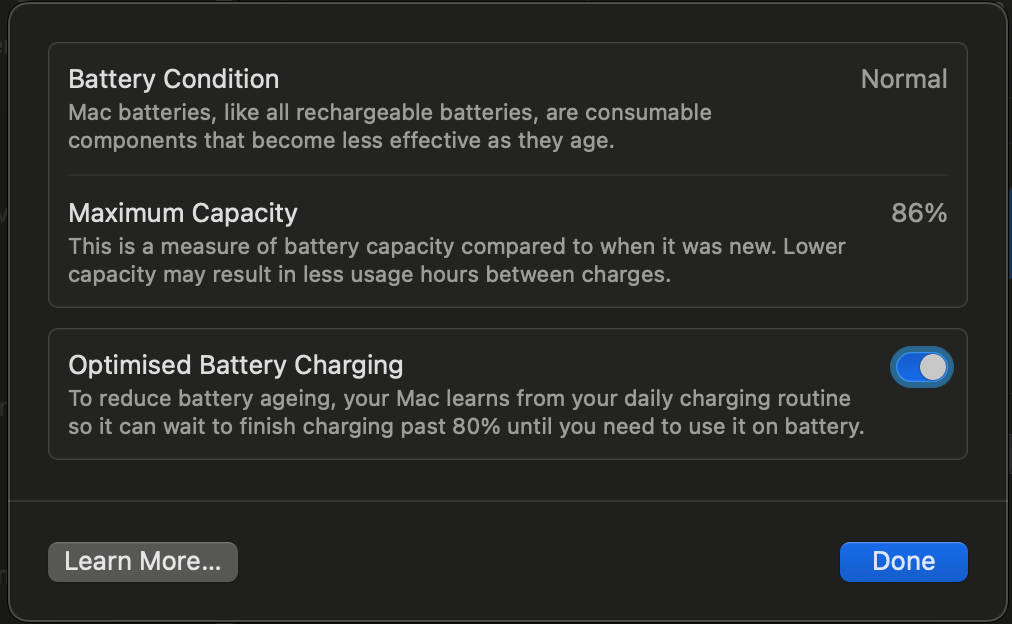
What macOS does not replace well
The information is scattered.
Maximum Capacity is in Battery settings.
Cycle count is in System Information.
Per-app energy use lives in Activity Monitor.
Battery-level history lives in Battery settings.
There is no coconutBattery-style historical health database showing how full-charge capacity changes every time you inspect the battery.
There is also no Mac utility for examining the detailed health of a connected iPhone or iPad in the same way coconutBattery does.
So macOS is the best free replacement for a one-off Mac health check.
It is not a full coconutBattery Plus replacement.
For the built-in workflow, see How to Check MacBook Battery Health.
Battery Health 3: one of the closest direct coconutBattery replacements
Battery Health 3 by FIPLAB is probably the closest match if you want a dedicated battery diagnostics app rather than a charge manager.
It runs from the menu bar and currently requires macOS 12 or later.4
Its Mac battery view includes:
| Metric | Battery Health 3 |
|---|---|
| Health percentage | Yes |
| Current / original capacity | Yes |
| Cycle count | Yes |
| Condition | Yes |
| Temperature | Yes |
| Voltage | Yes |
| Amperage | Yes |
| Whole-battery power usage | Yes |
| Estimated time remaining | Yes |
| Power history | Yes |
| Charge history | Yes |
| Health history | Yes |
That overlap with coconutBattery is substantial.
Battery Health 3 also covers iPhone and iPad
Battery Health 3 can inspect an iPhone or iPad connected over USB or Wi-Fi Sync.4
For supported iOS devices it exposes values including current capacity, original capacity, health percentage, cycle count, age, manufacture date and temperature.
That is important because iPhone/iPad diagnostics are one of coconutBattery's strongest advantages over Mac-only battery monitors.
Someone replacing coconutBattery specifically because they inspect used iPhones or iPads should not choose a Mac-only tool and assume it is equivalent.
Where Battery Health 3 goes further
It has configurable notifications.
It can show Bluetooth battery levels for AirPods, Magic Keyboard, Magic Mouse and Magic Trackpad.
Its Energy Hogs view ranks applications using their current Energy Impact.
And it provides separate historical charts for power consumption, charge level and health.4
Where it does not go further
Battery Health 3 does not advertise hardware charge limiting.
Its Energy Hogs view uses an energy-impact score. It does not claim direct process-level watt measurement.
That makes it primarily a diagnostic and monitoring tool, which is exactly why it is such a natural coconutBattery alternative.
FIPLAB sells Battery Health 3 as a one-time purchase and offers a free trial.4
If you like coconutBattery's purpose but want the information living in the menu bar with richer history and alerts, Battery Health 3 belongs near the top of the shortlist.
Mac 4 Breakfast: a newer coconutBattery-style health app with broader alerts
Mac 4 Breakfast is one of the newest products targeting this search directly.
It launched in 2026 and currently positions itself around battery health, cycle count, capacity, temperature, live wattage, time remaining, Apple-device batteries and alerts.5
The app requires macOS 14 or later and Apple silicon.5
Its current site lists a free tier, a 14-day Pro trial and a $4.99 launch price for Pro. The displayed normal Pro price is $9.99.5
Where it overlaps with coconutBattery
Mac 4 Breakfast shows:
- Battery health
- Cycle count
- Capacity
- Temperature
- Voltage
- Live charging wattage
- Historical information
- Lifetime analysis
- iPhone and iPad battery information
It also tracks AirPods, Apple Watch and Magic accessories, which extends the multi-device idea beyond coconutBattery's main Mac/iPhone/iPad focus.5
Its biggest difference is proactivity
coconutBattery is strongest when you deliberately inspect the battery.
Mac 4 Breakfast is designed more as an always-running menu-bar layer.
Its Smart Alerts include charge-target reminders, predictive low-battery warnings and temperature alerts.
Its Sleep Drain Detective tries to show how much battery was lost while the Mac slept and which application may have kept it awake.5
It also exposes how long open applications have been running and the energy attributed to them through macOS counters.
The trade-off is maturity
coconutBattery has been around since 2005.
Mac 4 Breakfast launched in 2026.
A new app can have features an older app lacks, but it cannot manufacture twenty years of public history.
That does not make the newer product worse.
It means maturity should be part of the decision if you depend on a battery utility professionally.
It does not hard-limit charging
Mac 4 Breakfast can remind you to unplug at a target percentage.
Its own documentation explicitly says it does not implement a hardware charging cap because the developer chose not to ship the privileged helper required for that feature.6
If your reason for leaving coconutBattery is that you want charge control, Juicy, AlDente, BatFi or MacBookBatteryMonitor are more direct candidates.
Juicy: coconutBattery-style health plus alerts, devices and charge control
Juicy is another current battery app that explicitly positions itself as a coconutBattery alternative.
It reads Mac battery health, cycle count, temperature and voltage and presents those values from the menu bar.7
It can also inspect connected iPhones and iPads, including battery health, cycle count, temperature and lifetime information.8
That makes it much closer to coconutBattery than a Mac-only charge limiter.
Juicy expands the job
Juicy also includes:
| Capability | Juicy |
|---|---|
| Custom battery alerts | Yes |
| AirPods / Magic accessory battery levels | Yes |
| iPhone / iPad health | Yes |
| Per-app energy information | Yes |
| 24-hour app history | Yes |
| 7-day app history | Yes |
| 30-day app history | Yes |
| Charge limiting | Yes |
| Sailing Mode | Yes |
| Automatic Discharge | Yes |
| Top Up to 100% | Yes |
Juicy can cap charging at a target anywhere from 50% to 100%, with 80% the recommended default for battery care. Its charge-limit guide also covers Sailing Mode, Automatic Discharge and a one-tap top up to 100%.9
That means Juicy is relevant when your coconutBattery replacement needs to do more than read battery health.
Per-app energy is a meaningful difference
coconutBattery can show whether the battery is charging or discharging and how much power is moving at the battery level.
That is different from identifying which application is responsible.
Juicy's current release provides app-level energy views with a live snapshot and 24-hour, 7-day and 30-day history.8
For a user asking:
My health is 96%. Why does my battery still disappear by lunchtime?
That extra layer can be more useful than another capacity readout.
Pricing
Juicy currently has a three-day full-feature trial.
Juicy costs $14.99 per year or $24.99 for a lifetime licence, and both cover up to two Macs.10
One caveat matters when comparing editions: some low-level functions are available only in the direct-download or Setapp versions because of Mac App Store sandbox restrictions.8
For a true coconutBattery replacement, compare the edition that contains the features you actually want.
AirBattery: excellent for device battery levels, but not a full health replacement
AirBattery ranks prominently on several coconutBattery alternative lists.
It is free and open source under AGPL-3.0.11
It supports macOS 11 or later and can collect battery information from a wide range of nearby devices.
The app can place device batteries in the Dock, status bar and widgets.
It can discover iPhones, iPads, Apple Watch and peripherals through combinations of Wi-Fi, USB and Bluetooth, and its NearCast feature shares battery state between Macs on a local network.11
That makes it very good at one job:
Show me the battery level of everything around me.
That is not the same job as coconutBattery.
Battery level is not battery health
coconutBattery is used to inspect things such as full-charge capacity, design capacity, cycle count and battery ageing.
AirBattery's main product purpose is collecting battery usage / level information across devices.
Its official README does not position it as a direct replacement for coconutBattery's detailed iPhone/iPad health diagnostics or lifetime battery analysis.
This is why generic alternatives directories can be misleading.
Two apps can both belong to the “Battery Monitor” category and answer very different questions.
Use AirBattery when the multi-device glanceable battery level is what you want.
Use coconutBattery, Battery Health 3, Juicy or another diagnostic tool when battery condition is the thing you need to measure.
AirBattery's maintenance status deserves a quick check
The latest visible release during this review was version 1.6.3.
The repository has a large user footprint, with roughly 2,900 GitHub stars, but open issues in 2026 include user questions about current maintenance activity.12,13
That is not proof the project is abandoned.
It is a reason to check the current release activity before standardising on it for a long-term workflow.
Battery Monitor: a simple $5.99 technical battery reader
Battery Monitor by Marcel Bresink Software-Systeme is worth including because it represents the opposite strategy from the newer all-in-one apps.
It is a small, focused Mac utility.
The Mac App Store currently lists it at $5.99.14
It can show technical battery information including:
- Temperature
- Discharge current
- Cycle count
- Expected lifetime
- Capacity
- Charge state
- Estimated remaining runtime
It can also place charge information in the Dock.
There is no attempt to turn it into a charge limiter, Apple-device dashboard or process-level power profiler.
That simplicity is useful if what you want from coconutBattery is the Mac battery data and nothing else.
It does not replace coconutBattery's iPhone/iPad diagnostic role.
It also does not give you the broader history and device ecosystem of coconutBattery Plus.
For a single Mac and a small one-time purchase, however, it remains a relevant direct battery-monitor option.
MacBookBatteryMonitor: the alternative when health data is not enough
Disclosure: MacBookBatteryMonitor is our product.
It overlaps with coconutBattery on Mac battery health information, but the two products are built around different questions.
coconutBattery is very good at:
What condition is this battery in?
MacBookBatteryMonitor is designed to also answer:
Where is the battery's power going right now?
It shows battery health, capacity, condition, cycle count and temperature from the menu bar.15
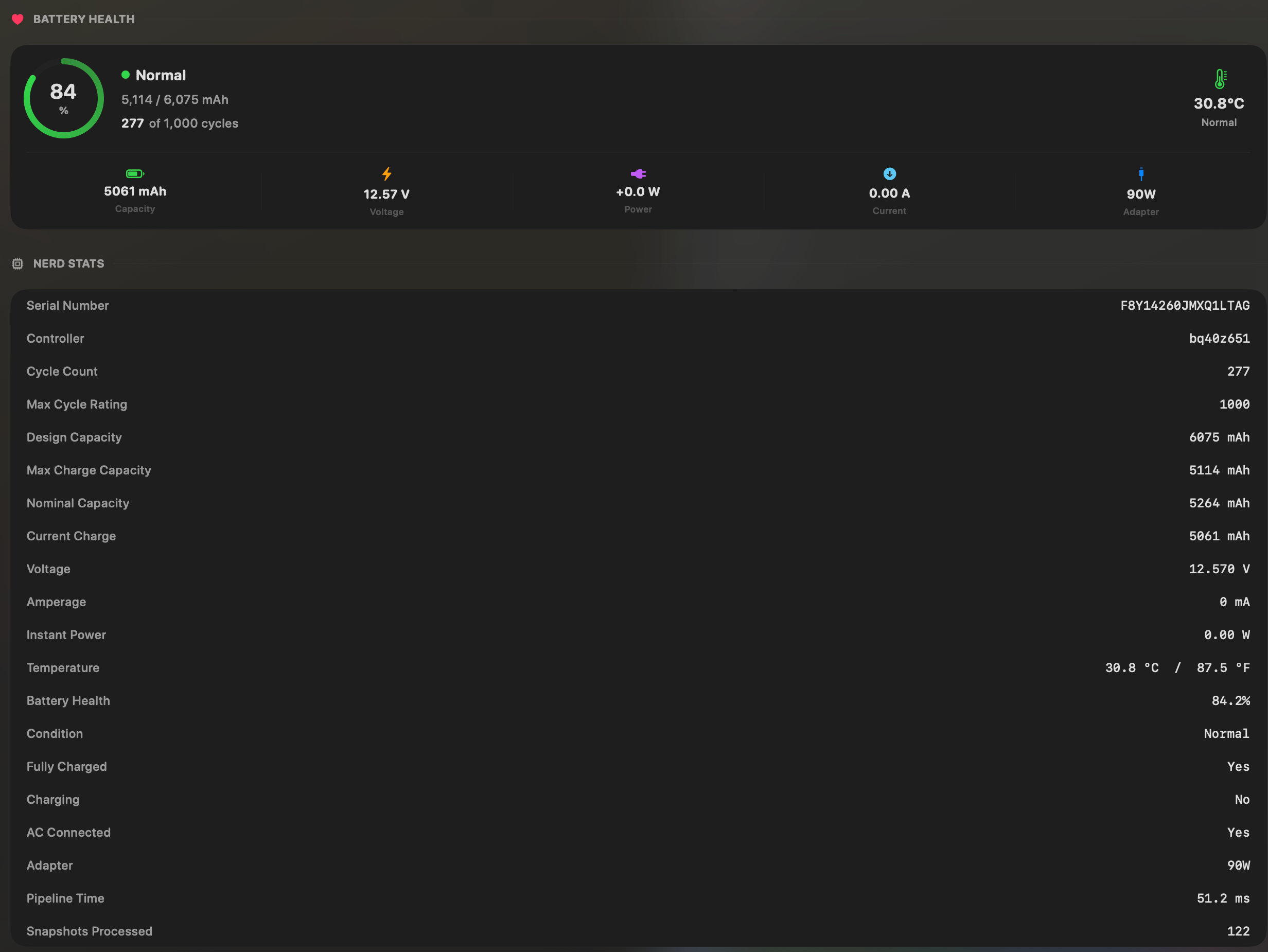
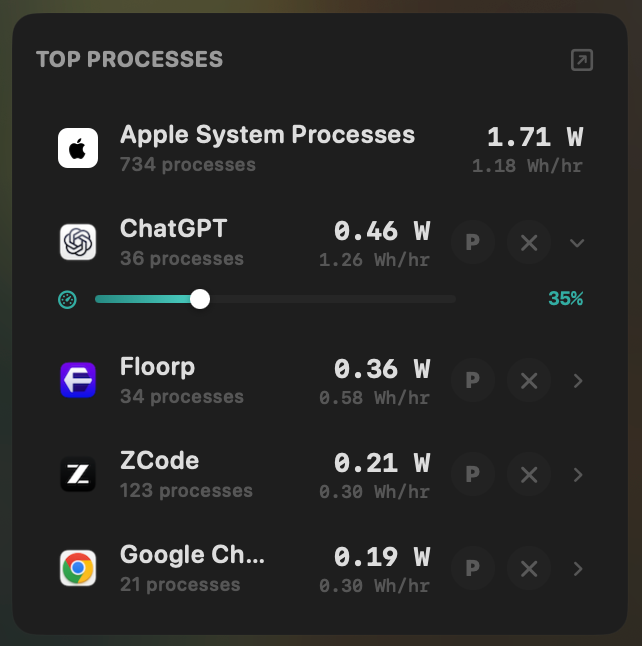
It then adds measured whole-system power consumption in watts, plus an estimate of how that power is attributed across the processes that are running.15
The whole-system watt figure is the measured value. The per-process figures are attributed estimates, not direct physical measurements of each app.
Historical views record system and per-app energy use, so a drain event can be investigated after it happened.
It also adds battery-management controls including a 50-100% charge limit and Sailing Mode.15
Where coconutBattery is stronger
coconutBattery can inspect iPhones and iPads.
MacBookBatteryMonitor cannot.
coconutBattery's Plus Lifetime Analyzer is designed specifically around long-term battery metrics such as temperature, voltage and charge/discharge-rate ranges.
coconutBattery also supports Intel Macs and older versions of macOS that MacBookBatteryMonitor deliberately does not target.1,15
And coconutBattery has a much longer history.
If your workflow is inspecting the health of several Apple devices, coconutBattery may simply be the better tool.
Where MacBookBatteryMonitor solves a different problem
Consider this scenario:
Your MacBook reports 95% battery health.
Cycle count is reasonable.
Condition is Normal.
Yet the battery lasts half as long as expected.
No additional health percentage will explain that.
The next question is which workload is consuming the power.
MacBookBatteryMonitor estimates process-level power draw in watts and provides controls for acting on a high-use process, including CPU limits, efficiency-core offload and process termination.15
That is the reason to consider it as a coconutBattery alternative.
Not because coconutBattery is poor at health diagnostics, but because your question has moved beyond health diagnostics.
For the measurement difference, see coconutBattery vs Activity Monitor vs MacBookBatteryMonitor.
For app-level diagnosis, compare the best Mac power monitor apps.
coconutBattery vs its closest alternatives by task
A task-based comparison is more useful than ranking seven unrelated apps from one to seven.
| What you want | Options that directly address it |
|---|---|
| Check Mac battery health occasionally | macOS or coconutBattery Free |
| Health, cycles, temperature and history in a dedicated app | coconutBattery Plus or Battery Health 3 |
| Inspect iPhone / iPad battery health from a Mac | coconutBattery, Battery Health 3, Juicy |
| Track AirPods, Watch and Magic accessory battery levels too | Juicy, Mac 4 Breakfast, AirBattery, Battery Health 3 for supported accessories |
| Free/open-source device battery overview | AirBattery |
| A simple paid Mac technical battery reader | Battery Monitor |
| Long-term battery-health analysis | coconutBattery Plus, Battery Health 3, Mac 4 Breakfast |
| Battery alerts | coconutBattery Plus, Battery Health 3, Juicy, Mac 4 Breakfast |
| Charge limiting | Juicy, MacBookBatteryMonitor or a dedicated charge manager |
| Live per-app power estimates in watts | MacBookBatteryMonitor |
| App-level energy history | Juicy or MacBookBatteryMonitor, with different measurement models |
| System and app drain plus battery-management controls | MacBookBatteryMonitor |
| Intel Mac support | coconutBattery, Battery Health 3 and other Intel-compatible tools; check each current requirement |
| No additional software | macOS |
This is why a search result that labels every battery icon utility as a coconutBattery alternative is not very useful.
The category contains several different products hiding under the same name.
Which alternative is closest to coconutBattery?
For the core diagnostic job, Battery Health 3 is one of the closest current substitutes.
Both products are focused on battery condition rather than primarily on charging behaviour.
Both expose health, cycles, capacity, temperature and electrical information.
Both support iPhone and iPad diagnostics.
Both can maintain historical information.
Battery Health 3 places more emphasis on an always-available menu-bar workflow, Energy Hogs and notifications.
coconutBattery Plus has its Lifetime Analyzer, advanced device viewer, SSD statistics and a long-established device-diagnostic workflow.
Neither choice makes the other obsolete.
They are the two products in this guide with some of the strongest overlap in the actual coconutBattery job.
Which is the best free coconutBattery alternative?
If you only need Mac battery condition and cycle count, macOS itself is the strongest free starting point.
It is already installed and Apple documents how to retrieve the information.
If you need battery levels for a large collection of nearby devices, AirBattery is free and open source.
If you specifically need the same detailed Mac/iPhone/iPad health workflow as coconutBattery, coconutBattery's own free tier is difficult to beat on price.
That is worth saying plainly.
Replacing a free app with another free app only makes sense if the second one solves a problem the first one does not.
Which alternative can check iPhone and iPad battery health?
This requirement narrows the shortlist considerably.
coconutBattery remains strong here.
Battery Health 3 can inspect iPhone and iPad devices over USB or Wi-Fi Sync and exposes capacity, health, cycle count, temperature and manufacture information.4
Juicy's current direct-download and Setapp builds can inspect connected iPhones and iPads and show health, cycles, temperature and lifetime stats.8
Mac 4 Breakfast also supports iPhone and iPad battery information alongside a broader set of Apple devices.5
MacBookBatteryMonitor is not an alternative for this use case because it does not inspect iOS-device batteries.
If iPhone/iPad diagnostics are the feature you care about most, keep that limitation near the top of your decision.
Which alternative shows what's actually draining the Mac?
This is where the word “battery monitor” becomes ambiguous.
coconutBattery can tell you the rate at which the battery is discharging.
That does not automatically identify the responsible app.
Battery Health 3 has an Energy Hogs view based on Energy Impact.
macOS Activity Monitor also ranks apps using Energy Impact.
Juicy provides per-app energy information with live and historical views.
Mac 4 Breakfast reports app energy consumed over time and has sleep-drain analysis.
MacBookBatteryMonitor measures whole-system power in watts, estimates how it is attributed across processes, and records per-app energy history.
Those are not identical measurements.
If your primary problem is runtime rather than health, compare the power-monitoring models instead of choosing based on which app has the nicest battery-health percentage.
Why coconutBattery and macOS can show different health numbers
This question appears repeatedly in Reddit discussions around coconutBattery.
The first thing to check is whether you are comparing the same metric.
Current charge percentage, full-charge capacity, design capacity, Apple's Maximum Capacity percentage and a third-party capacity calculation are related but not interchangeable values.
Battery-management behaviour can also affect the raw maximum-charge value exposed by the system.
A small difference between two tools does not automatically prove that one is wrong.
The useful method is to compare the same measurement repeatedly over time rather than switching between different definitions whenever one number looks better.
We cover the measurement details in coconutBattery vs Activity Monitor vs MacBookBatteryMonitor.
Is coconutBattery still worth using in 2026?
Yes, if its core job matches your question.
coconutBattery remains particularly useful for:
- A detailed one-off MacBook battery-health check
- Comparing current and design capacity
- Checking cycles and temperature
- Inspecting iPhone or iPad battery health from a Mac
- Keeping a long-term health record with Plus
- Inspecting deeper device details
The alternatives become more compelling when you want a different workflow.
Battery Health 3 is closer to a persistent modern diagnostic dashboard, Mac 4 Breakfast emphasises alerts and device batteries, Juicy combines health with alerts and charge control, AirBattery focuses on battery levels across many devices, and Battery Monitor stays a small technical Mac-only utility.
MacBookBatteryMonitor connects health information with estimated per-app battery drain and battery-management controls.
The right replacement follows from the missing capability.
To rank the health-app category as a whole rather than replace one coconutBattery job, see the Best Mac Battery Health Apps guide.
What we would not use as a direct coconutBattery replacement
Some applications appear on alternatives pages because they have something to do with batteries.
That is not enough.
A basic menu-bar battery percentage app does not replace coconutBattery's capacity and cycle diagnostics.
A charge limiter does not automatically replace battery-health history.
A general system monitor may show battery voltage and temperature while offering no iPhone/iPad diagnostics.
A device-battery widget can show that your AirPods are at 34% without telling you anything about your MacBook's full-charge capacity.
This is the main weakness in most coconutBattery alternatives lists.
The category label is too broad.
Choose based on the measurement or control you actually need.
Final comparison
coconutBattery is not a legacy utility that needs replacing simply because newer battery apps exist.
Version 4 is actively maintained, supports current hardware and has expanded Plus features including menu-bar information, notifications, Wi-Fi iOS support, historical health data and a Lifetime Analyzer.1
The alternatives are useful because they make different trade-offs.
Use macOS when you need an occasional free health check.
Look at Battery Health 3 when you want a close diagnostic replacement with health history, alerts and iPhone/iPad support.
Look at Mac 4 Breakfast when you want an inexpensive new menu-bar health app with alerts, broader Apple-device batteries and sleep-drain information, and you are comfortable adopting a much newer product.
Look at Juicy when you want coconutBattery-style health data to sit alongside custom alerts, charge control and app-energy history.
Look at AirBattery when your real requirement is seeing battery levels across many devices for free.
Look at Battery Monitor when you want a small paid technical Mac battery utility without a large feature set.
Look at MacBookBatteryMonitor when a healthy-looking battery is not answering the real question and you need per-app power estimates that point to the workload consuming the power, while also having charging controls in the same app.
The strongest coconutBattery alternative is therefore the one that replaces the particular part of coconutBattery you have outgrown.
FAQ
What is the best coconutBattery alternative for Mac?
Battery Health 3 is one of the closest replacements for the coconutBattery core diagnostic role because it shows battery health, capacity, cycles, temperature, electrical data, history and iPhone/iPad information. Other apps are better matched to different requirements such as device battery levels, charge limiting or per-app power monitoring.
Is there a free coconutBattery alternative?
Yes. macOS itself shows Battery Condition, Maximum Capacity and cycle count for free. AirBattery is free and open source if your priority is monitoring battery levels across many devices. The coconutBattery free version also remains one of the strongest zero-cost options for detailed Mac battery diagnostics.
Does macOS make coconutBattery unnecessary?
For a basic occasional health check, possibly. macOS exposes Maximum Capacity and Condition in Battery settings and cycle count in System Information. coconutBattery remains useful when you want more technical values, iPhone/iPad diagnostics, saved health information or Plus features such as Lifetime Analyzer and menu-bar details.
Which coconutBattery alternative can check iPhone battery health?
Battery Health 3 and Juicy can inspect connected iPhones and show detailed battery information. Mac 4 Breakfast also supports iPhone and iPad battery information. MacBookBatteryMonitor does not inspect iOS-device batteries.
Which coconutBattery alternative can check iPad battery health?
Battery Health 3, Juicy and Mac 4 Breakfast provide iPad battery information from a Mac. coconutBattery itself remains a strong option for this job.
Which coconutBattery alternative is open source?
AirBattery is free and open source under AGPL-3.0, but its focus is broad device battery levels rather than coconutBattery-style health diagnostics. BatteryBoi is another free/open-source Mac battery indicator, but it is not as direct a coconutBattery diagnostic replacement as Battery Health 3 or the current all-in-one battery apps.
Which coconutBattery alternative shows battery history?
Battery Health 3 tracks power, charge and health history. Mac 4 Breakfast includes health and lifetime analysis. Juicy records app-energy history. MacBookBatteryMonitor records whole-system and per-app energy history. These histories measure different things, so choose based on whether you want battery ageing or power-consumption history.
Which coconutBattery alternative shows which apps drain the battery?
Battery Health 3 ranks Energy Hogs using Energy Impact. Juicy has live and historical per-app energy insights. Mac 4 Breakfast reports application energy information and sleep drain. MacBookBatteryMonitor measures whole-system watts and estimates how they are attributed to running apps, plus per-app history.
Does coconutBattery show per-app battery usage?
No. coconutBattery shows battery-level and device-level information rather than attributing power consumption to individual running applications.
Does coconutBattery limit charging?
No. coconutBattery is primarily a monitoring and diagnostic tool. If you want a charge limit, choose macOS Charge Limit on supported Macs or a battery-management app that specifically supports charging control.
Does coconutBattery have notifications?
coconutBattery Plus currently includes notifications. Some competitor reviews still say coconutBattery has no alerts, but the current first-party coconutBattery 4 Plus page lists notifications for Mac and iPhone/iPad battery thresholds.
Does coconutBattery work in the menu bar?
coconutBattery Plus currently includes Mac battery details and iPhone/iPad battery details in the menu bar. Claims that coconutBattery only works in a standalone window describe older or free-tier workflows rather than the full current Plus feature set.
Is coconutBattery Plus a subscription?
No. The current FAQ at coconut-flavour.com says all coconutBattery Plus editions are one-time purchases. The current product offers a coconutBattery 4 edition covering v4.x updates and a Lifetime edition covering future Plus updates.
Is coconutBattery accurate?
coconutBattery reads battery values exposed by the Mac. Confusion usually arises when users compare different metrics, such as a raw capacity ratio with the Apple displayed Maximum Capacity percentage. Track the same metric over time rather than assuming two differently defined percentages should always match exactly.
Which is better, coconutBattery or Battery Health 3?
coconutBattery has a very long track record, strong Mac/iPhone/iPad diagnostics and Plus features such as Lifetime Analyzer and advanced device details. Battery Health 3 is more menu-bar-focused and combines health history, notifications, Energy Hogs and accessory battery monitoring. The better fit depends on which workflow you prefer.
Which is better, coconutBattery or MacBookBatteryMonitor?
They answer different questions. coconutBattery is stronger for detailed Mac/iPhone/iPad health diagnostics and long-term battery-health analysis. MacBookBatteryMonitor combines Mac battery-health information with live power monitoring that attributes estimated watts to running processes, energy history and charging controls. If iOS diagnostics matter, coconutBattery has the advantage. If app-level Mac battery drain is the problem, MacBookBatteryMonitor addresses that directly.
Sources
Claims about each product were checked against current first-party documentation on 21 August 2026.
- coconut-flavour.com, the official coconutBattery page. Supports the macOS 12 or later requirement, Mac/iPhone/iPad diagnostics, the Plus feature set including menu-bar details, Wi-Fi support, notifications and Lifetime Analyzer, and the one-time-purchase model. Checked 21 August 2026. https://www.coconut-flavour.com/coconutbattery/
- Apple Support, "Determine battery cycle count for Mac laptops." Supports the System Information path for cycle count and the 1,000-cycle, 80%-capacity ratings that apply to many current MacBooks. https://support.apple.com/en-nz/102888
- Apple Support, "About Optimized Battery Charging and Charge Limit on Mac." Supports the Apple silicon and macOS Tahoe 26.4 requirement and the native 80-100% Charge Limit. https://support.apple.com/en-nz/102338
- FIPLAB, the official Battery Health 3 page. Supports the macOS 12 or later requirement, health and electrical readings, history charts, Energy Hogs, iPhone and iPad inspection, accessory battery levels, notifications, and the one-time price with free trial. Checked 21 August 2026. https://fiplab.com/apps/battery-health-3-for-mac
- Mac 4 Breakfast, the official product page. Supports the macOS 14 and Apple-silicon requirement, Smart Alerts, Sleep Drain Detective, device batteries, and the $4.99 launch price with a $9.99 regular Pro price and 14-day trial. Checked 21 August 2026. https://www.mac4breakfast.app/
- Mac 4 Breakfast, the official documentation repository on GitHub. Supports the closed-source status and the developer statement that the app does not implement a hardware charging cap. Checked 21 August 2026. https://github.com/onekapisch/Mac-4-Breakfast
- getjuicy.app, the official Juicy page. Supports Mac health monitoring, accessory batteries, custom alerts and app energy insights. Checked 21 August 2026. https://getjuicy.app/
- Juicy, the official press kit. Supports the health, cycle, temperature and voltage readings, the per-app energy views with 24-hour, 7-day and 30-day history, and iPhone and iPad battery-health support. Checked 21 August 2026. https://getjuicy.app/press/
- Juicy, the official charge-limit feature page. Supports the 50% to 100% charge-limit range with 80% as the recommended default, plus Sailing Mode, Automatic Discharge and the one-tap top up. Checked 21 August 2026. https://getjuicy.app/features/limit-battery-charging/
- Juicy, the official battery-health and pricing page. Supports the three-day trial, the $14.99 yearly and $24.99 lifetime prices. Checked 21 August 2026. https://getjuicy.app/features/battery-health-tracking/
- lihaoyun6/AirBattery, the official GitHub repository. Supports the AGPL-3.0 licence, the macOS 11 or later requirement, Dock, status-bar and widget display, nearby-device discovery and NearCast. Checked 21 August 2026. https://github.com/lihaoyun6/AirBattery
- AirBattery, the GitHub releases page. Supports the current-release position used to judge maintenance activity; v1.6.3 was the latest release at check time. https://github.com/lihaoyun6/AirBattery/releases
- AirBattery, the GitHub issue tracker. Records current user questions about maintenance activity; open issues are not evidence that the project is abandoned. https://github.com/lihaoyun6/AirBattery/issues
- Mac App Store (US), Battery Monitor by Marcel Bresink Software-Systeme. Supports the $5.99 price and the technical battery readings such as temperature, discharge current and cycles. Checked 26 September 2026. https://apps.apple.com/us/app/battery-monitor/id413678017?mt=12
- macbookbatterymonitor.com, our product page. Supports the Apple-silicon and macOS 14 requirement, health readings, measured whole-system watts, estimated per-app attribution, energy history, the 50-100% charge limit, Sailing Mode and per-app controls. Checked 21 August 2026. https://macbookbatterymonitor.com/