Comparison
FruitJuice vs MacBookBatteryMonitor
fruitjuice is no longer sold and has not been updated since 2022. This comparison exists because people still search for it. The short version: it was good for its time, and its time is over.
 vs
vs
Price
In US dollars.
MacBookBatteryMonitor10% lessFruitJuiceSide by side
Finding the app that is draining the battery, and stopping it
FruitJuice never had a process view. MacBookBatteryMonitor ranks every running app by watts, flags hidden workloads, and puts a CPU cap, an E-core offload toggle, and a kill button on each row.
MacBookBatteryMonitorWinner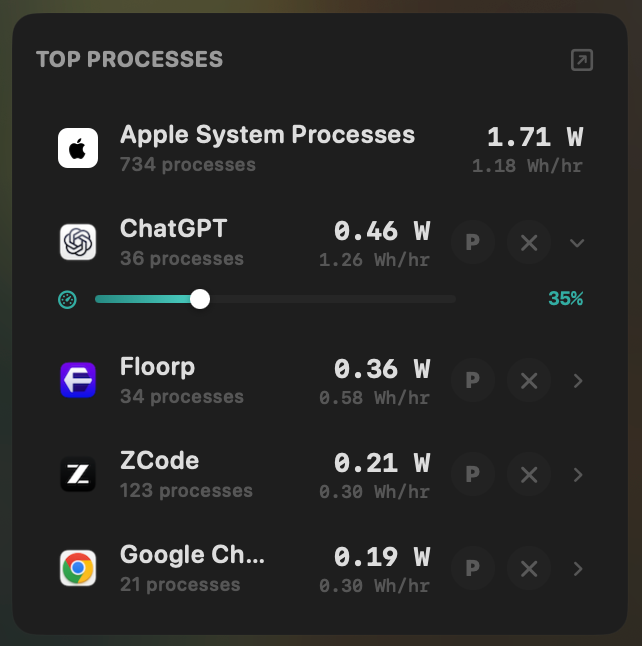
- Yes:Live per-app power draw · Process-level, real-time
- Yes:Hidden-workload detection · Docker, cloudflared, launchd
- Yes:Per-app CPU throttle · 10% to 100% slider
- Yes:E-core offload · Per-app toggle
- Yes:One-click kill · Runaway apps + subprocesses
FruitJuice- No:Live per-app power draw
- No:Hidden-workload detection
- No:Per-app CPU throttle
- No:E-core offload
- No:One-click kill
Seeing where the power goes
FruitJuice tracked time on battery, not watts. MacBookBatteryMonitor shows the live system total in watts, split into CPU+GPU, RAM, display, and USB.
MacBookBatteryMonitorWinner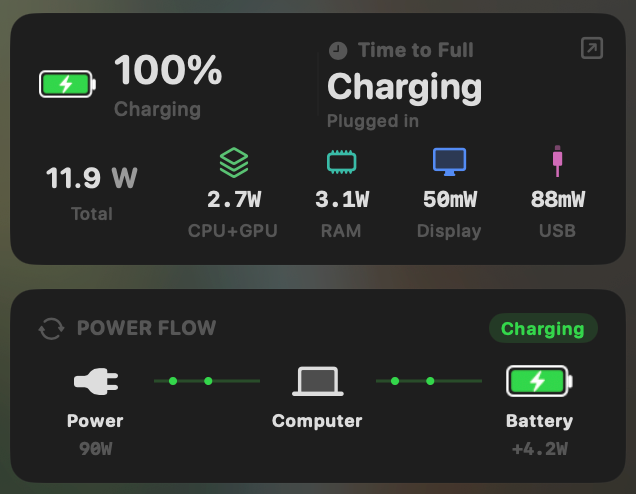
- Yes:System total power draw · Live, in watts
- Yes:Power breakdown by component · CPU / GPU / RAM / Display / USB
FruitJuice- No:System total power draw
- No:Power breakdown by component
Charge limit and Sailing Mode
FruitJuice coached you to unplug for a daily target; it could not limit charging. MacBookBatteryMonitor sets a 50% to 100% charge limit over SMC, sails to it while plugged in, and switches on Low Power Mode by itself.
MacBookBatteryMonitorWinner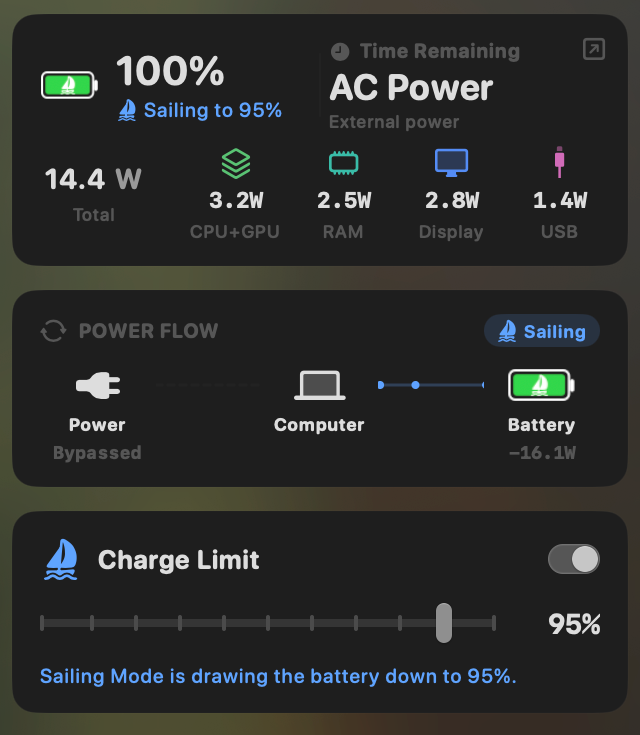
- Yes:Charge limit · 50% to 100% via SMC
- Yes:Sailing mode · Discharge while plugged in
- Yes:Low Power Mode automation · Auto below a threshold
FruitJuice- No:Charge limit
- No:Sailing mode
- No:Low Power Mode automation
Battery health
FruitJuice showed health and cycle count. MacBookBatteryMonitor adds temperature, the design cycle limit, and a condition label.
MacBookBatteryMonitorWinner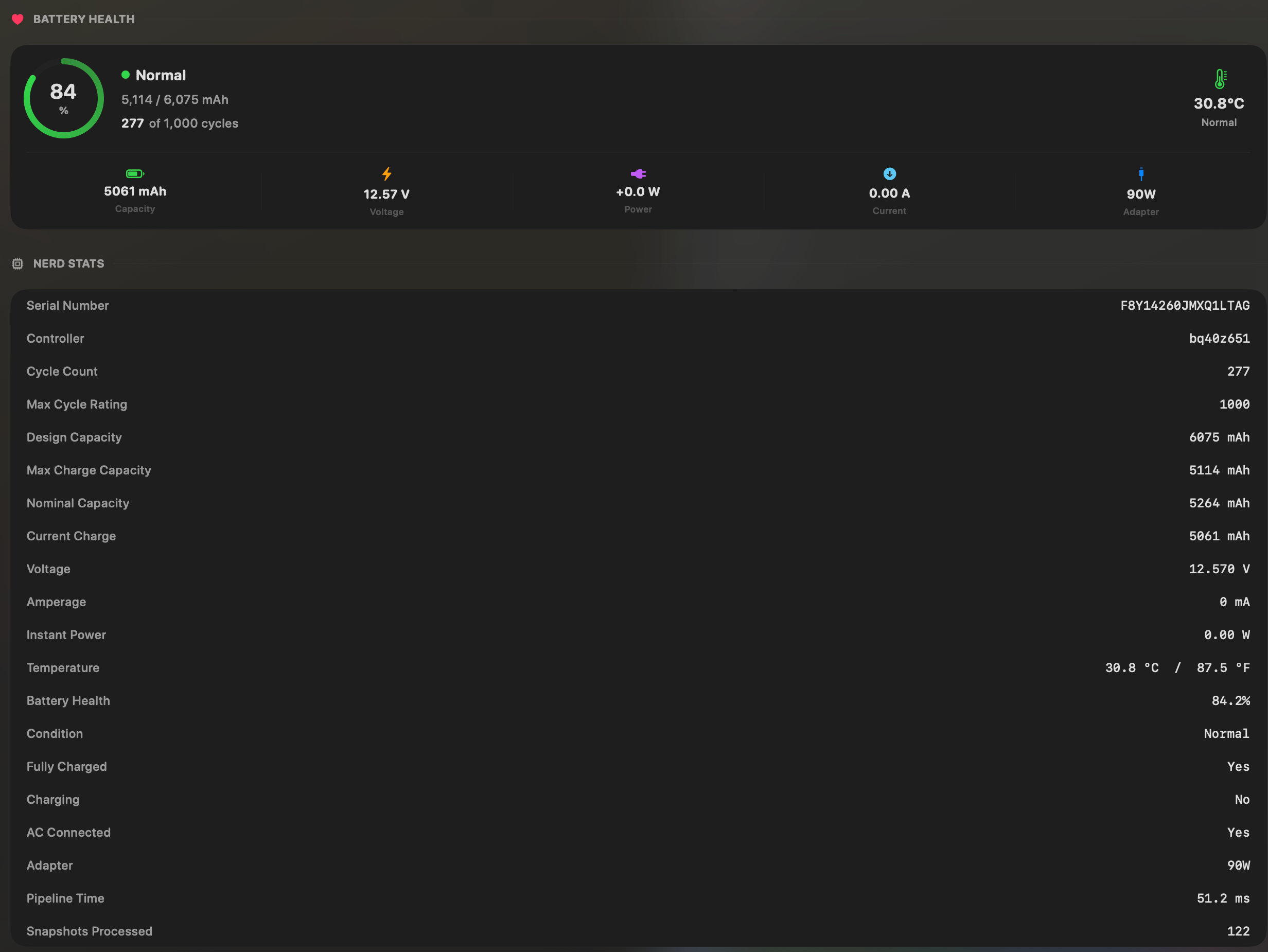
- Yes:Battery health % · Health % + condition label
- Yes:Cycle count · Cycles + design cycle count
- Yes:Battery temperature · °C / °F with status label
FruitJuice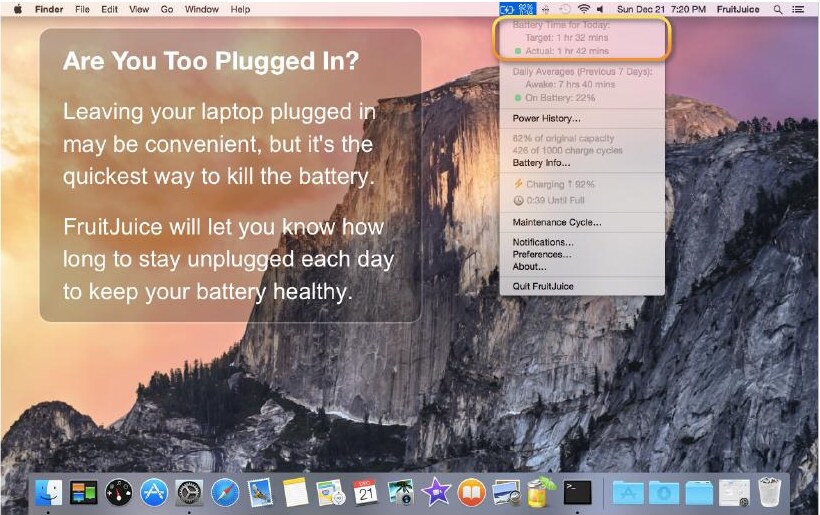
- Yes:Battery health %
- Yes:Cycle count
- No:Battery temperature
Menu bar and history
Both are menu bar apps with history. FruitJuice's Power History graphed daily on-battery time. MacBookBatteryMonitor graphs battery level and per-app energy from 1 hour to 7 days.
MacBookBatteryMonitorDraw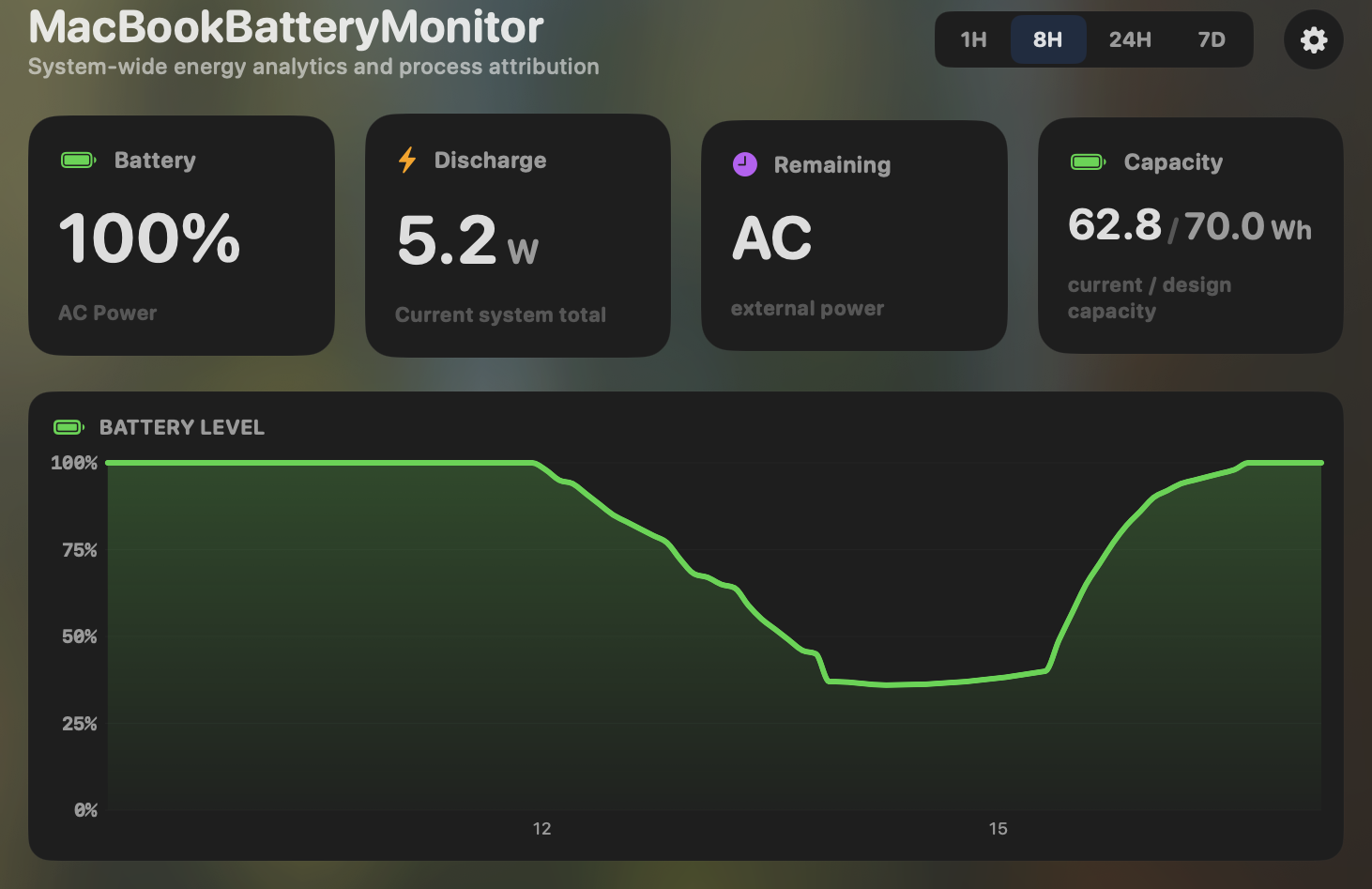
- Yes:Menu-bar first · Native, configurable icon
- Yes:History charts · 6h / 24h / 7d + per-app
FruitJuiceDraw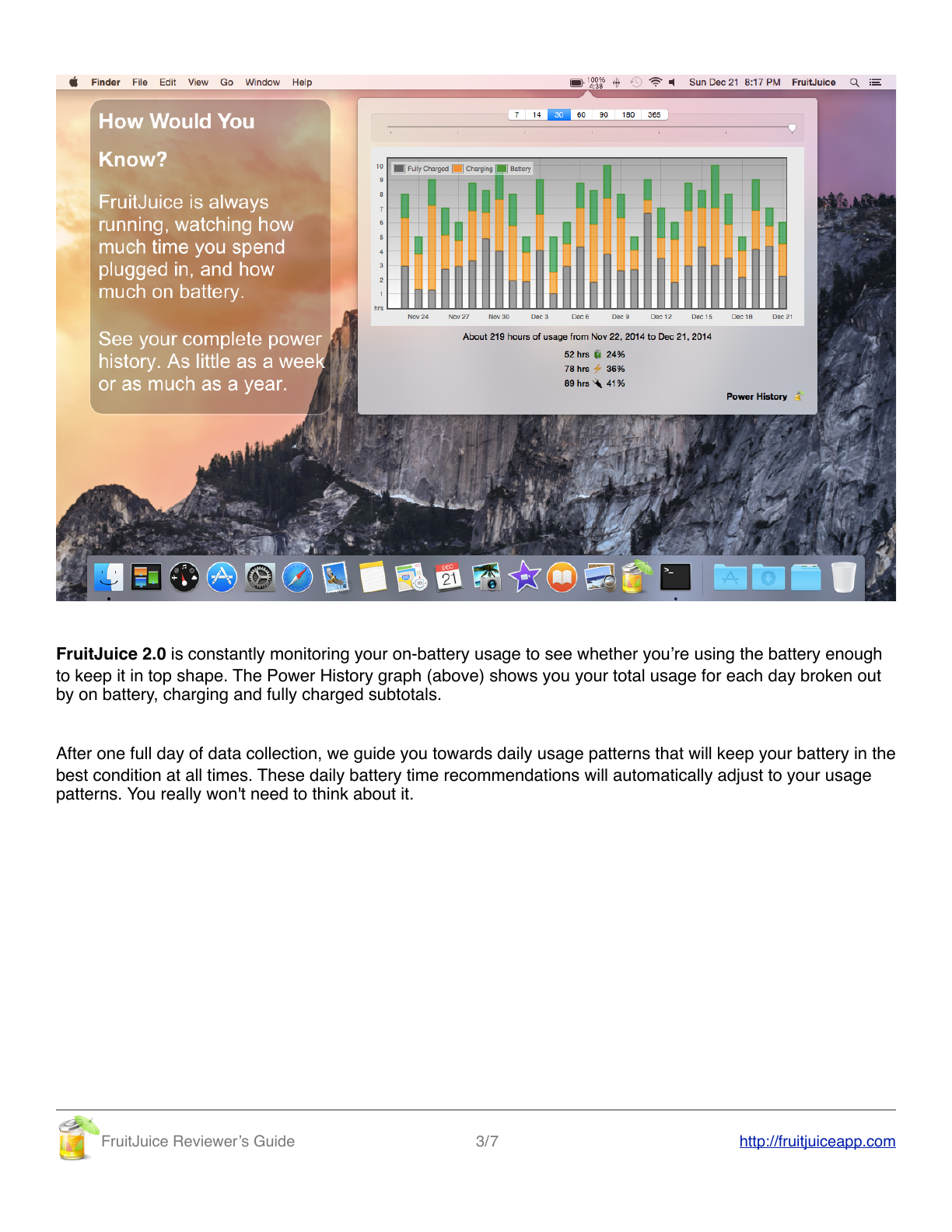
- Yes:Menu-bar first
- Yes:History charts · Daily on-battery totals
Feature comparison
 MacBookBatteryMonitor
Why consider MacBookBatteryMonitor
See the drain, then do something about it
FruitJuice is discontinued. MacBookBatteryMonitor is maintained, Apple-Silicon-native, and adds per-app watts, charge control, and per-app actions.
What FruitJuice does
fruitjuice, by Battery Project LLC, was a $9.99 menu-bar app whose central idea was coaching you to use your battery enough. It set an adaptive daily time-on-battery target and nudged you to hit it, and it ran guided maintenance and calibration cycles when your usage was low. It showed health as a percentage of factory capacity, cycle count, and a daily power history graph broken into on-battery, charging, and fully-charged time. It was genuinely original for its era, which was the early built-in-battery MacBook period when periodic discharge and calibration mattered. On April 22, 2022 the developers announced they could no longer sustain development. Email support ended that December. The last version is 2.5.3 from early 2022, never updated for macOS past Big Sur, and it is no longer available for purchase. The website is still up but its goodbye post has been injected with SEO spam. As a standalone app it keeps running until Apple breaks it. It never had per-app power draw, charge limiting, Sailing Mode, or Low Power Mode, because all of those postdate its active development.
What MacBookBatteryMonitor does
MacBookBatteryMonitor is what you would build today if you started fresh. It shows real per-app power draw in watts, a component breakdown, hidden drain from Docker, cloudflared, and launchd, battery health and cycle count against the design limit, and the modern control layer fruitjuice never had: a 50% to 100% charge limit over SMC, Sailing Mode, automated Low Power Mode, and per-app actions including a CPU throttle, an E-core offload toggle, and a one-click kill. It is actively developed, Apple-Silicon-native, and actually available to buy.
Which one should you pick?
If you are reading this because fruitjuice stopped working or you cannot buy it, MacBookBatteryMonitor is the modern successor for people who cared about their battery. It does not replicate the daily-habit coaching, which was fruitjuice’s original idea, because that idea is largely obsolete on Apple Silicon where periodic calibration matters less. It does everything fruitjuice did telemetry-wise, plus everything that has been invented since.
Related guides
Frequently asked questions
Can you still buy fruitjuice?
No. Battery Project LLC discontinued it on April 22, 2022, and it is no longer available for purchase. Prior owners can re-download it, but it has not been updated since version 2.5.3 in early 2022 and was never updated for macOS past Big Sur.
Does fruitjuice still work on current macOS?
It runs until Apple breaks it, which is not a reliable foundation. It targets Big Sur and has had no updates for Monterey, Ventura, Sonoma, Sequoia, or Tahoe. If you need a battery app that actually works on a current Mac, you need a currently maintained one.
Did fruitjuice have charge limiting or per-app power draw?
No. Those features postdate its active development. fruitjuice was a habit-coaching and health-stats app. It could not limit charging, could not sail, and could not attribute drain to specific apps.
Sources
Feature and pricing claims on this page come from FruitJuice’s own documentation and Apple’s published guidance.