Comparison
TG Pro vs MacBookBatteryMonitor
TG Pro is a thermal and fan-control app. It reads battery temperature among dozens of other sensors. Here is how it compares with a dedicated battery tool.
 vs
vs
Price
In US dollars.
MacBookBatteryMonitor10% lessTG ProSide by side
Finding the app that is draining the battery, and stopping it
TG Pro has no process view. MacBookBatteryMonitor ranks every running app by watts, flags hidden workloads, and puts a CPU cap, an E-core offload toggle, and a kill button on each row.
MacBookBatteryMonitorWinner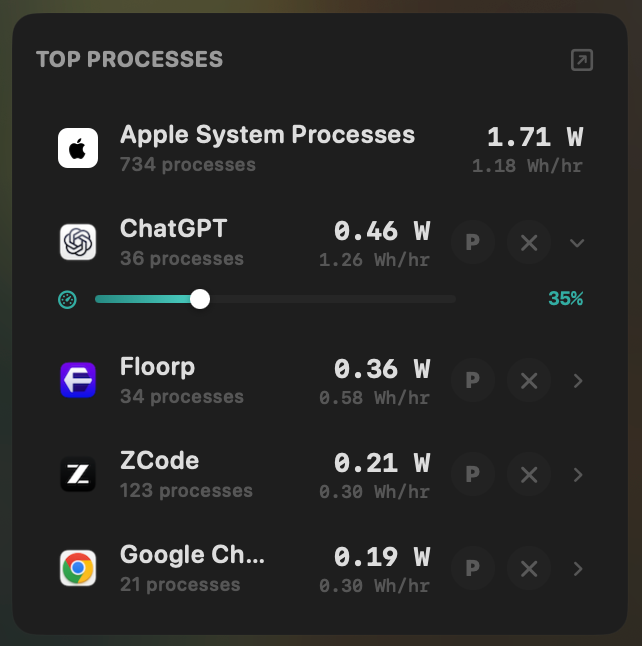
- Yes:Live per-app power draw · Process-level, real-time
- Yes:Hidden-workload detection · Docker, cloudflared, launchd
- Yes:Per-app CPU throttle · 10% to 100% slider
- Yes:E-core offload · Per-app toggle
- Yes:One-click kill · Runaway apps + subprocesses
TG Pro- No:Live per-app power draw
- No:Hidden-workload detection
- No:Per-app CPU throttle
- No:E-core offload
- No:One-click kill
Seeing where the power goes
TG Pro reads temperatures and fan speeds, not power. MacBookBatteryMonitor shows the live system total in watts, split into CPU+GPU, RAM, display, and USB.
MacBookBatteryMonitorWinner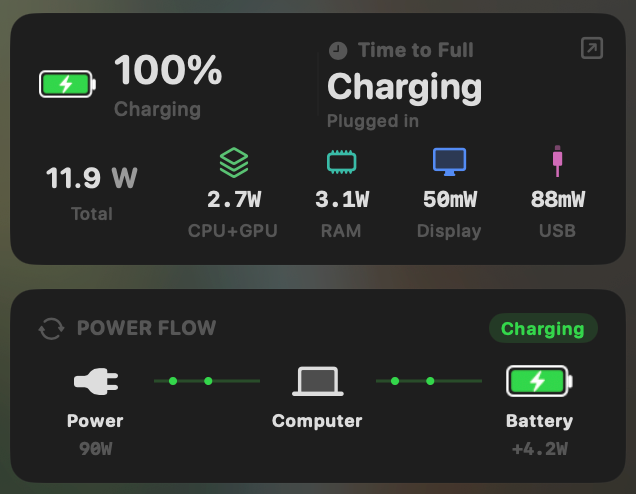
- Yes:System total power draw · Live, in watts
- Yes:Power breakdown by component · CPU / GPU / RAM / Display / USB
TG Pro- No:System total power draw
- No:Power breakdown by component
Charge limit and Sailing Mode
TG Pro has no charge control. MacBookBatteryMonitor sets a 50% to 100% charge limit over SMC, sails to it while plugged in, and switches on Low Power Mode by itself.
MacBookBatteryMonitorWinner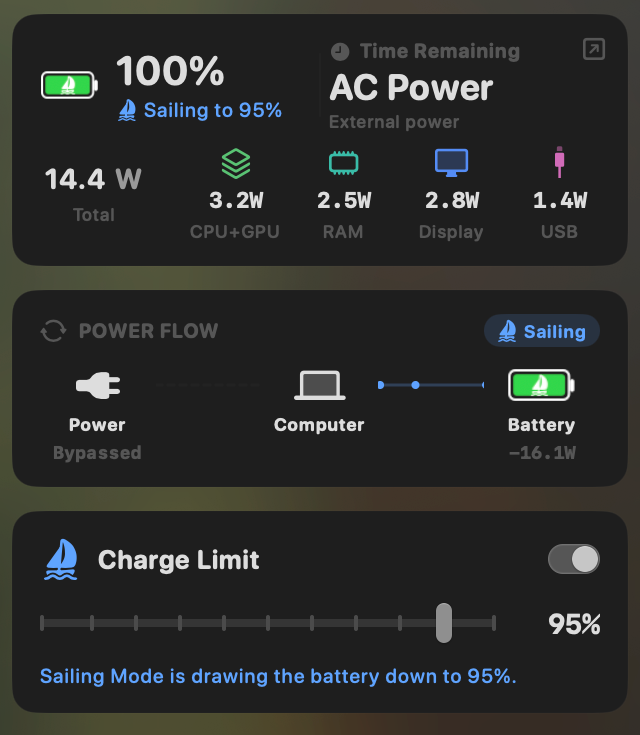
- Yes:Charge limit · 50% to 100% via SMC
- Yes:Sailing mode · Discharge while plugged in
- Yes:Low Power Mode automation · Auto below a threshold
TG Pro- No:Charge limit
- No:Sailing mode
- No:Low Power Mode automation
Battery health
TG Pro shows cycle count, a Good / Fair / Poor condition, and the full sensor array including the battery's own temperature sensors. MacBookBatteryMonitor shows health as a percentage with cycles against the design limit.
MacBookBatteryMonitorWinner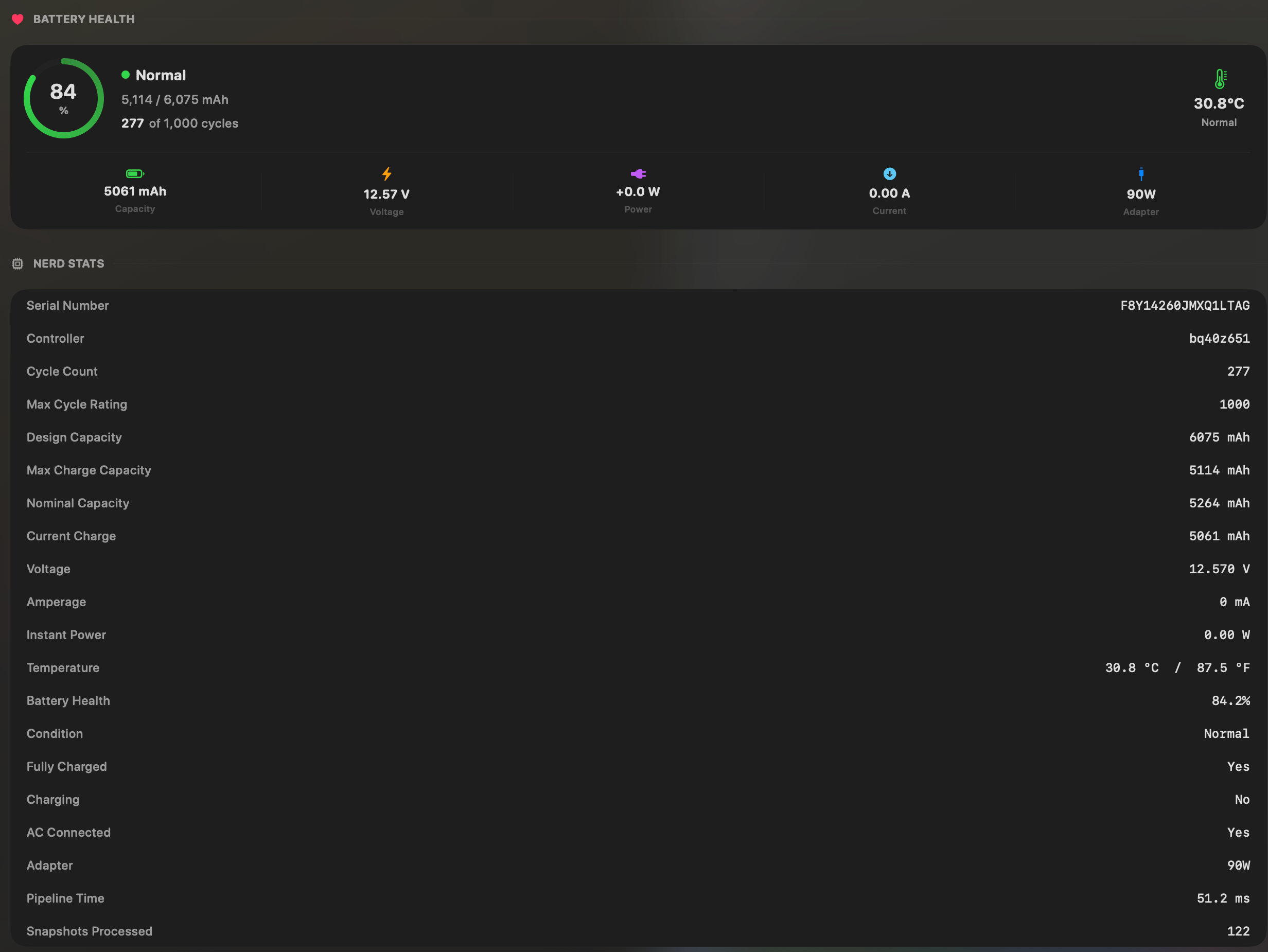
- Yes:Battery health % · Health % + condition label
- Yes:Cycle count · Cycles + design cycle count
- Yes:Battery temperature · °C / °F with status label
TG Pro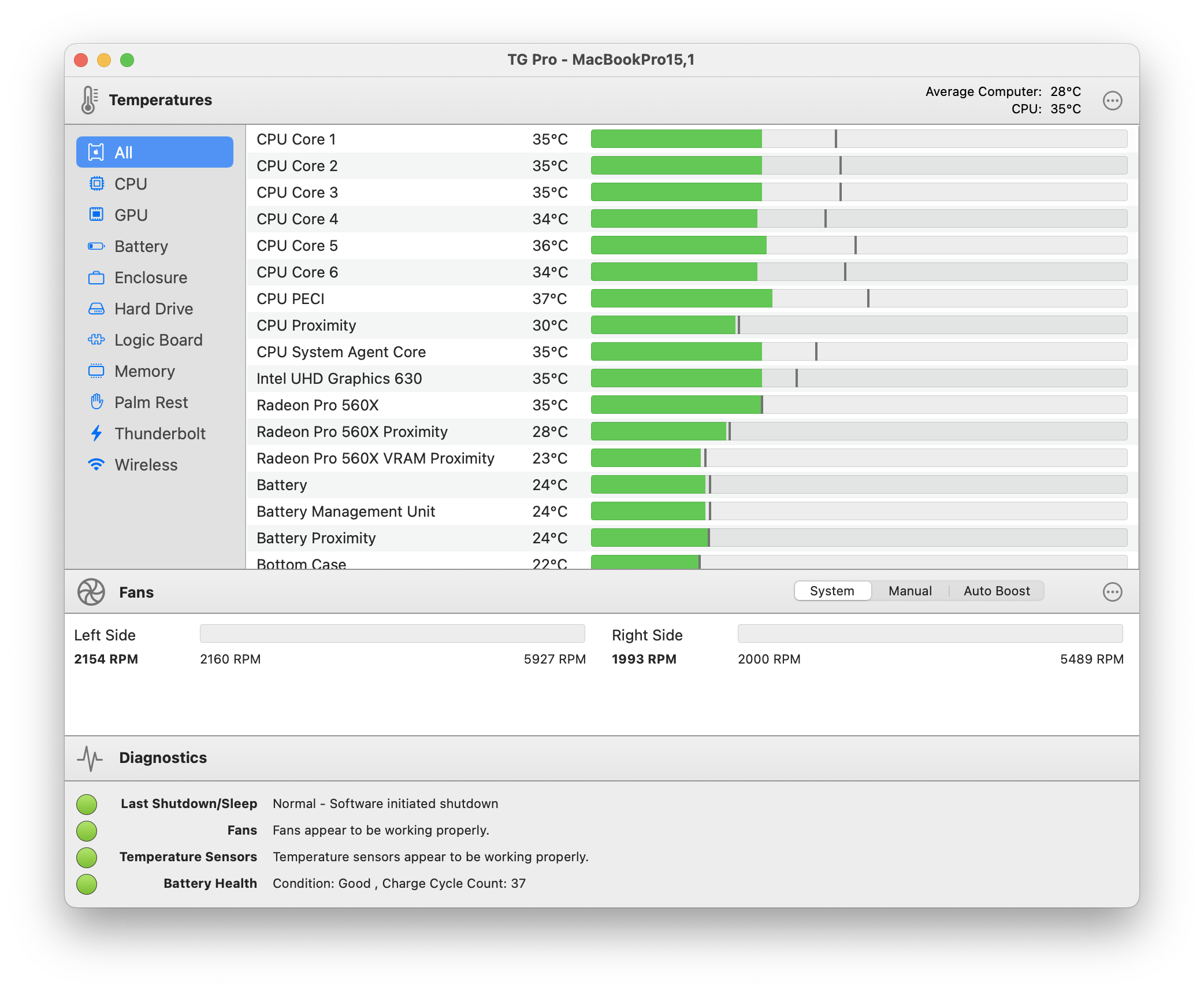
- Partial:Battery health % · Good / Fair / Poor only
- Yes:Cycle count
- Yes:Battery temperature · Full sensor array + fans
Menu bar and history
Both live in the menu bar. TG Pro logs temperatures and fans to CSV. MacBookBatteryMonitor keeps battery level and per-app energy history from 1 hour to 7 days.
MacBookBatteryMonitorWinner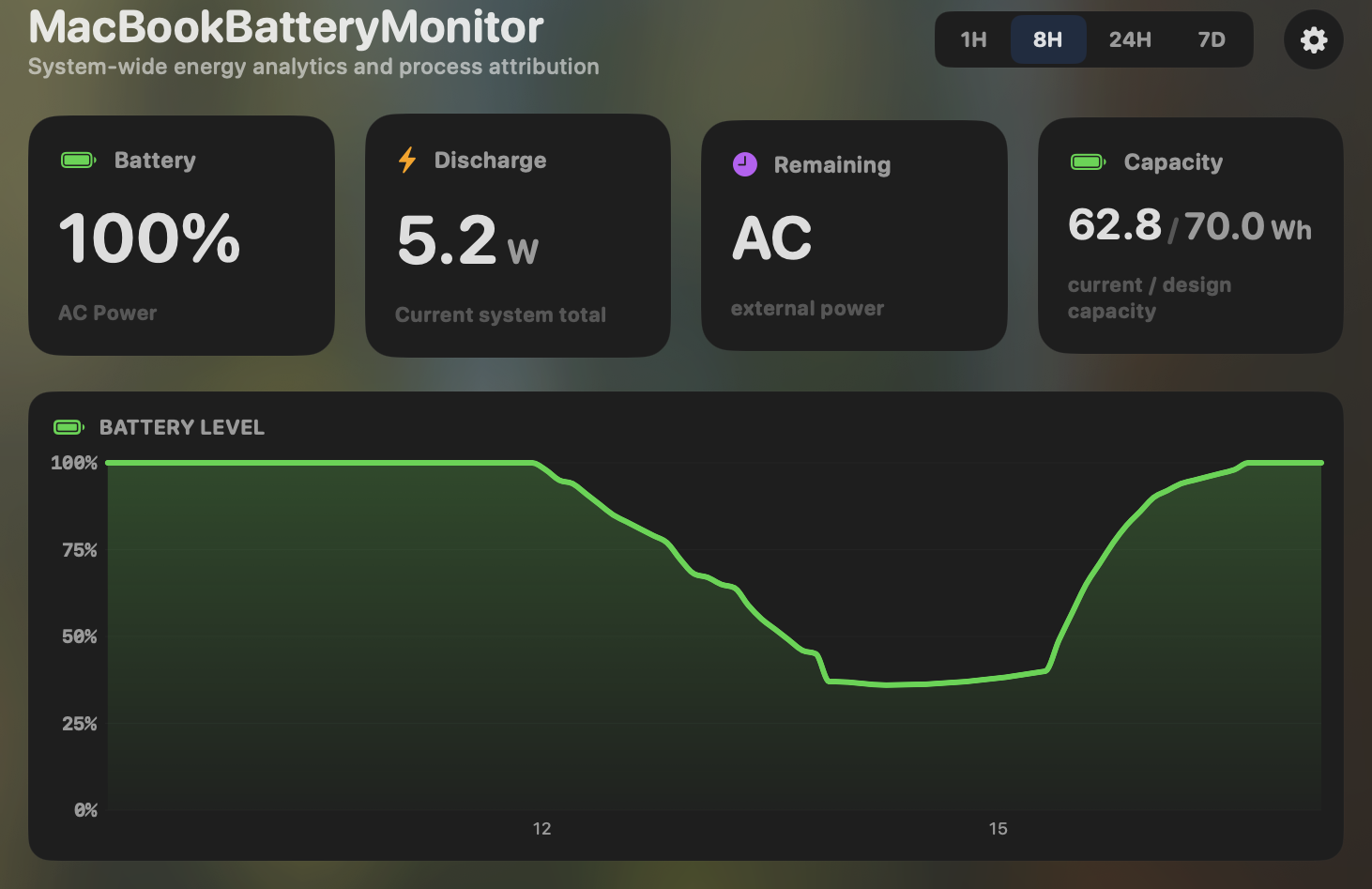
- Yes:Menu-bar first · Native, configurable icon
- Yes:History charts · 6h / 24h / 7d + per-app
TG Pro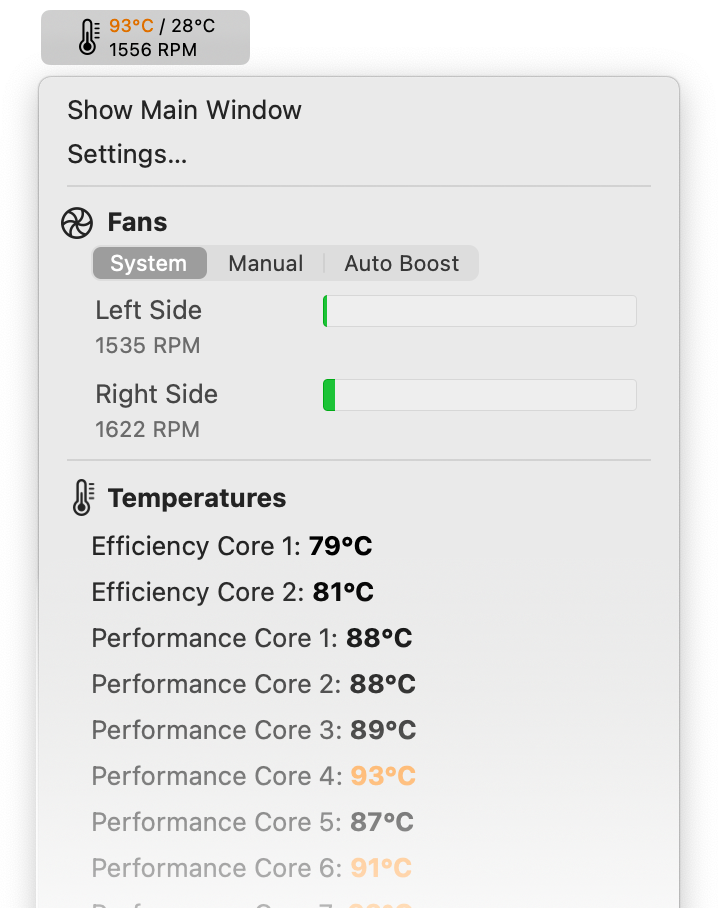
- Yes:Menu-bar first
- Partial:History charts · CSV temp/fan logs
Feature comparison
 MacBookBatteryMonitor
Why consider MacBookBatteryMonitor
See the drain, then do something about it
TG Pro watches temperatures and fans. MacBookBatteryMonitor watches battery drain, per app, and gives you charge control and per-app actions.
What TG Pro does
TG Pro, by Tunabelly Software, is a thermal-management and fan-control utility. Its strength is breadth: it reads CPU temperatures per core on Apple Silicon, GPU and eGPU temperatures, SMART drive temperatures, logic board, trackpad, power, battery, WiFi chip, airflow, Thunderbolt ports, case, and memory sensors, and it logs the max temperature per sensor. Its fan control is full manual, max, and rule-based Auto Boost with custom curves keyed to any sensor. For battery it shows a Good, Fair, or Poor condition label, cycle count, and temperature, plus diagnostics for power supply and irregular shutdowns, with local and email alerts. It has the broadest platform reach in this list, running from macOS 10.13 High Sierra through macOS 26 Tahoe, on Intel Macs back to 2008, Apple Silicon, and even Hackintosh. Version 2.103 is current, and one $10 to $20 license covers three Macs. What it does not have is any power-draw monitoring or battery control. No per-app watts, no charge limiting, no Sailing Mode, and no process management. It is a thermal tool that happens to see the battery.
What MacBookBatteryMonitor does
MacBookBatteryMonitor is the inverse focus. It does not read system sensors or control fans. What it does is show real per-app power draw in watts, a component breakdown (CPU, GPU, RAM, display, USB), hidden drain from Docker, cloudflared, and launchd, a precise battery health percentage rather than a three-level label, and cycle count against the design limit. It adds the controls TG Pro lacks: a 50% to 100% charge limit over SMC, Sailing Mode, automated Low Power Mode, and per-app actions including a CPU throttle, an E-core offload toggle, and a one-click kill. It is Apple-Silicon-only on macOS 14.6 and up.
Which one should you pick?
TG Pro is the correct choice if your problem is heat or fan noise. It is the category leader for sensors and cooling, it covers far more hardware, and it is cheap. MacBookBatteryMonitor is the correct choice if your problem is battery life and longevity, and you need real per-app watts and charge control. Many power users will reasonably own both, because thermal and battery are different problems.
Related guides
Frequently asked questions
Does TG Pro show per-app power draw?
No. TG Pro reads temperatures and controls fans. It has no process-level power attribution, no wattage readouts, and no battery control. For per-app watts you need a battery-focused tool.
Can TG Pro limit charging?
No. TG Pro has no charge limiting, no Sailing Mode, and no Low Power Mode automation. It is read-only on the battery, and only shows a coarse health label rather than a precise percentage.
Should I run TG Pro and MacBookBatteryMonitor together?
If you care about both thermal management and battery, yes. They cover non-overlapping ground. TG Pro for sensors and fans, MacBookBatteryMonitor for battery and power draw.
Sources
Feature and pricing claims on this page come from TG Pro’s own documentation and Apple’s published guidance.