Comparison
AirBuddy vs MacBookBatteryMonitor
AirBuddy and MacBookBatteryMonitor solve different problems that share the word "battery". AirBuddy is about your other devices. MacBookBatteryMonitor is about your Mac. Here is the split.
 vs
vs
Price
In US dollars.
MacBookBatteryMonitor55% lessAirBuddySide by side
Finding the app that is draining the battery, and stopping it
AirBuddy has no process view. MacBookBatteryMonitor ranks every running app by watts, flags hidden workloads, and puts a CPU cap, an E-core offload toggle, and a kill button on each row.
MacBookBatteryMonitorWinner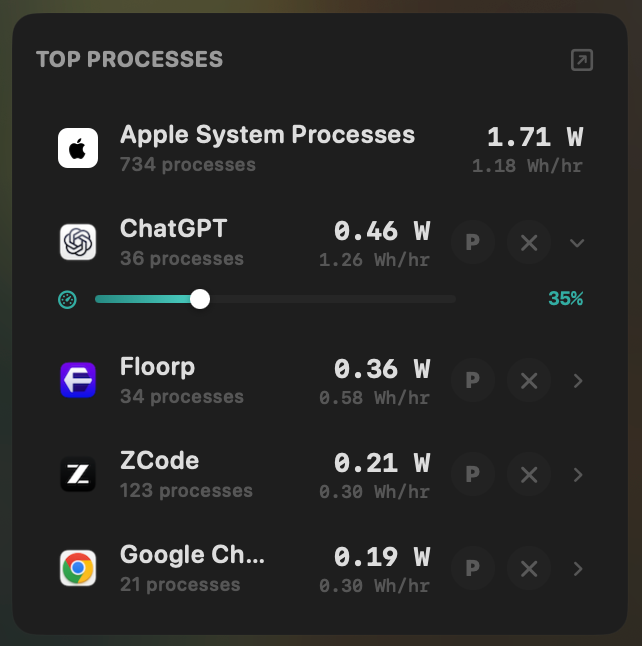
- Yes:Live per-app power draw · Process-level, real-time
- Yes:Hidden-workload detection · Docker, cloudflared, launchd
- Yes:Per-app CPU throttle · 10% to 100% slider
- Yes:E-core offload · Per-app toggle
- Yes:One-click kill · Runaway apps + subprocesses
AirBuddy- No:Live per-app power draw
- No:Hidden-workload detection
- No:Per-app CPU throttle
- No:E-core offload
- No:One-click kill
Seeing where the power goes
AirBuddy shows the Mac's battery percentage as one device in its list. MacBookBatteryMonitor shows the live system total in watts, split into CPU+GPU, RAM, display, and USB.
MacBookBatteryMonitorWinner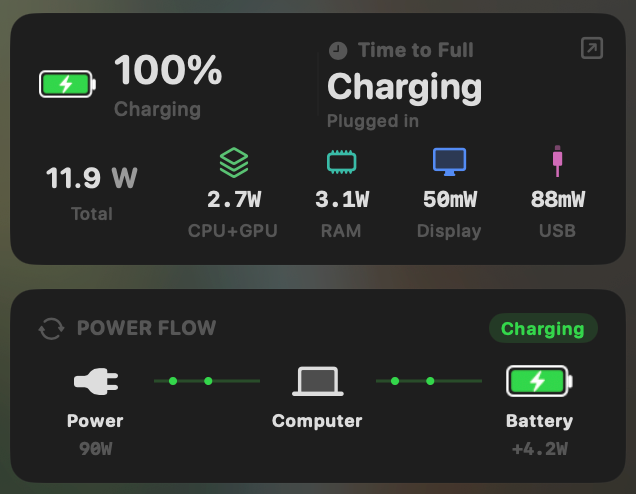
- Yes:System total power draw · Live, in watts
- Yes:Power breakdown by component · CPU / GPU / RAM / Display / USB
AirBuddy- No:System total power draw
- No:Power breakdown by component
Charge limit and Sailing Mode
AirBuddy has no charge control. MacBookBatteryMonitor sets a 50% to 100% charge limit over SMC, sails to it while plugged in, and switches on Low Power Mode by itself.
MacBookBatteryMonitorWinner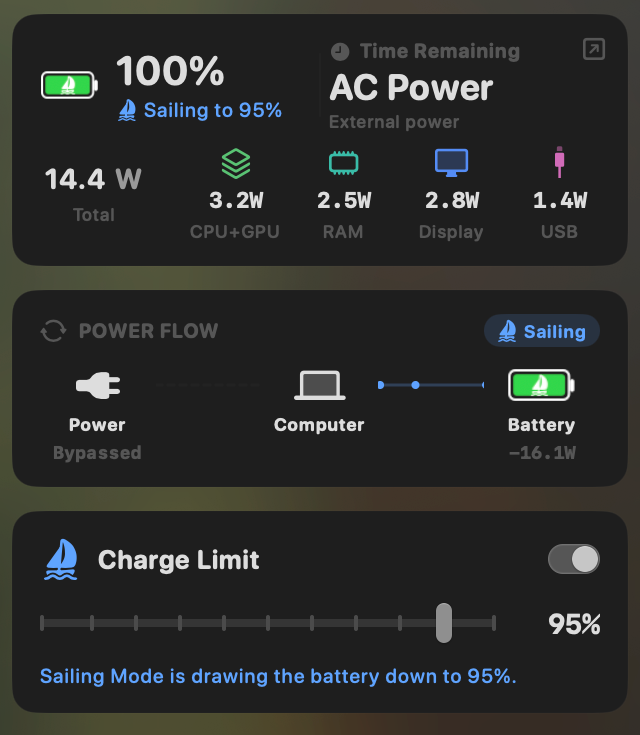
- Yes:Charge limit · 50% to 100% via SMC
- Yes:Sailing mode · Discharge while plugged in
- Yes:Low Power Mode automation · Auto below a threshold
AirBuddy- No:Charge limit
- No:Sailing mode
- No:Low Power Mode automation
Battery health
AirBuddy shows no Mac battery health, cycle count, or temperature. MacBookBatteryMonitor shows all three, with cycles against the design limit and a condition label.
MacBookBatteryMonitorWinner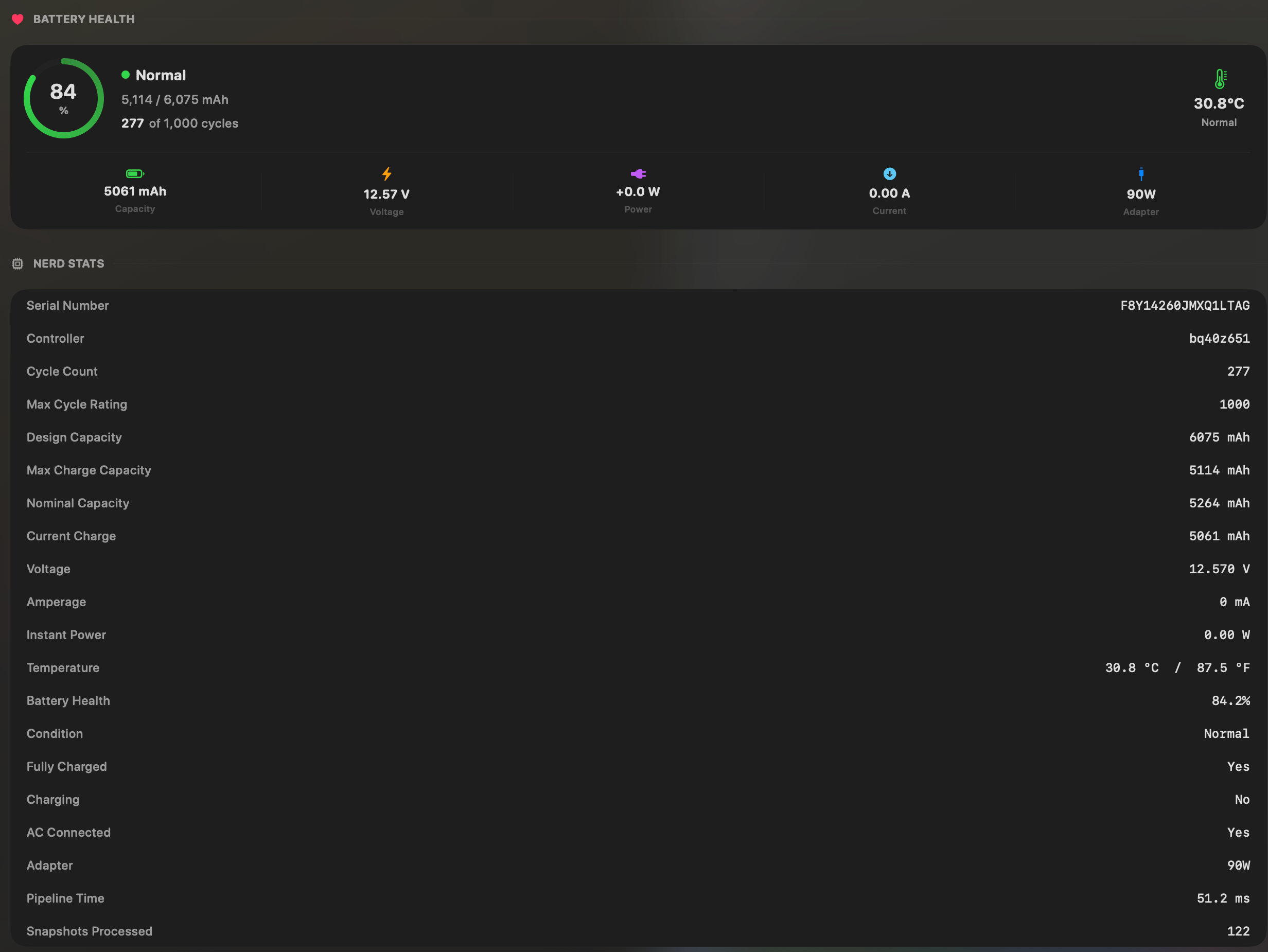
- Yes:Battery health % · Health % + condition label
- Yes:Cycle count · Cycles + design cycle count
- Yes:Battery temperature · °C / °F with status label
AirBuddy- No:Battery health %
- No:Cycle count
- No:Battery temperature
Menu bar and history
Both live in the menu bar. AirBuddy's list is AirPods, iPhone, iPad, Apple Watch, and Magic peripherals, with the Mac as one row. MacBookBatteryMonitor is Mac-only and keeps a battery level history from 1 hour to 7 days.
MacBookBatteryMonitorWinner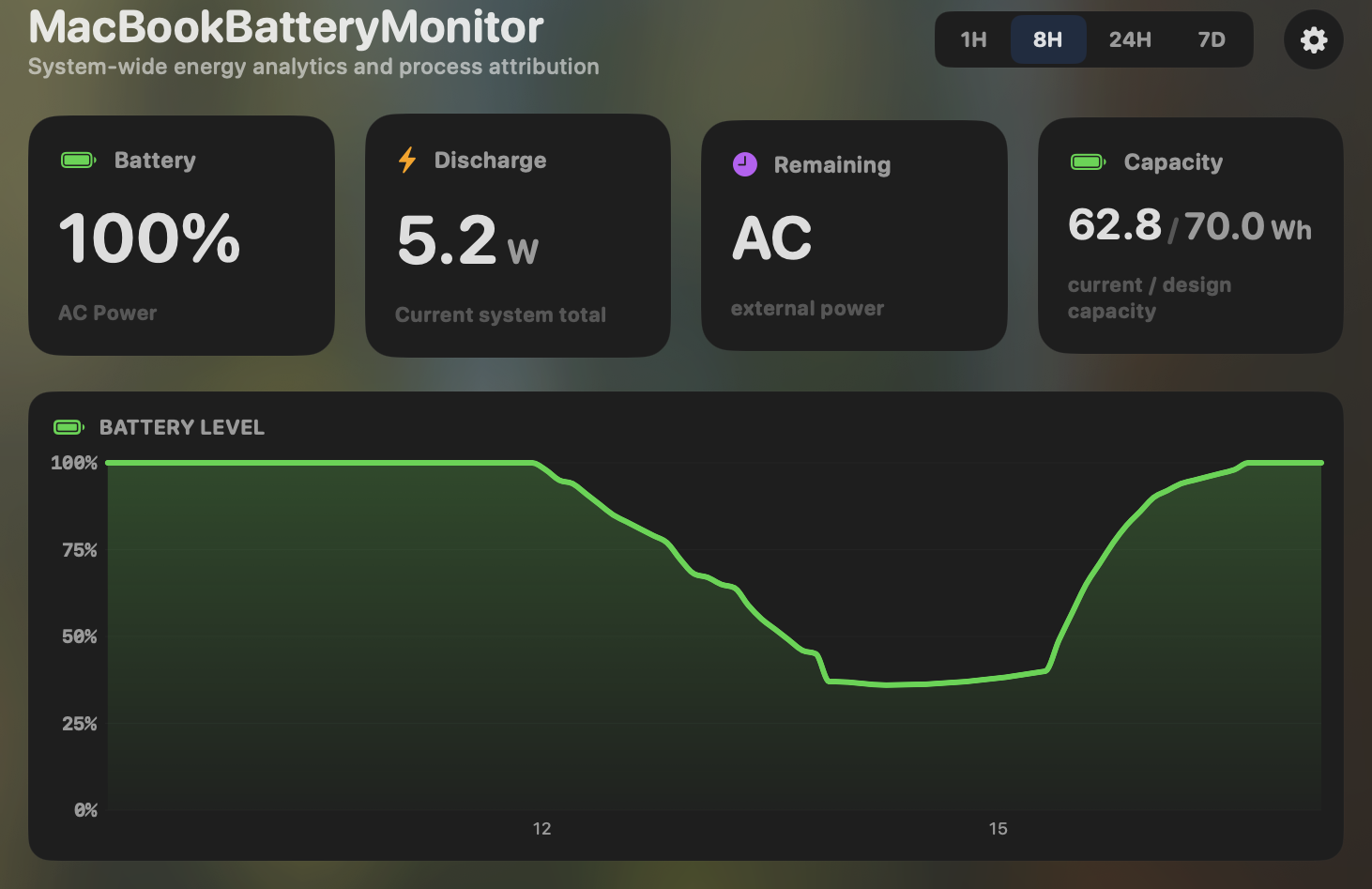
- Yes:Menu-bar first · Native, configurable icon
- Yes:History charts · 6h / 24h / 7d + per-app
AirBuddy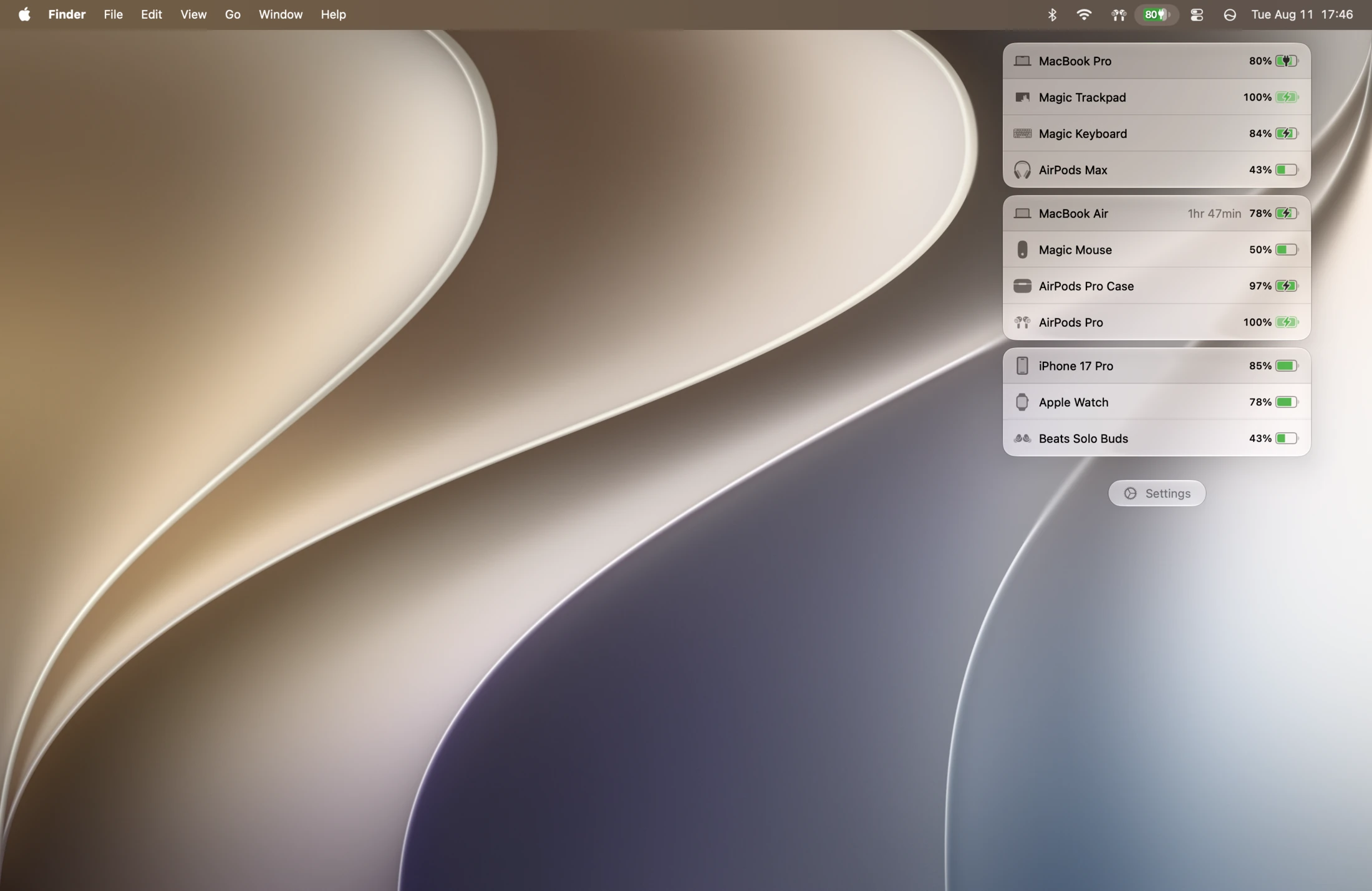
- Yes:Menu-bar first · Accessory focus
- No:History charts
Feature comparison
 MacBookBatteryMonitor
Why consider MacBookBatteryMonitor
See the drain, then do something about it
AirBuddy tracks your accessories' batteries. MacBookBatteryMonitor tracks the MacBook's: per-app watts, health, charge control, and per-app actions.
What AirBuddy does
AirBuddy, by Sam Eckert, brings the iOS-style battery popup to the Mac. Open your AirPods case near your Mac and you get the native-looking battery sheet. Beyond AirPods, it tracks Beats, iPhone, iPad, Apple Watch, Magic Mouse, Magic Keyboard, Magic Trackpad, and other nearby Macs, in one ranked menu-bar list with per-device low-battery alerts that sync across machines. It can toggle AirPods listening modes, auto-connect them, and hand Magic peripherals between Macs with one click. It shows the MacBook’s battery percentage as one device in that list, and nothing more about the Mac: no health, no cycle count, no per-app draw, no charge control. It runs on macOS 10.14.6 and up on any Mac with Bluetooth Low Energy, Intel and Apple Silicon, and costs roughly $9.99 to $12.99 one-time with paid major-version upgrades. It is the category leader for accessory battery status.
What MacBookBatteryMonitor does
MacBookBatteryMonitor does not touch AirPods, iPhone, iPad, or accessories. Its entire focus is the MacBook battery itself. It shows real per-app power draw in watts, a component breakdown, battery health and cycle count against the design limit, hidden drain from Docker, cloudflared, and launchd, a 50% to 100% charge limit, Sailing Mode, automated Low Power Mode, and per-app actions including a CPU throttle, an E-core offload toggle, and a one-click kill. It is Apple-Silicon-only on macOS 14.6 and up, and a one-time purchase.
Which one should you pick?
These apps are not really competitors. AirBuddy is the right choice, and genuinely the best choice, if you want to see and manage your AirPods, iPhone, iPad, and accessory batteries from your Mac. MacBookBatteryMonitor is the right choice if you want to understand and manage your MacBook battery specifically. If you care about both, they complement each other rather than replace each other.
Related guides
Frequently asked questions
Does AirBuddy show MacBook battery health or cycle count?
No. AirBuddy shows the MacBook’s charge percentage as one device in its menu-bar list. It has no health percentage, no cycle count, no per-app power, and no charge control for the Mac itself. Its focus is accessories.
Can MacBookBatteryMonitor track my AirPods or iPhone?
No. MacBookBatteryMonitor is entirely about the MacBook battery. If you want accessory and iOS device battery status, AirBuddy is the right tool for that job.
Should I run both?
If you care about both your AirPods and your MacBook battery, yes. They cover non-overlapping ground. AirBuddy for accessories, MacBookBatteryMonitor for the Mac.
Sources
Feature and pricing claims on this page come from AirBuddy’s own documentation and Apple’s published guidance.