This is the story behind the MacBook battery monitor.
About
What Is MacBookBatteryMonitor and Why Does It Exist?
- Published
- Last edited
MacBookBatteryMonitor is a native menu-bar app that turns battery drain into numbers you can inspect and controls you can use: total watts, component power, per-app watts and watt-hours, battery health and history, charge limits, Low Power Mode automation, and per-app power controls.
Who it is for: MacBookBatteryMonitor is for people who want to connect three questions: how much power the Mac is using now, which apps account for that use, and what they can change without opening several macOS utilities.
Why another MacBook battery app exists
A falling battery percentage does not tell you whether the battery stores less energy than it once did or whether the Mac is spending energy unusually quickly. Those are separate questions.
Activity Monitor ranks app energy use with Energy Impact. System Settings shows condition, maximum capacity, and whole-Mac usage history. Both are useful. MacBookBatteryMonitor connects the battery, current workload, charging state, and controls in one menu-bar workflow.
1. See total Mac power and its components
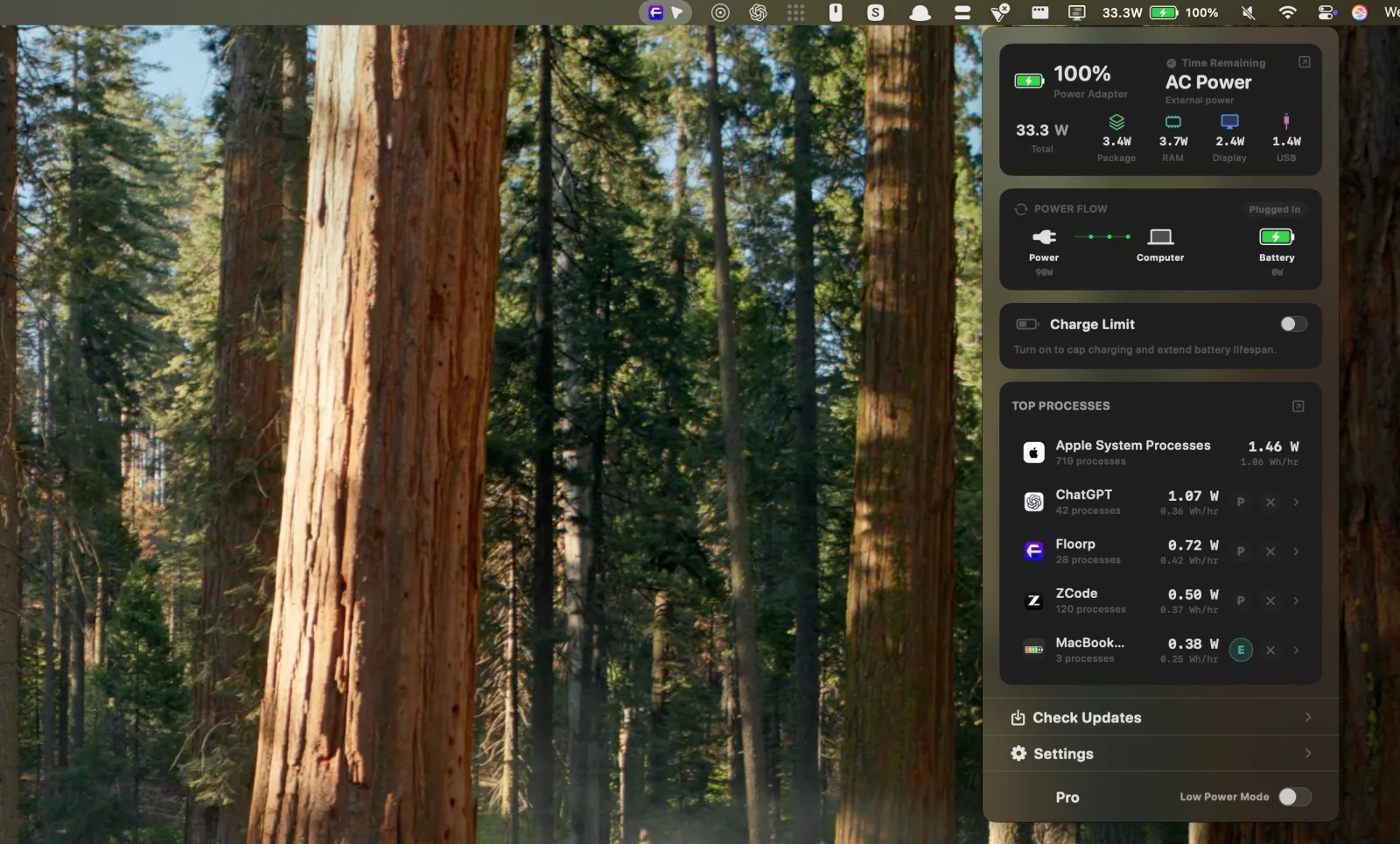
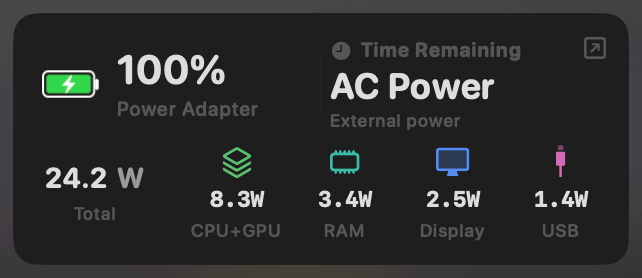
The popover starts with whole-system power in watts. Beside it, the app separates CPU and GPU package power, memory, display, and USB power. This makes a change easier to interpret. Raising display brightness, plugging in a USB device, or starting a heavy task changes a named part of the total instead of only moving a battery percentage.
2. See every app's power use in watts
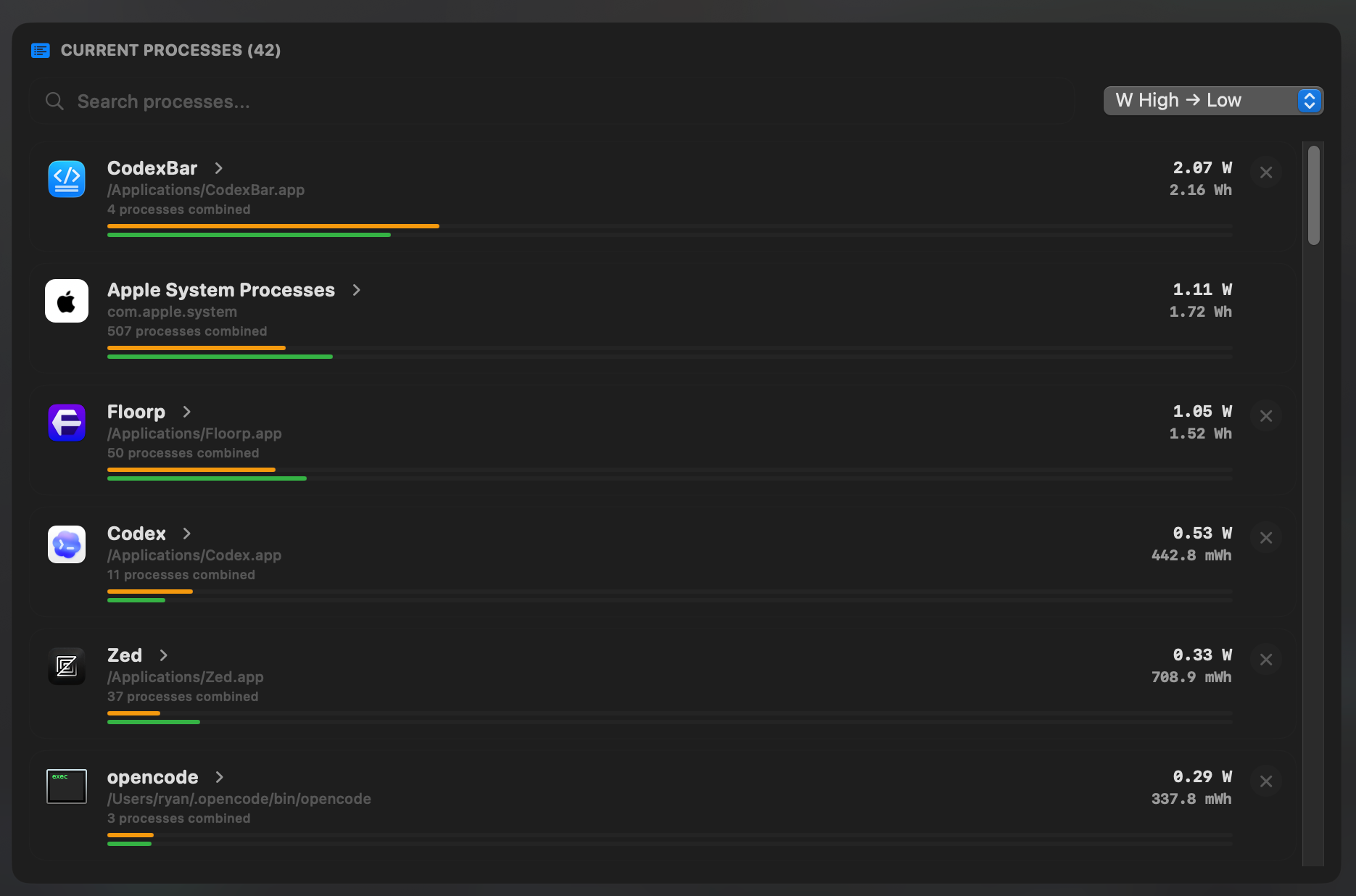
The Current Processes view attributes live watts and accumulated watt-hours to apps and process groups. Related helper processes are grouped under the parent app, which is useful for browsers, developer tools, and desktop apps that run many subprocesses.
Per-app watts are attribution estimates based on the work each process is doing and the Mac's measured power. They are not separate physical sensors attached to every app. The value is that you can compare app activity with the whole-system total in the same unit.
For a side-by-side comparison with Activity Monitor, read MacBookBatteryMonitor vs Activity Monitor.
3. Act on a demanding app
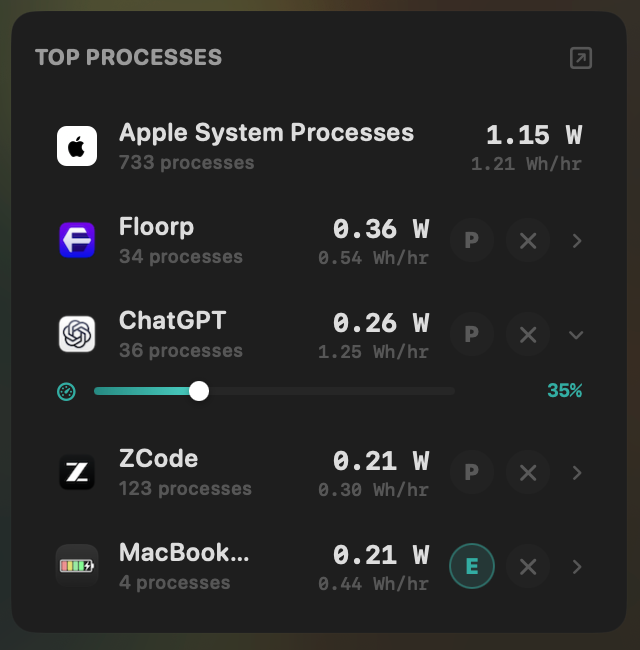
Finding a demanding app is only half the job. For user apps, MacBookBatteryMonitor can quit the app, cap its CPU use from 10% to 100%, or route it to efficiency cores. A background export or development task can keep running at a lower pace instead of being stopped outright.
The controls apply to the selected app and its related processes. Protected macOS processes are excluded, and the app returns to normal when its configured battery conditions no longer apply.
4. See where charging power is going
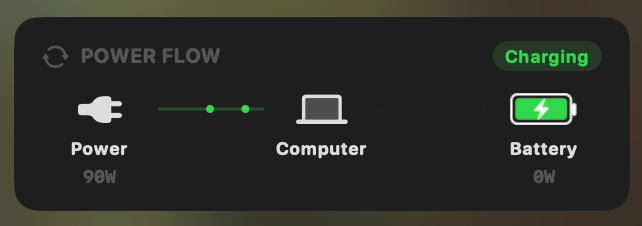
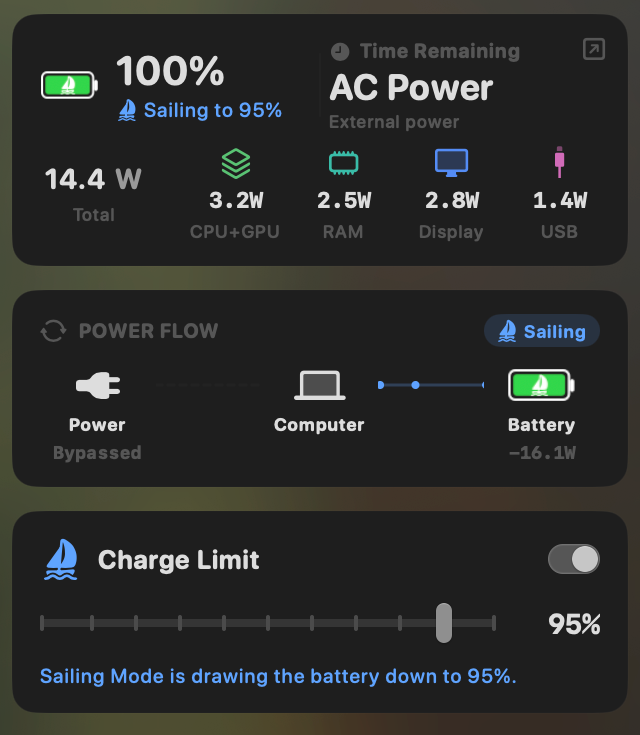
Plugging a MacBook into a 90W adapter does not mean all 90W goes into the battery. The Mac itself consumes part of the incoming power. MacBookBatteryMonitor shows the current flow between the adapter, computer, and battery, then keeps the Mac's own component use beside the total.
5. Set a charge limit and use Sailing Mode
On supported Apple Silicon Macs, Charge Limit accepts a target from 50% to 100%. When the battery is already above that target, Sailing Mode can draw it down while the Mac stays plugged in. The power-flow diagram shows when the adapter is bypassed and the battery is moving toward the selected level. To compare this with other charge limiters, see the best Mac charge limiter apps.
6. Automate Low Power Mode
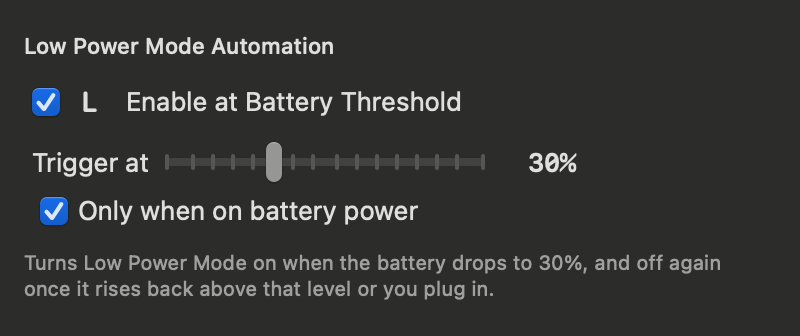
macOS can run in Low Power Mode, but remembering to switch it on is another task. MacBookBatteryMonitor can enable it automatically when the battery reaches a threshold you choose. The policy can run only while the Mac is on battery, then release Low Power Mode after the level rises above the threshold or power is connected.
7. Check battery health and review history
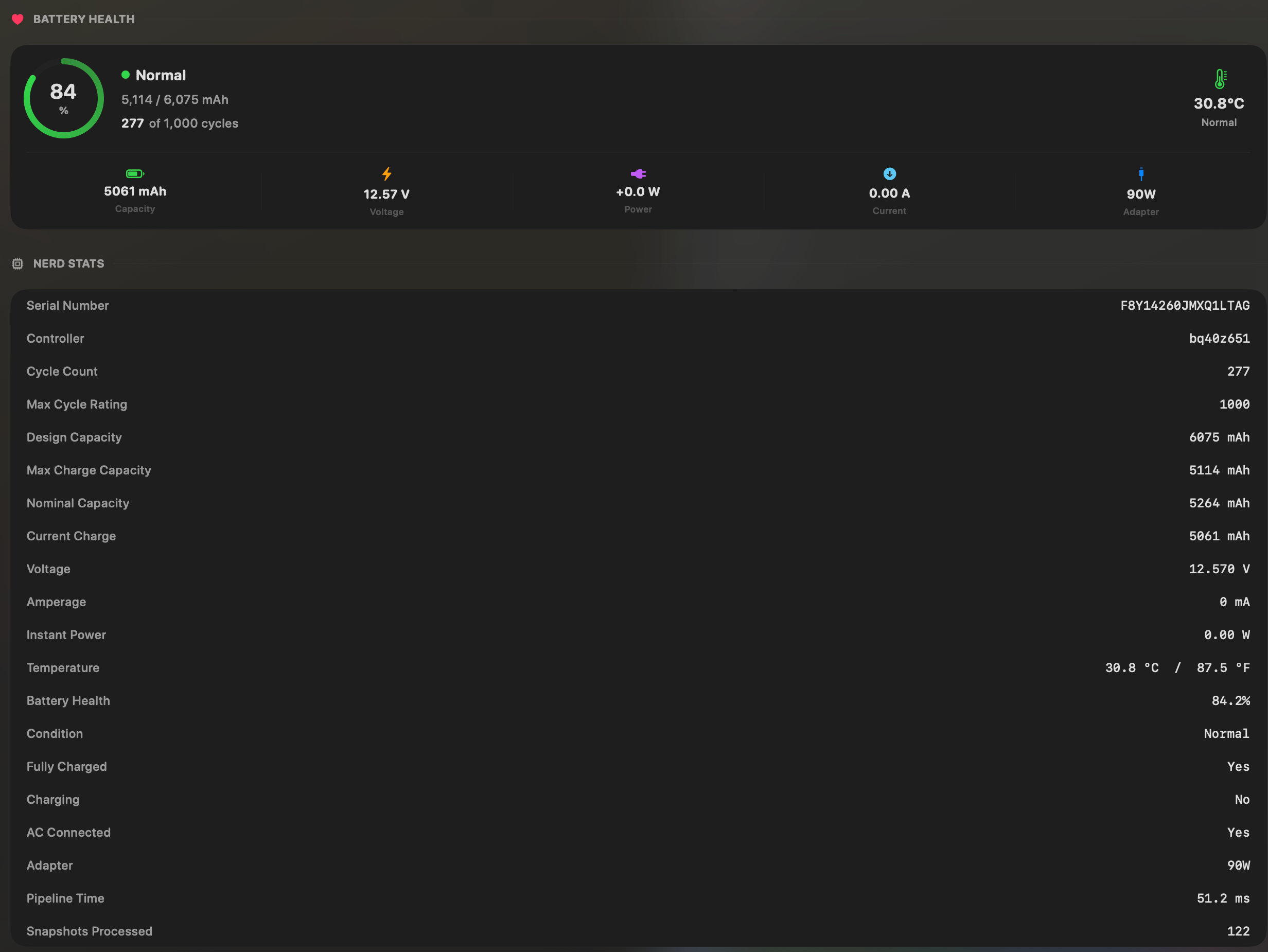
The health view keeps maximum capacity, condition, cycle count, design-cycle rating, temperature, voltage, current, and adapter information together. That separates a battery that stores less energy from a healthy battery powering an expensive workload.
The app also stores whole-system, component, and per-app energy history for up to 30 days. Use current watts to inspect what is happening now, then use history to tell a brief spike from a pattern that lasted for hours. Available history ranges depend on the license tier.
Why it was built
I started building MacBookBatteryMonitor after my 14-inch MacBook Pro was lasting roughly two hours during my own workload. Activity Monitor could rank Energy Impact, but I wanted live watts, health, history, and a way to test one change at a time without moving between several utilities.
The app is built in Swift and AppKit as a menu-bar utility. It stores its history locally and keeps the current battery state available without requiring a dashboard window to remain open.
Where it fits beside macOS
Use Activity Monitor when you want a free built-in ranking of current and recent app energy impact. Use Battery settings for Apple's health status and whole-Mac usage timeline. Use MacBookBatteryMonitor when you want those questions connected through watts, longer history, charging controls, and direct actions for demanding apps.
The battery-monitor comparison explains which tool fits each question. Current compatibility and licensing details are kept on the MacBookBatteryMonitor product page so this article does not leave you with stale purchase information.