Looking for the app? See the MacBook battery monitor.
Comparisons
 Comparisons
Juicy Alternatives: 6 Mac Battery Apps, Tested Against Juicy 1.6.2
- Published
- Updated
How we tested Juicy alternatives
We installed Juicy 1.6.2 from getjuicy.app on a 14-inch MacBook Pro (2021, M1 Max) with 332 battery cycles, running macOS 27.2, and ran it side by side with MacBookBatteryMonitor on the same Mac. For the other alternatives we used our coconutBattery test from 10 November and each developer's own feature and pricing pages. Every app was judged on the same six things:1,2,6
- Per-app power: whether it shows each app’s draw in watts, or only a share or a score
- Control: whether you can throttle or quit the app that is draining the battery
- Charge limit: how low the limit goes, and whether it has Sailing Mode
- Battery health: cycle count, capacity and condition
- Other devices: AirPods, iPhone and accessory batteries
- Price: what it costs to buy and to keep updated, in US dollars, checked 12 November 2026
Juicy alternatives compared
Swipe sideways to see every feature →
| App | Price (USD) | Maintained | Per-app watts | Throttle apps | Charge limit | Sailing Mode | AirPods & accessories | Battery health |
|---|---|---|---|---|---|---|---|---|
| Mac | $9lifetimeFree trial | Activev1.0.8, Nov 2026 | YesPlus component totals | YesCPU limit, E-cores | Yes50% to 100% | Yes | No | Yes |
| JuicyIntel + Apple silicon, macOS 15+ | $24.99lifetimeFree trial | Activev1.6.2, Oct 2026 | PartialPercent in the panel | No | Partial80% to 100%, via macOS | NoNot offered on macOS 27 | YesAirPods, iPhone, Watch | PartialRead 78%, macOS 83% |
| Al | Free$14.99/yr$24.99lifetime | Activev1.39.4, Sep 2026 | No | No | YesFree | YesPro | No | PartialPro only |
| i | $11.99lifetime | Activev7.30, App Store | NoCPU % per app | No | No | No | YesBluetooth levels | Yes |
| coconut | Free$12.95lifetime | Activev4.4, Sep 2026 | No | No | No | No | PartialiPhone, iPad by cable | Yes |
| StatsOpen source, macOS 12+ | Free | Activev3.0.22, Oct 2026 | PartialScore without units | No | No | No | YesBluetooth module | Yes |
| mac | Free | ActivePart of macOS | PartialEnergy Impact score | No | Partial80% to 100% | No | YesBatteries widget | Yes |


For more charge limiters, see the best Mac charge limiter apps. For apps that show power per app, see the best Mac power monitor apps.
The 6 best Juicy alternatives
Each pick below covers a different part of what Juicy does, with what it has and what you give up against Juicy.3,4,5,6,7
Best for: Finding the app that drains your battery and doing something about it
What it has
- YesEvery app in watts, plus CPU and GPU, RAM, display and USB totals
- YesThrottle, move to the efficiency cores or quit a draining app from the list
- YesCharge limit from 50% to 100%, with Sailing Mode
- YesSigned with a Developer ID and notarized by Apple
What it lacks
- NoCustom low-battery alerts like Juicy’s
- NoAirPods, iPhone and accessory batteries
- NoIntel Macs and macOS 13 or earlier
AlDente
Best for: Charge limiting with more knobs than macOS gives you
What it has
- YesA charge limiter in the free version
- YesPro adds Sailing Mode, Discharge, Heat Protection and a schedule
- YesOne Pro licence covers up to 3 Macs
- YesIntel and Apple silicon, macOS 12 or later
What it lacks
- NoPer-app power
- NoAirPods, iPhone and accessory batteries
- NoBattery health in the free version
iStat Menus
Best for: Keeping an eye on AirPods and Magic accessory batteries alongside system stats
What it has
- YesBattery levels for AirPods, Magic Mouse, Magic Trackpad and other Bluetooth devices
- YesCPU, GPU, memory, network and sensor readings in the menu bar
- YesBattery state and details for the Mac itself
What it lacks
- NoA charge limit
- NoPer-app power in watts
coconutBattery
Best for: A free battery health readout, including iPhone and iPad
What it has
- YesHealth, cycle count, design and full charge capacity for free
- YesiPhone and iPad battery health over a cable
- YesIntel and Apple silicon, macOS 12 or later
What it lacks
- NoA charge limit
- NoPer-app power. Its power reading stayed at 0 mW for 81 seconds after we unplugged
Stats
Best for: A free, open source menu bar monitor
What it has
- YesBattery and Bluetooth devices modules
- YesCPU, GPU, memory, disk, network and sensor readings
- YesMIT licence, macOS 12 or later
What it lacks
- NoPer-app power in watts. Its power column is a score without units
- NoA charge limit
macOS built-in tools
Best for: The basics, with nothing to install
What it has
- YesCharge Limit from 80% to 100% on Tahoe 26.4 and later, Apple silicon
- YesBattery health and Low Power Mode in System Settings > Battery
- YesA Batteries widget for AirPods and other Bluetooth accessories
What it lacks
- NoAlerts at levels you choose
- NoPer-app power. Activity Monitor’s Energy Impact is a score without units
MacBookBatteryMonitor vs Juicy
We ran both apps on the same 14-inch MacBook Pro on macOS 27.2. Juicy costs nearly three times as much and does less with the battery data it shows.1,2
Price
In US dollars, checked 12 November 2026.
Finding the app that drains your battery, and stopping it
Juicy ranks apps by their share of the energy used by apps. MacBookBatteryMonitor measures each app in watts and lets you cap its CPU, move it to the efficiency cores or quit it from the same row.
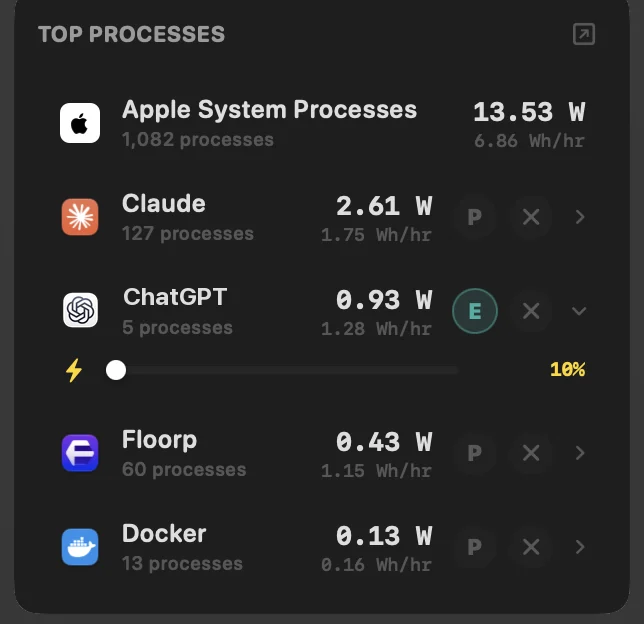
- YesPer-app power · Watts and Wh per hour
- YesPer-app CPU limit · 10% to 100% slider
- YesEfficiency-core offload · Per app
- YesQuit a draining app · From any row
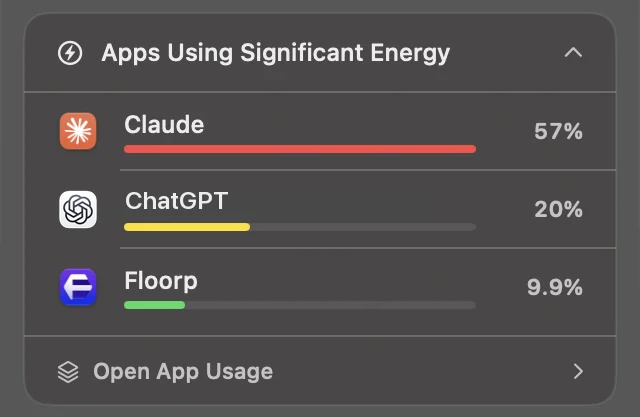
- PartlyPer-app power · Percent of apps’ energy
- NoPer-app CPU limit
- NoEfficiency-core offload
- PartlyQuit a draining app · From its insights card
Limiting the charge
On macOS 27.2, Juicy sets its limit through the Charge Limit built into macOS, from 80% to 100%. MacBookBatteryMonitor holds the battery anywhere from 50% to 100% and adds Sailing Mode.
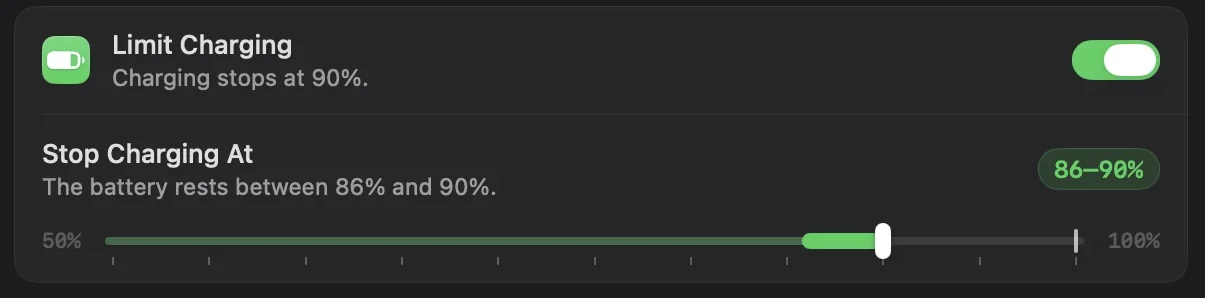
- YesCharge limit · 50% to 100%
- YesSailing Mode · Runs from the battery down to the limit
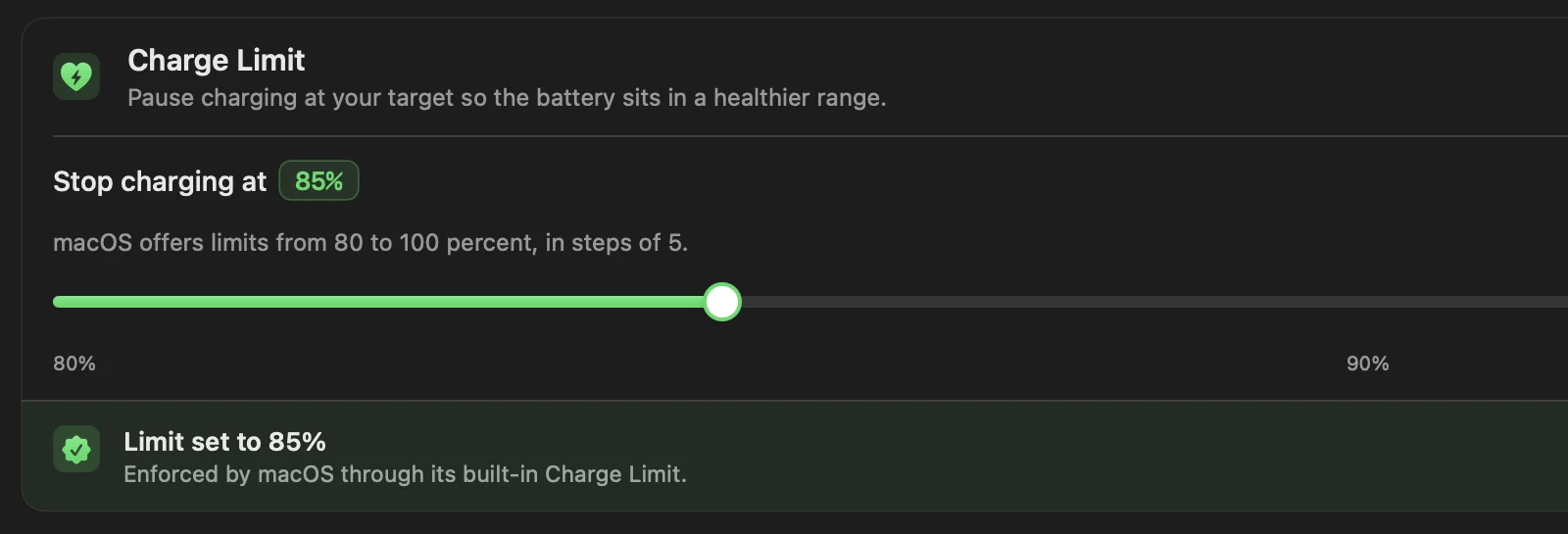
- PartlyCharge limit · 80% to 100%, set by macOS
- NoSailing Mode · Not offered on macOS 27
Feature comparison
| Feature | MacBookBatteryMonitor | Juicy |
|---|---|---|
| Price | Yes$9 once | Partly$14.99 plus $9.99 a year for updates, or $24.99 |
| Free trial | Yes7 days | Partly3 days, starts on first launch |
| Per-app power | YesIn watts | PartlyPercent of apps’ energy |
| Power by component | YesCPU and GPU, RAM, display, USB | NoTotal watts only |
| Per-app CPU limit | Yes10% to 100% | NoNo |
| Efficiency-core offload | YesPer app | NoNo |
| Quit a draining app | YesFrom any row | PartlyFrom insights |
| Charge limit | Yes50% to 100% | Partly80% to 100% on macOS 27 |
| Sailing Mode | YesYes | NoNot on macOS 27 |
| Low Power Mode | YesTurns on below a level you set | PartlyManual switch |
| Battery health and cycles | YesYes | YesYes |
| Custom low-battery alerts | NoNo | YesSounds and screen glow |
| AirPods, iPhone and Watch batteries | NoNo | YesYes |
| Intel Macs | NoApple silicon only | YesYes |
| Requires | YesmacOS 14 or later | PartlymacOS 15 or later |
We tested Juicy 1.6.2
On 12 November 2026 we downloaded Juicy.dmg (29.2 MB) from getjuicy.app and opened it on a 14-inch MacBook Pro (2021, M1 Max) running macOS 27.2. The app is signed with a Developer ID from Seven Degrees Labs LLC and notarized by Apple, so it opened normally on first launch.2
Onboarding sets up three alerts before it shows you anything else. Each one has its own sound and an optional glow around the screen, and a Test button previews it. This is the part of Juicy no alternative here matches.
Free trial
3 days
It starts the first time you open Juicy, with no card, email or account.
Price
$14.99
Pro includes one year of updates, then $9.99 a year to keep them. Lifetime is $24.99.
Health it reported
78%
macOS read the same battery as 83% with the condition Normal.
Lowest charge limit
80%
Set through the Charge Limit built into macOS, in steps of 5, on macOS 27.2.
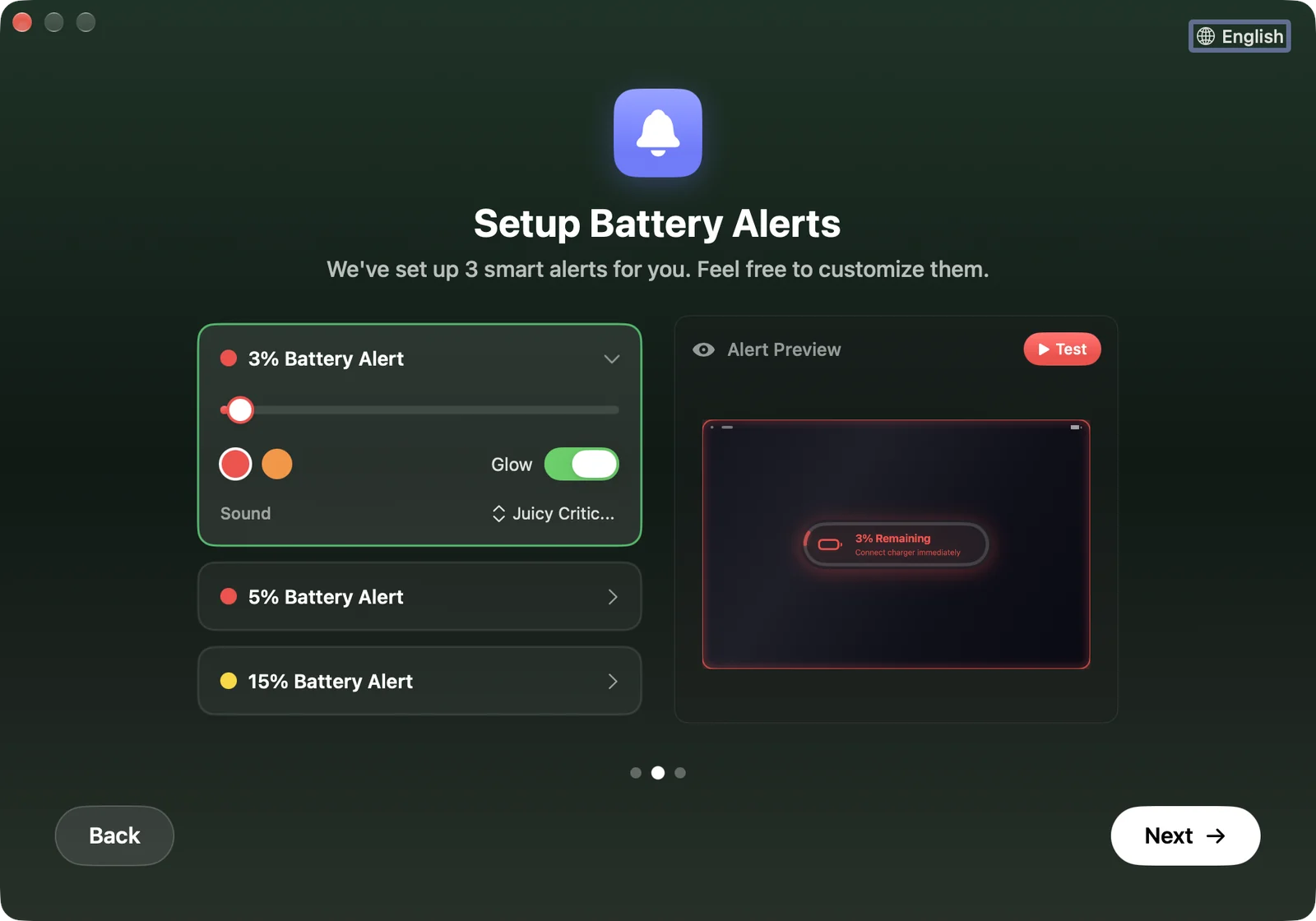
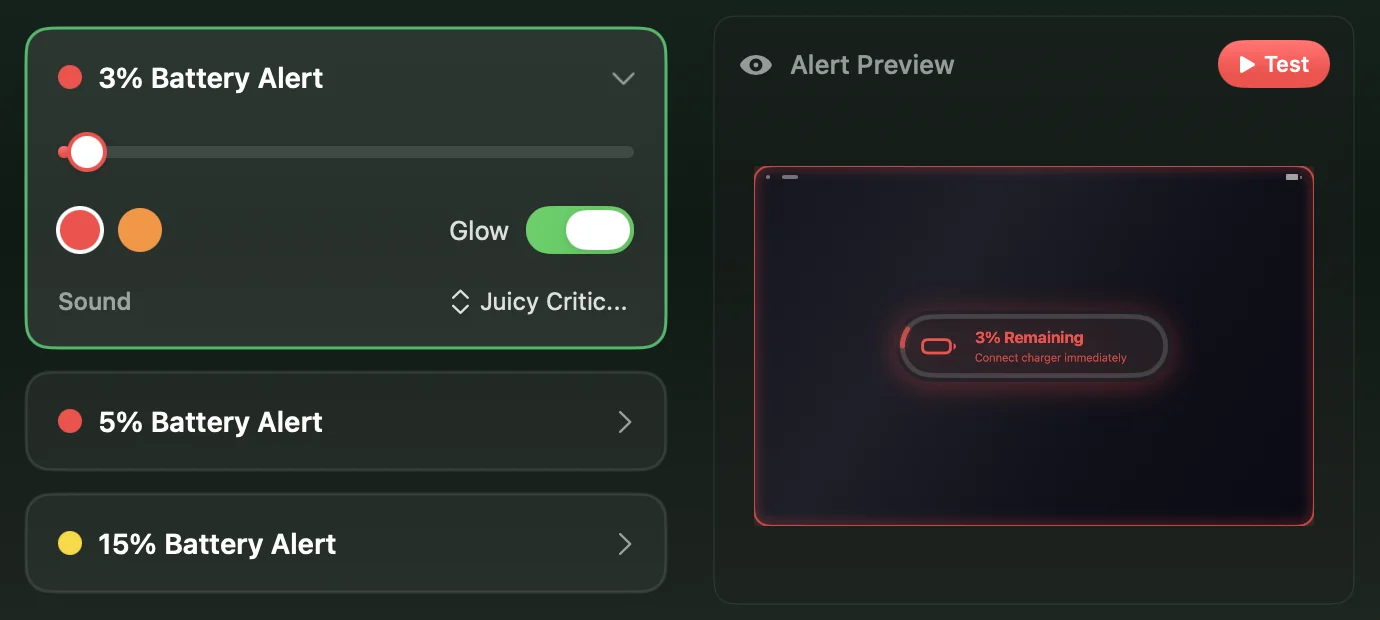
- 3%Critical sound and a glow around the screen
- 5%Warning sound, glow off
- 15%No sound, glow off
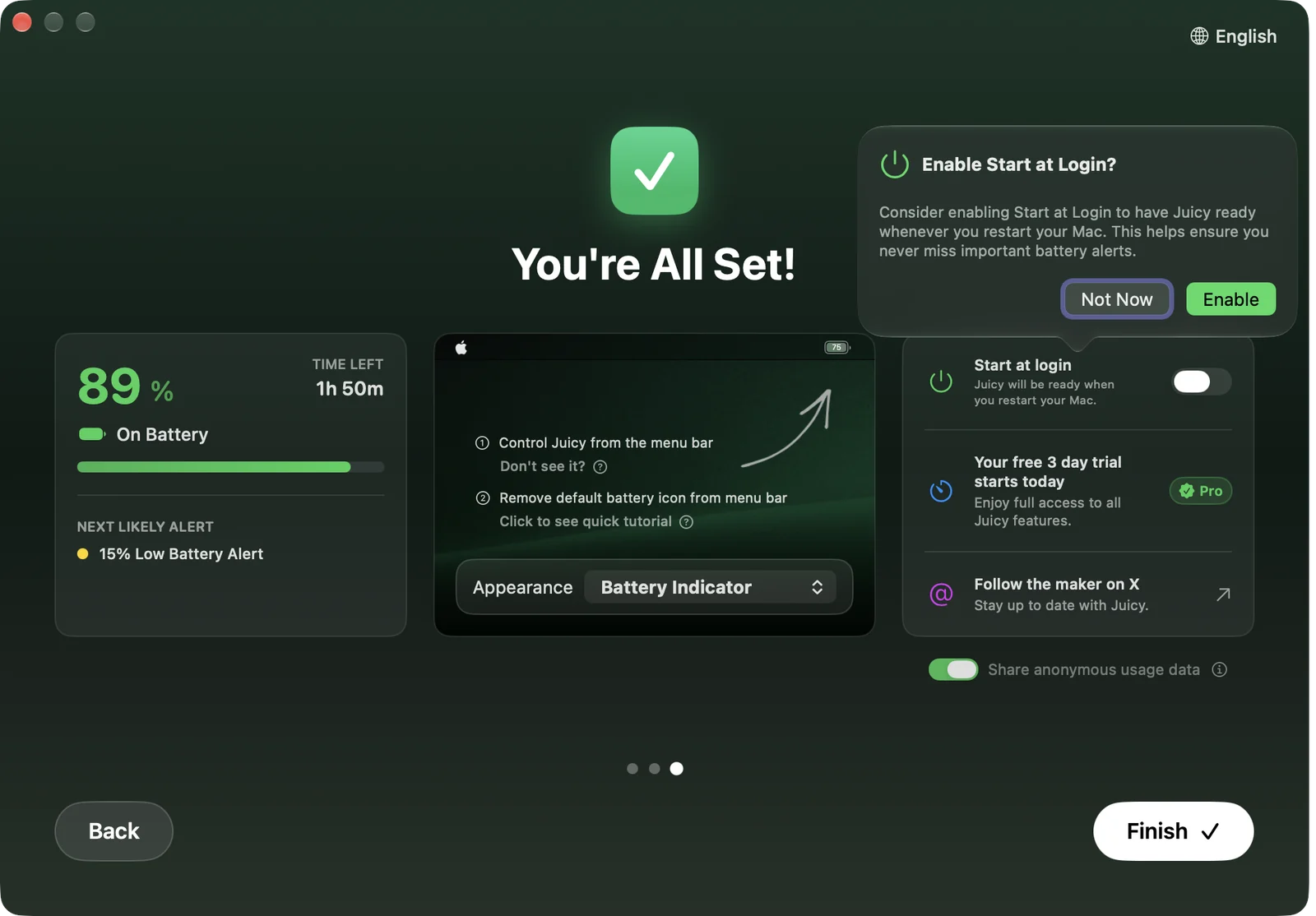
The 3-day trial starts on first launch
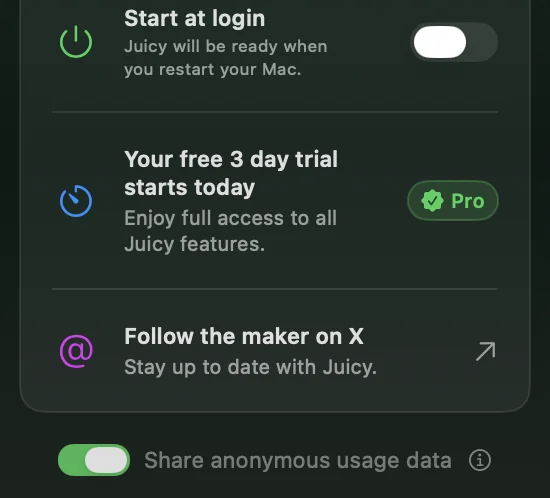
The last onboarding screen says "Your free 3 day trial starts today". Juicy did not ask for a card, an email or an account, so nothing is charged when the trial ends. Three days is still short: a weekday, an evening and one more day is not much time to see how a battery app behaves across charge cycles, travel and overnight sleep.1,2
The same screen has Share anonymous usage data switched on and offers Start at Login. Switch the first off there if you would rather not send usage data.
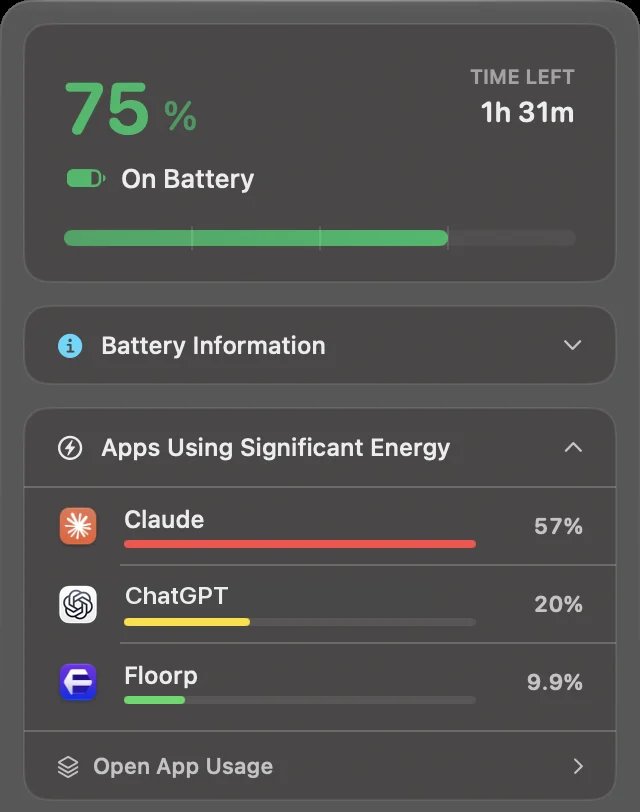
Juicy ranks apps by percent, not watts
On battery, we opened MacBookBatteryMonitor's panel and then Juicy's, 25 seconds apart. Juicy put Claude at 57%, ChatGPT at 20% and Floorp at 9.9%. MacBookBatteryMonitor measured the same three apps at 2.61 W, 0.93 W and 0.43 W, out of 24.8 W for the whole Mac.2
Juicy's percentages are shares of the energy used by apps alone. Apple's system processes, the biggest draw on the Mac at 13.53 W, are left out of the list, so Claude's 57% was about a tenth of what the battery was supplying. A percentage tells you which app is ahead. It does not tell you whether quitting it buys you ten minutes or two hours.
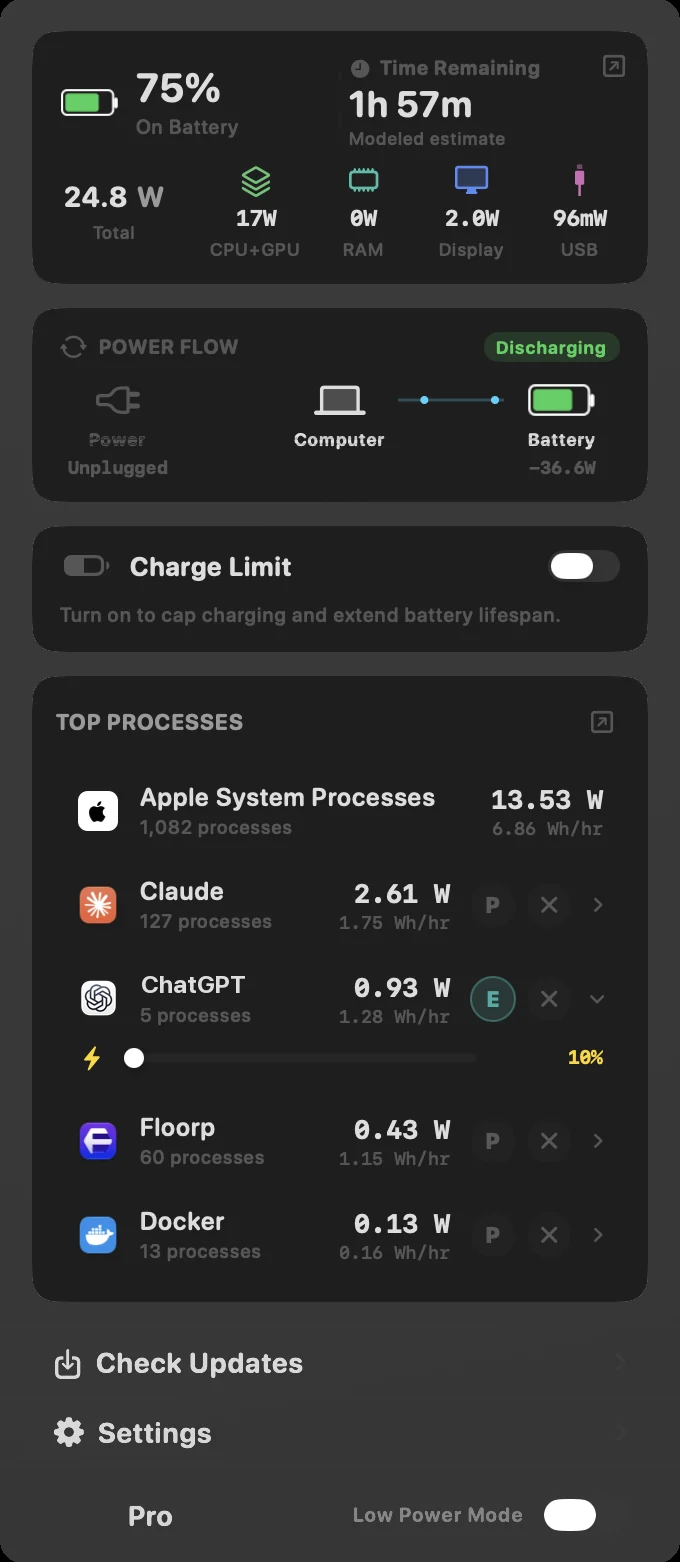
Juicy's App Usage window uses the same shares. It flagged that "Claude is dominating your battery" at 53% of apps' energy, with a Quit button next to it. MacBookBatteryMonitor lists every app in watts and watt-hours per hour, splits the total into CPU and GPU, RAM, display and USB, and puts throttle and quit buttons on each row.

On macOS 27, Juicy's charge limit starts at 80%
Juicy's site describes a charge limit in the 50% to 80% band with Sailing Mode and Automatic Discharge. On our Mac running macOS 27.2, its Charging page offered 80% to 100% in steps of 5, set through the Charge Limit built into macOS. Sailing Mode, Heat Protection and Discharge were not offered. That is the same limit you get for free under System Settings > Battery.1,2,7
The info button next to the switch still recommends keeping the battery in a 50% to 80% band, a range the slider below it cannot reach. MacBookBatteryMonitor limits charging anywhere from 50% to 100%, and its Sailing Mode runs the Mac from the battery down to the limit while the charger stays connected.
Juicy reads battery health lower than macOS
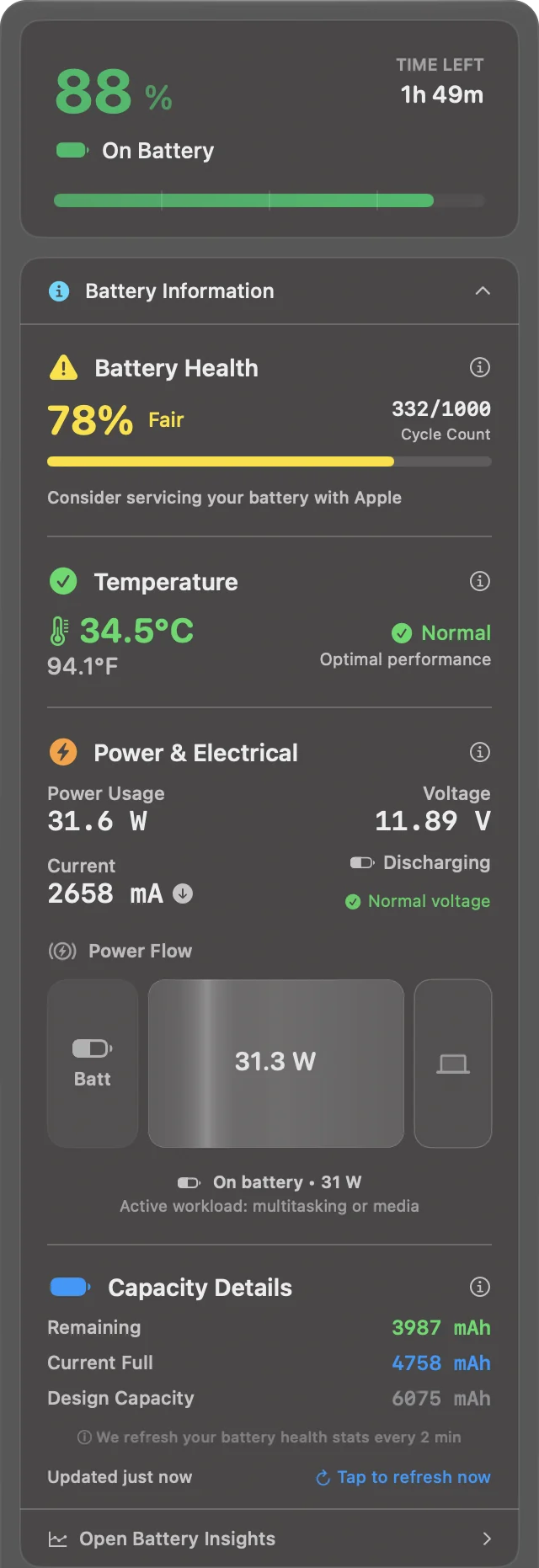
Juicy rated our battery 78% and Fair, with the line "Consider servicing your battery with Apple". It gets 78% by dividing the current full charge, 4,758 mAh, by the design capacity of 6,075 mAh. macOS read the same battery the same afternoon as 83% maximum capacity with the condition Normal.2
Current Full:    4,758 mAh
Design Capacity: 6,075 mAh
Battery Health:  78% Fair
Cycle Count: 332
Condition: Normal
Maximum Capacity: 83%
Apple decides when a battery needs service, and macOS says so under System Settings > Battery > Battery Health. A third-party app telling you to book a service while macOS says Normal is a good way to worry about a battery that is fine. Juicy's panel is otherwise thorough: temperature, voltage, current, power flow and capacity in milliamp-hours, with health stats refreshed every 2 minutes.
Our verdict
Keep Juicy if alerts and your AirPods, iPhone and Apple Watch batteries are what you open it for. Nothing on this list does custom alerts as well. If you came to Juicy to find out why your battery drains, it stops at a percentage, and on macOS 27 its charge limit is the free one macOS already has. MacBookBatteryMonitor shows the drain in watts, lets you throttle or quit the app causing it, and holds the charge anywhere from 50% to 100%, for $9 once with a 7-day trial.
FAQ
What is the best Juicy alternative?
For per-app power in watts and charge control, MacBookBatteryMonitor: it lists every app in watts, limits charging anywhere from 50% to 100% with Sailing Mode, and costs $9 once. For a charge limiter alone, AlDente. For AirPods and accessory batteries, iStat Menus. For a free battery health check, coconutBattery or the Battery settings built into macOS.
Is Juicy free?
No. Juicy has a 3-day free trial. Juicy Pro costs $14.99 once with one year of updates and $9.99 to renew updates after that, and a Lifetime licence costs $24.99. Both cover up to 2 Macs.
Does Juicy charge you after the free trial?
No. When we installed Juicy 1.6.2 on 12 November 2026, the 3-day trial started on first launch without asking for a card, an email or an account, so there is nothing to charge when it ends.
Does Juicy show per-app power in watts?
No. Its menu bar panel and its App Usage window rank apps by their share of the energy used by apps. In our test Juicy put Claude at 57% while MacBookBatteryMonitor, read 25 seconds earlier, measured Claude at 2.61 W of a 24.8 W total. MacBookBatteryMonitor lists every app in watts and watt-hours per hour.
Can Juicy limit charging below 80%?
Not on macOS 27.2. On our test Mac, Juicy’s Charging page offered 80% to 100% in steps of 5 and set the limit through the Charge Limit built into macOS, the same limit System Settings > Battery gives you for free. It offered no Sailing Mode, Heat Protection or Discharge. MacBookBatteryMonitor limits charging anywhere from 50% to 100% and has Sailing Mode.
Why does Juicy say my battery needs servicing?
Juicy rates health by dividing the current full charge capacity by the design capacity. On our test Mac that gave 78%, which Juicy labelled Fair with the line "Consider servicing your battery with Apple". macOS read the same battery the same afternoon as 83% maximum capacity with the condition Normal. For Apple’s own verdict, open System Settings > Battery and click the info button next to Battery Health.
Is Juicy safe?
Yes. The copy we downloaded from getjuicy.app is signed with a Developer ID from Seven Degrees Labs LLC and notarized by Apple, and it opened normally on macOS 27.2. Its onboarding has Share anonymous usage data switched on, which you can switch off on the last screen.
Does Juicy work on macOS 14 Sonoma?
No. Juicy needs macOS 15 Sequoia or later. MacBookBatteryMonitor runs on macOS 14 and later, and Stats, AlDente and coconutBattery run on macOS 12 and later.
Is there a free alternative to Juicy?
Yes. macOS has a Charge Limit from 80% to 100% on Tahoe 26.4 and later, battery health in System Settings and a Batteries widget for AirPods. Stats is free and open source, AlDente has a free charge limiter, and coconutBattery’s free version shows health and cycle count.
Which Juicy alternative shows AirPods battery?
iStat Menus shows battery levels for AirPods, Magic Mouse, Magic Trackpad and other Bluetooth devices, and costs $11.99 once on the Mac App Store. The free Batteries widget in macOS shows them too.
Sources
- getjuicy.app Juicy’s features, the 3-day trial without a card, Pro at $14.99 with one year of updates and $9.99 renewal, Lifetime at $24.99, 2 Macs per licence, macOS 15 or later, and the features missing from the Mac App Store version. Checked 12 November 2026.
- MacBookBatteryMonitor test, 12 November 2026 Juicy 1.6.2 downloaded from getjuicy.app, checked with codesign and Gatekeeper, and run through onboarding and its menu bar panel on a 14-inch MacBook Pro (2021, M1 Max) with 332 cycles on macOS 27.2. System Information was read the same afternoon. Checked 12 November 2026.
- AlDente pricing Pro features including Sailing Mode, Discharge, Heat Protection and Schedule, and one Pro licence for up to 3 Macs. Checked 12 November 2026.
- Bjango: iStat Menus Battery details and Bluetooth battery levels for AirPods, Magic Mouse and Magic Trackpad. $11.99 on the US Mac App Store, which lists macOS 14 or later. Checked 12 November 2026.
- GitHub: exelban/stats MIT licence, the battery and Bluetooth devices modules, and macOS 12 or later. Checked 12 November 2026.
- Our coconutBattery review coconutBattery 4.4 tested side by side with MacBookBatteryMonitor, including its power reading after unplugging. Checked 10 November 2026.
- Apple Support: About Optimized Battery Charging and Charge Limit on Mac The 80% to 100% Charge Limit in macOS Tahoe 26.4 and later on Apple silicon. Checked 12 November 2026.