Looking for the app? See the MacBook battery monitor.
Reviews
 Reviews
coconutBattery Review: Tested Side by Side on a 332-Cycle MacBook Pro
- Published
- Updated
Is coconutBattery worth installing?
coconutBattery shows very little you cannot already see in macOS. Cycle count, battery condition, maximum capacity, charge level and charger wattage are all in System Settings and System Information, free on every Mac. What coconutBattery adds is capacity in milliamp-hours, cell temperature and the battery's maker and manufacture date, which matter mostly when you are checking a used MacBook before you buy it.
It stops at reading. It cannot show which app is draining the battery, it cannot limit charging, and in our test it still read 0 mW of discharge 81 seconds after we pulled the charger. MacBookBatteryMonitor, running beside it, showed every app's power in watts within seconds.
coconutBattery at a glance
coconutBattery
v4.4 · Intel and Apple silicon · macOS 12+
Verdict: worth it for checking a used MacBook before you buy. Skip it otherwise.
- YesmAh capacity, temperature and cell age in one window
- YesSigned and notarized, runs on Intel and Apple silicon
- NoMost readings already in System Settings
- NoNo per-app power
- NoNo charge limit
- NoReadings ran 81 seconds behind after unplugging
- No
Does it show anything macOS does not?
Little: capacity in mAh, temperature and the cell's age. The rest is already in System Settings
- Yes
Is it safe to install?
Signed by its developer and notarized by Apple
- No
Does it match the health figure in System Settings?
It read 77.1% where macOS read 83% on the same battery
- No
Does it show which app is draining the battery?
One discharge figure for the whole Mac
- No
Can it limit charging to 80%?
No charge control in Free or Plus
- Partly
Is Plus worth $12.95 to $17.95?
Only if you want its menu bar readout, alerts or iPhone over Wi-Fi
How we tested coconutBattery
We downloaded coconutBattery 4.4 from coconut-flavour.com on 10 November 2026 and ran it on a 14-inch MacBook Pro (2021, M1 Max) running macOS 27.2. The battery is a Sunwoda cell made on 18 October 2021, 1,849 days old with 332 charge cycles.6
MacBookBatteryMonitor ran on the same Mac at the same time. We captured both windows within the same second, first on the charger at 100%, then on battery, then plugged in with Sailing Mode running. Every screenshot in this review comes from that session. We also read the battery's own registers and System Information to check coconutBattery's numbers against macOS.
Health reading
77.1% vs 83%
coconutBattery against macOS Maximum Capacity, same battery, same sitting.
Unplug lag
81 seconds
coconutBattery still showed 100% and 0 mW after the charger came out.
Per-app readings
0
coconutBattery shows one figure for the whole Mac. MacBookBatteryMonitor ranked every app.
New over macOS
4 readings
mAh capacity, temperature, cell maker and date, and a whole-Mac discharge figure.
What coconutBattery shows
coconutBattery opens to one window with three tabs: This Mac, History and iPhone/iPad. The This Mac tab holds everything most people install it for.
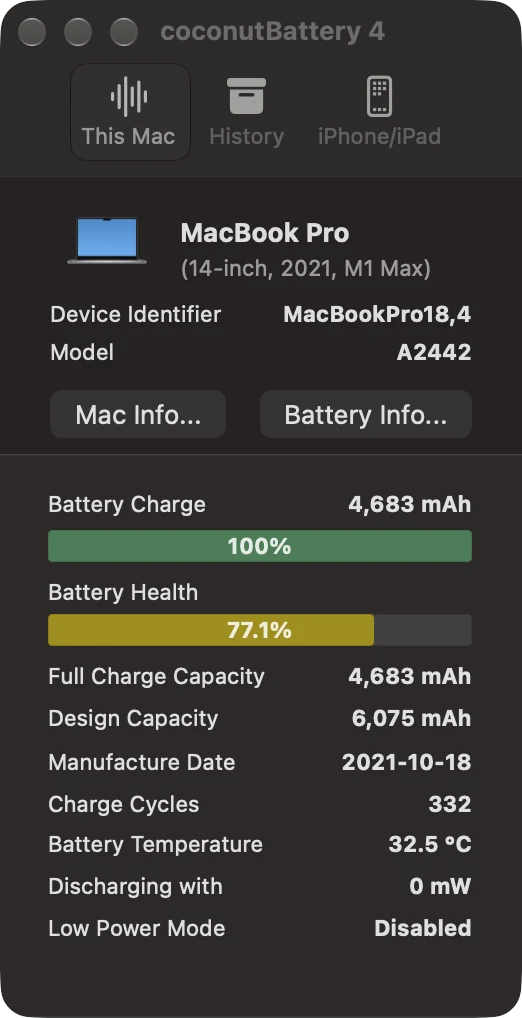
- Battery Charge
- 4,683 mAh · 100%
- Charge left right now
- Battery Health
- 77.1%
- Full charge capacity ÷ design capacity
- Full Charge Capacity
- 4,683 mAh
- What the battery holds today
- Design Capacity
- 6,075 mAh
- What it held new
- Charge Cycles
- 332
- Out of Apple's 1,000-cycle design
- Battery Temperature
- 32.5 °C
- Cell temperature
The Battery Info button opens a panel with the cell manufacturer, its age in days, the serial number and the wattage of the connected charger. On our Mac it named Sunwoda as the maker and reported the 90 W charger we had connected. The Lifetime Details button inside it belongs to Plus.
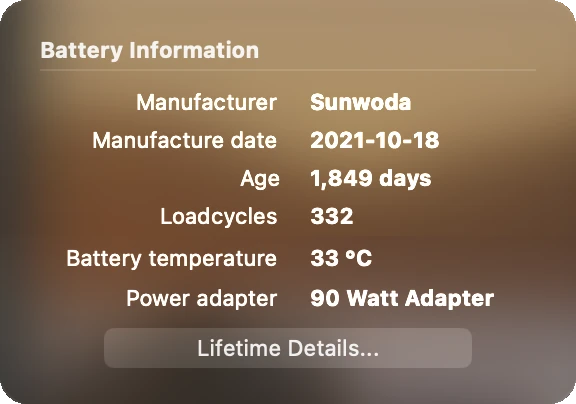
What coconutBattery shows that macOS does not
Most of coconutBattery's window repeats what your Mac already tells you. We read the same battery in System Settings and System Information at the same sitting.6
Cycle count
YesSystem Information: 332Yes332Battery condition
YesSystem Settings: NormalNoNot shownHealth as a percentage
YesSystem Settings: 83% Maximum CapacityYes77.1%, its own calculationCharge level
YesMenu bar and System InformationYes100%Charger wattage
YesSystem Information: 90 WYes90 WHistory
YesBattery level and screen time, last 10 daysPartlyMonthly average health and cyclesiPhone battery health
YesOn the iPhone, in Settings > BatteryYesOver USBCapacity in mAh
NoNot in the interfaceYes4,683 of 6,075 mAhBattery temperature
NoNot in the interfaceYes32.5 °CCell maker and manufacture date
NoNot in the interfaceYesSunwoda, 18 October 2021Live discharge rate
NoNot in the interfacePartlyOne figure, 81 seconds behind in our test

| Reading | macOS, free | coconutBattery |
|---|---|---|
| Cycle count | YesSystem Information: 332 | Yes332 |
| Battery condition | YesSystem Settings: Normal | NoNot shown |
| Health as a percentage | YesSystem Settings: 83% Maximum Capacity | Yes77.1%, its own calculation |
| Charge level | YesMenu bar and System Information | Yes100% |
| Charger wattage | YesSystem Information: 90 W | Yes90 W |
| History | YesBattery level and screen time, last 10 days | PartlyMonthly average health and cycles |
| iPhone battery health | YesOn the iPhone, in Settings > Battery | YesOver USB |
| Capacity in mAh | NoNot in the interface | Yes4,683 of 6,075 mAh |
| Battery temperature | NoNot in the interface | Yes32.5 °C |
| Cell maker and manufacture date | NoNot in the interface | YesSunwoda, 18 October 2021 |
| Live discharge rate | NoNot in the interface | PartlyOne figure, 81 seconds behind in our test |
That leaves four extras, and even those are not hidden. The battery controller hands out capacity and current to anyone who runs ioreg -rn AppleSmartBattery in Terminal. coconutBattery puts them in a window. That is worth having when you are inspecting a used MacBook and want the milliamp-hours and the manufacture date in one place. For a Mac you already own, System Settings answers the question most people install coconutBattery for.
coconutBattery vs macOS: which health figure is right?
Both. They answer different questions. At the same sitting, coconutBattery read 77.1% and System Settings reported Maximum Capacity of 83% for the same battery.6,5
Same battery, same sitting. coconutBattery: 4,683 mAh ÷ 6,075 mAh. macOS does not publish its formula.
coconutBattery's figure is simple arithmetic: 4,683 mAh full charge capacity divided by 6,075 mAh design capacity is 77.1%. Apple measures Maximum Capacity against its own reference and does not publish the formula. If you are deciding whether a battery is due for service, go by System Settings, which is where macOS shows its Service Recommended warning. If you want to track wear over months in raw milliamp-hours, coconutBattery's numbers are the more useful ones.
Expect coconutBattery's health percentage to drift a little. The battery revises its own full charge estimate as it works, and our reading moved between 76.5% and 77.1% in just over two minutes, with full charge capacity between 4,647 and 4,683 mAh.
The unplug test: coconutBattery vs MacBookBatteryMonitor
A battery app earns its place when something is draining the battery. So we pulled the charger and watched both apps.
The MacBook was on battery by 16:46:36. At 16:47:57, 81 seconds later, coconutBattery still showed the plugged-in readings: 100% charge, 4,683 mAh and "Discharging with 0 mW". Only the temperature had updated. MacBookBatteryMonitor, captured in the same second, showed the Mac drawing 36.7 W, with the battery supplying 33.0 W, Floorp using 11.68 W and Claude 2.43 W. coconutBattery caught up at 16:48:17, when it read 97.5% and 41 W.
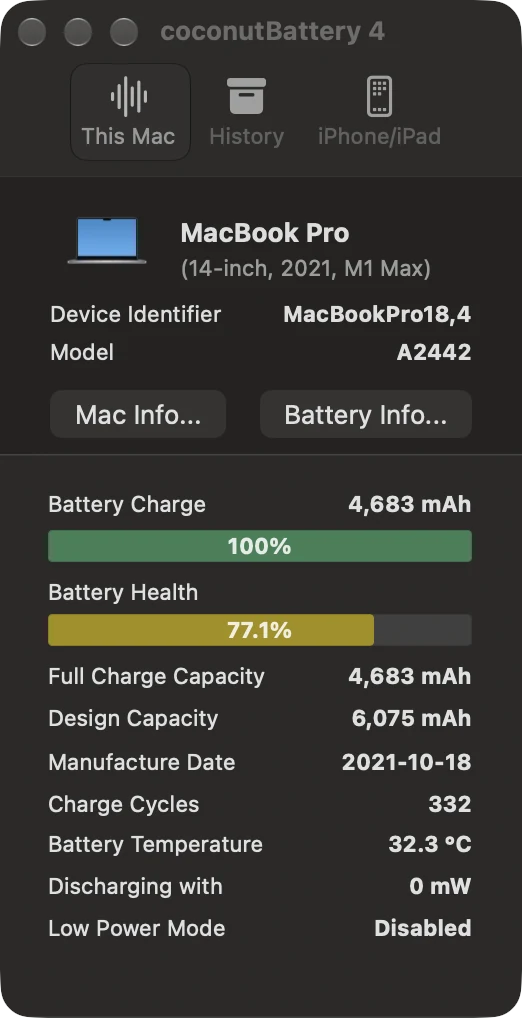
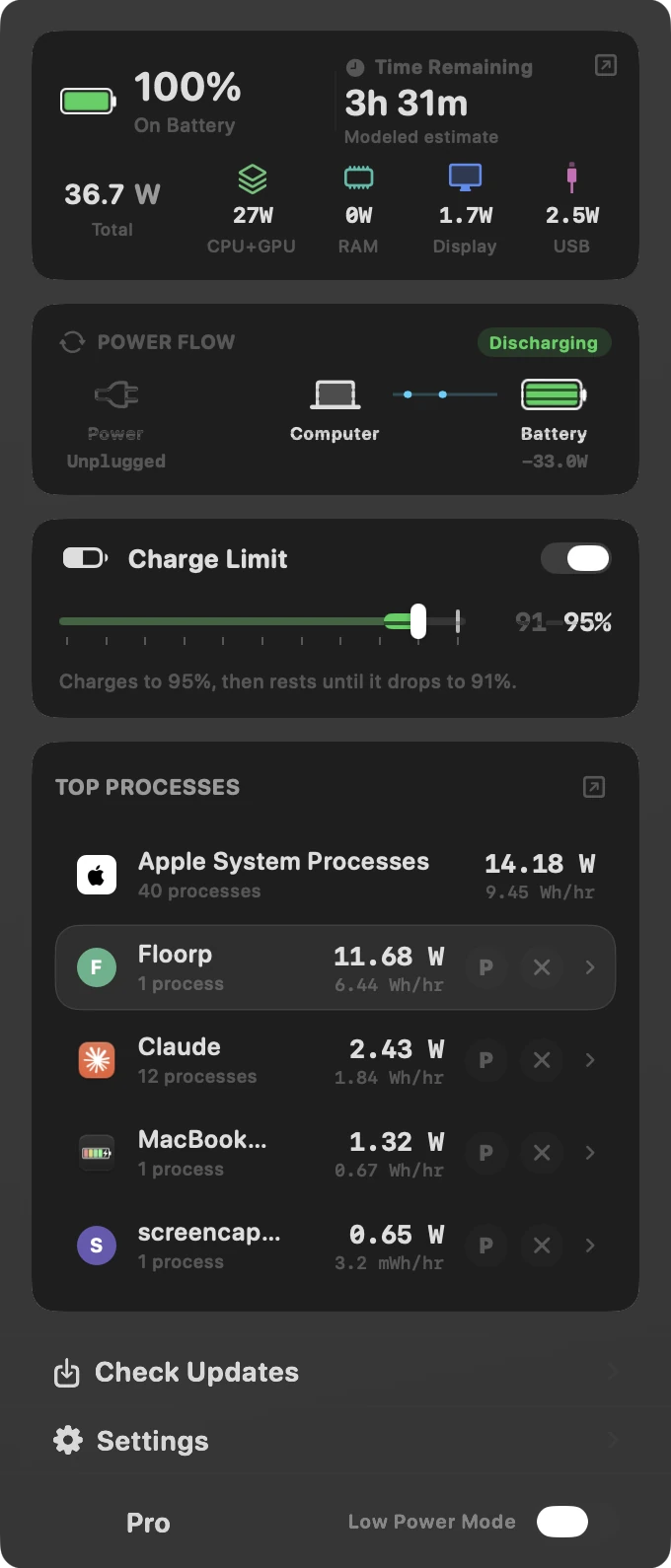
The second difference matters more than the delay. Even once coconutBattery caught up, it showed one number for the whole Mac. It cannot tell you that one browser is drawing nearly five times the power of the next app. MacBookBatteryMonitor ranks every running app by watts, and each row has a button to cap that app's CPU or quit it.
If you want to dig further into drain, our guide to seeing what is draining your MacBook battery walks through Activity Monitor and per-app watts.
History: one row a month
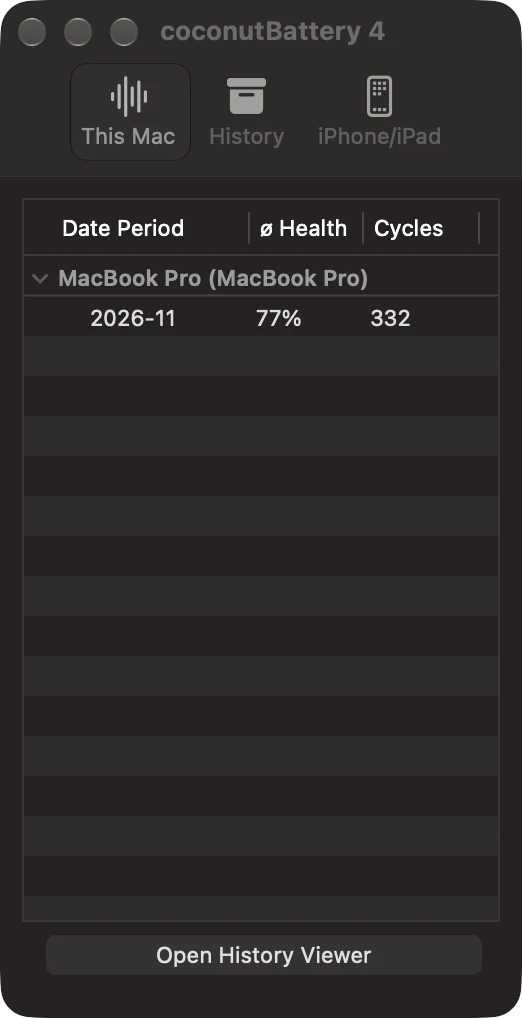
The free version saves your battery's health automatically. After our first session, the History tab held a single row for November 2026: 77% average health and 332 cycles. Over months that builds into a simple wear log. The Plus Lifetime Analyzer adds the temperature, voltage and charge-rate ranges the battery has seen over its life.1
coconutBattery Free vs Plus
Plus is a one-time purchase in two editions. Standard covers the 4.x releases. Lifetime includes all future Plus updates. Both work on unlimited devices, and Plus has a free trial.1,3
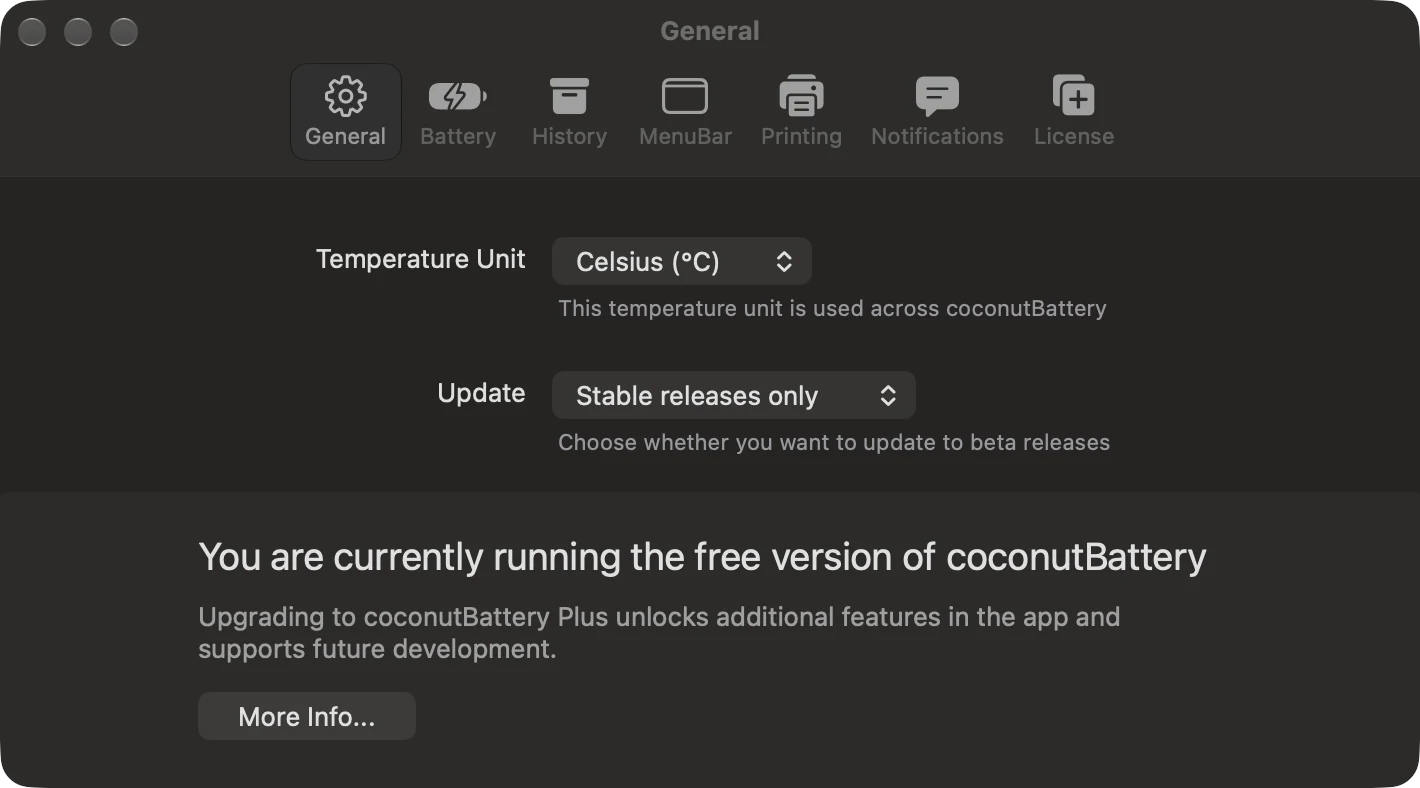
The free version tells you plainly what you are missing. Its Settings window carries a banner for Plus, and the Battery, History, MenuBar, Printing and Notifications tabs sit beside General.
coconutBattery pros and cons
What it does well
- YesSigned by its developer and notarized by Apple
- YesRuns on Intel and Apple silicon Macs from macOS 12
- YesPuts mAh capacity, temperature and cell age in one window
- YesReads an iPhone or iPad battery over USB
Where it falls short
- NoMost readings repeat System Settings and System Information
- NoNo per-app power, so it cannot find what is draining the battery
- NoNo charge limit or Sailing Mode in Free or Plus
- NoIts readings ran 81 seconds behind when we pulled the charger
- NoMenu bar readout and alerts cost $12.95 to $17.95
What coconutBattery cannot do
coconutBattery reads the battery and leaves it alone. That keeps it simple and safe, and it also means three jobs are out of reach in both editions.
Find the app draining the battery
Keep the battery off 100%
Rein in a runaway app
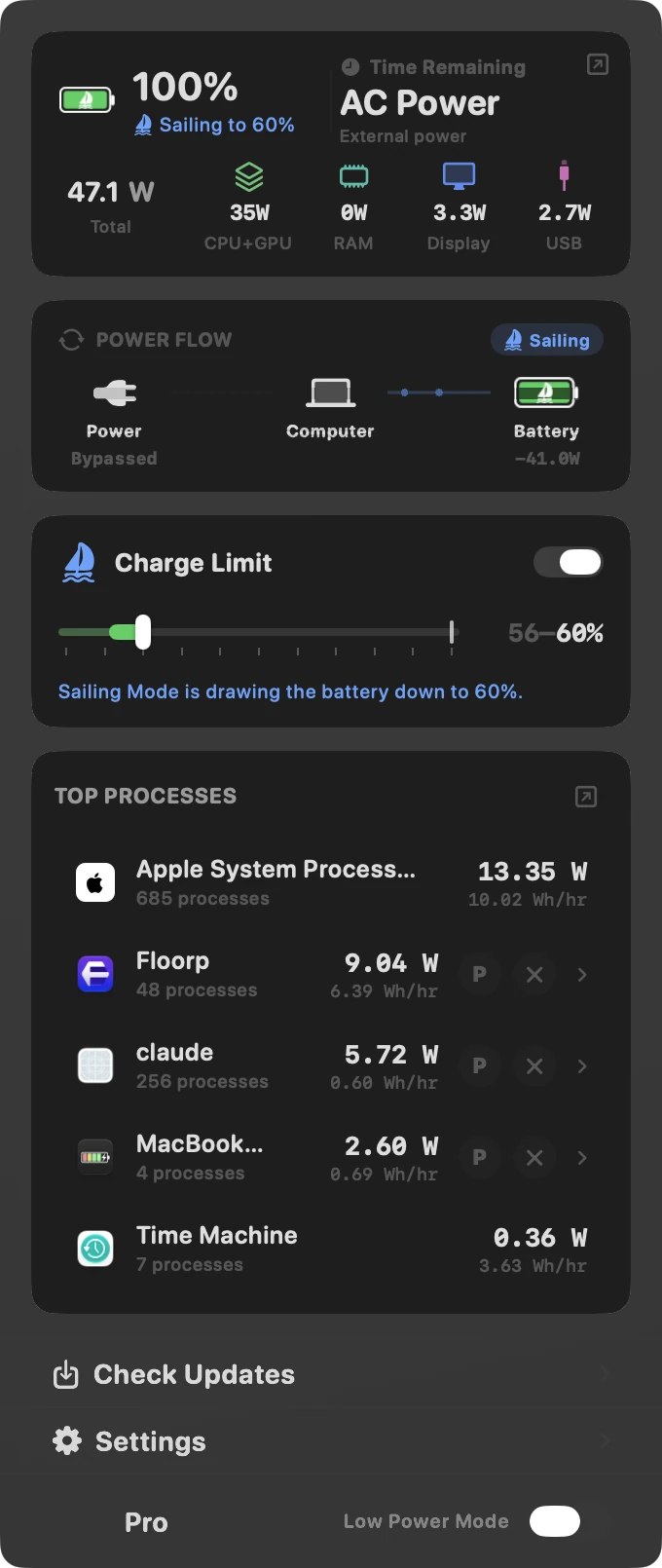
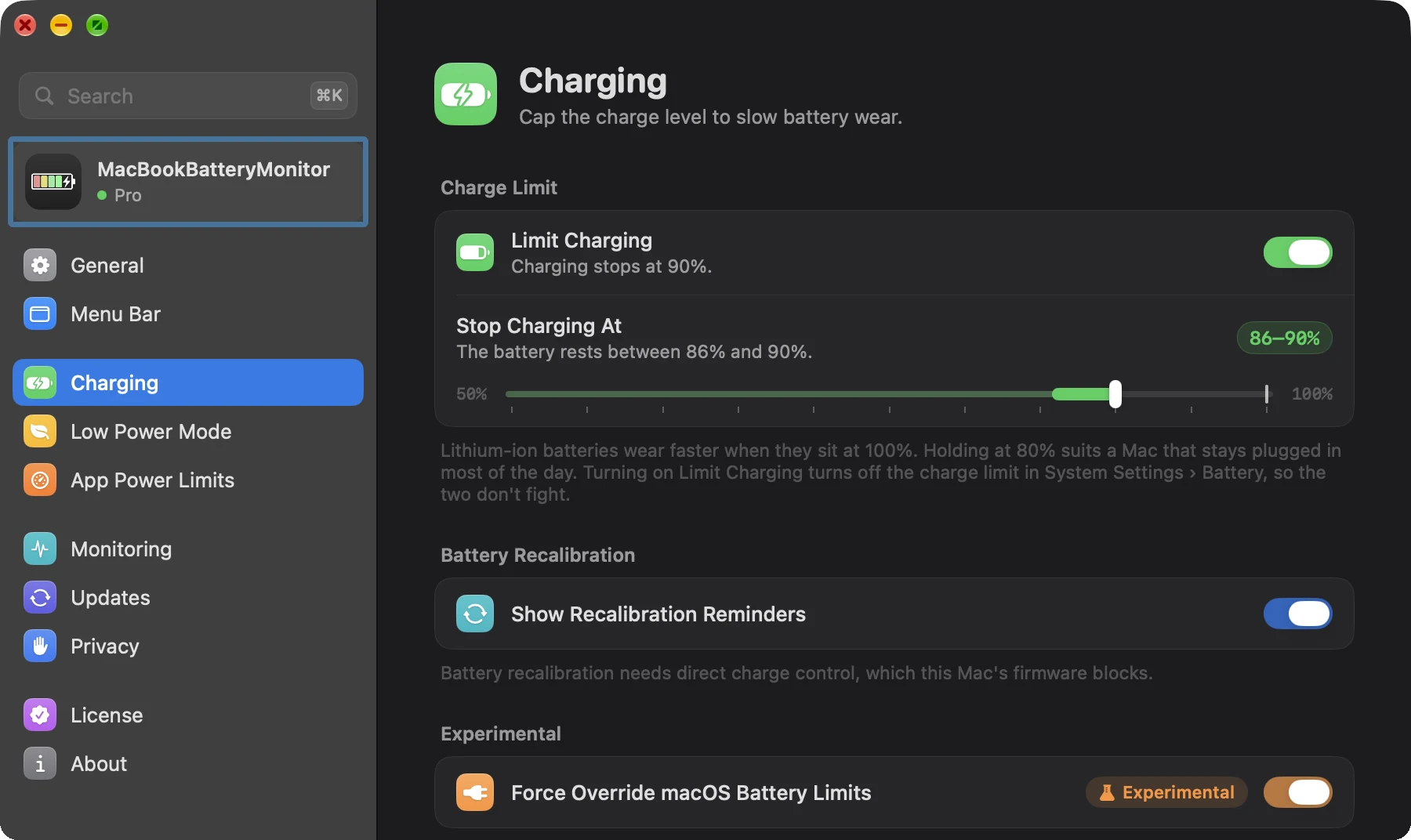
MacBookBatteryMonitor covers all three. Its charge limit runs from 50% to 100%, and Sailing Mode lets the Mac run on the battery down to your limit while the charger stays connected, so the battery cycles through a small band instead of sitting full.
coconutBattery vs MacBookBatteryMonitor
Swipe sideways to see every feature →
| App | Price (USD) | Maintained | Health & cycles | Live power | Per-app watts | Charge limit | Sailing Mode | Cap or quit apps |
|---|---|---|---|---|---|---|---|---|
| Mac | $9lifetimeFree trial | Activev1.0.8, Nov 2026 | YesAdds condition label | YesTotal, by component and by app | Yes | Yes50% to 100% | Yes | YesCPU cap or quit |
| coconut | Free | Activev4.4, Sep 2026 | YesmAh, cycles, temp | PartialOne figure, 81 s behind in our test | No | No | No | No |
| coconut | $12.95–$17.95lifetimeFree trial | Activev4.4, Sep 2026 | YesLifetime Analyzer | PartialOne figure for the Mac | No | No | No | No |
The full feature-by-feature breakdown, with screenshots of each, is on our coconutBattery vs MacBookBatteryMonitor comparison. If you want to see every other option, read the best coconutBattery alternatives.
Is coconutBattery safe?
Yes. We checked the 4.4 download before opening it. It is signed with the Developer ID of Christoph Sinai, the developer behind coconut-flavour.com, and Apple notarized it. Gatekeeper accepted it as a notarized Developer ID app.6
coconutBattery only reads battery data, so it cannot change how your Mac charges. Its privacy policy lists two network calls: an automatic update check, which asks for permission on first launch, and the optional coconutBattery Online service, which sends anonymised battery information only when you use it.2
Our verdict
coconutBattery is a window onto numbers your Mac already has. macOS shows cycle count, condition and maximum capacity for free, and an iPhone shows its own battery health. coconutBattery adds milliamp-hours, temperature and the cell's age, and even its live discharge figure ran 81 seconds behind in our test. Install it if you are about to buy a used MacBook and want those raw numbers in one place. Otherwise you can skip it.
If your question is why the battery is running down, coconutBattery cannot answer it. MacBookBatteryMonitor shows the same health and cycle figures, then tells you which app is using the power, caps the culprit without quitting it, and stops the battery sitting at 100% on the charger.
Checking a used MacBook before you buy
coconutBattery
mAh capacity and the cell's age in one window
Finding what drains your battery
MacBookBatteryMonitor
Every app in watts, and a cap or quit button on each
Keeping the battery off 100%
MacBookBatteryMonitor
Charge limit from 50% to 100% and Sailing Mode
FAQ
Is coconutBattery safe?
Yes. The coconutBattery 4.4 download from coconut-flavour.com is signed with the Developer ID of its developer, Christoph Sinai, and notarized by Apple. macOS Gatekeeper accepted it as "Notarized Developer ID" when we checked it on 10 November 2026. The app reads battery data and does not change charging.
Is coconutBattery free?
The standard version is free and shows battery health, charge, capacity, cycle count, temperature and the current discharge rate for your Mac, plus iPhone and iPad batteries over USB. coconutBattery Plus is a one-time purchase that costs $12.95 to $17.95 as of September 2026 and adds a menu bar readout, notifications, Wi-Fi connection to iPhone and iPad, and the Battery Lifetime Analyzer.
Does coconutBattery show anything macOS does not?
Very little. Cycle count, battery condition, maximum capacity, charge level and charger wattage are already in System Settings and System Information. coconutBattery adds capacity in milliamp-hours, battery temperature, the cell maker and manufacture date, and a single whole-Mac discharge figure. The capacity and current readings are also available free from the ioreg command in Terminal.
How accurate is coconutBattery?
coconutBattery shows the values the battery reports to macOS. Its health percentage is full charge capacity divided by design capacity. On our test MacBook Pro that was 4,683 mAh out of 6,075 mAh, or 77.1%. The figure moves as the battery updates its own capacity estimate: it read between 76.5% and 77.1% within just over two minutes of our test.
Why does coconutBattery show lower battery health than macOS?
They use different figures. coconutBattery divides full charge capacity by design capacity, which gave 77.1% on our test MacBook Pro. System Settings reported Maximum Capacity of 83% for the same battery at the same sitting. Neither number is wrong. They measure the battery against different references.
Does coconutBattery work on Apple silicon and Intel Macs?
Yes. coconutBattery 4.4 is a universal app with Intel and Apple silicon code, and it needs macOS 12 Monterey or later.
Is there a coconutBattery for Windows?
No. coconutBattery is a Mac app. It can read the battery of an iPhone or iPad connected to the Mac, but there is no Windows or iPad version of the app itself.
Does coconutBattery show which apps drain the battery?
No. coconutBattery shows one discharge figure for the whole Mac. It has no process list. MacBookBatteryMonitor shows each app in watts and lets you cap or quit the one draining the battery.
Can coconutBattery limit charging to 80%?
No. coconutBattery reads the battery and does not control charging. MacBookBatteryMonitor sets a charge limit anywhere from 50% to 100% and has a Sailing Mode that runs the Mac from the battery down to the limit while the charger stays plugged in.
What is a good battery health percentage in coconutBattery?
Apple designs current MacBook batteries to keep up to 80% of their original capacity at 1,000 charge cycles. A battery that reads above 80% in coconutBattery is within that design target. Our 2021 test battery read 77.1% at 332 cycles, which is below it.
Sources
- coconut-flavour.com: coconutBattery 4 Version 4.4, the macOS 12 Monterey requirement, the "since 2005" history, the Free and Plus feature split, the Lifetime and Standard Plus editions and the Plus free trial. Checked 10 November 2026.
- coconut-flavour.com: coconutBattery privacy policy The automatic update check and the optional coconutBattery Online service that sends anonymised battery information. Checked 10 November 2026.
- coconutBattery vs MacBookBatteryMonitor comparison The coconutBattery Plus price range of $12.95 to $17.95 and the MacBookBatteryMonitor features and pricing. Checked September 2026.
- Apple Support: Determine battery cycle count for Mac laptops The 1,000-cycle maximum for current Mac laptops. Checked 10 November 2026.
- Apple Support: Battery health management in Mac laptops with Apple silicon Maximum Capacity in System Settings and the 80% of original capacity design target. Checked 10 November 2026.
- MacBookBatteryMonitor test, 10 November 2026 coconutBattery 4.4 and MacBookBatteryMonitor run together on a 14-inch MacBook Pro (2021, M1 Max) on macOS 27.2, with codesign and Gatekeeper checks of the download and macOS battery readings from System Information. Checked 10 November 2026.