Comparison
Amphetamine vs MacBookBatteryMonitor
Amphetamine and MacBookBatteryMonitor share the word battery in some search results, and that is about where the overlap ends. One stops your Mac sleeping. The other shows and controls its battery.
 vs
vs
Side by side
Finding the app that is draining the battery, and stopping it
Amphetamine has no process view. MacBookBatteryMonitor ranks every running app by watts, flags hidden workloads, and puts a CPU cap, an E-core offload toggle, and a kill button on each row.
MacBookBatteryMonitorWinner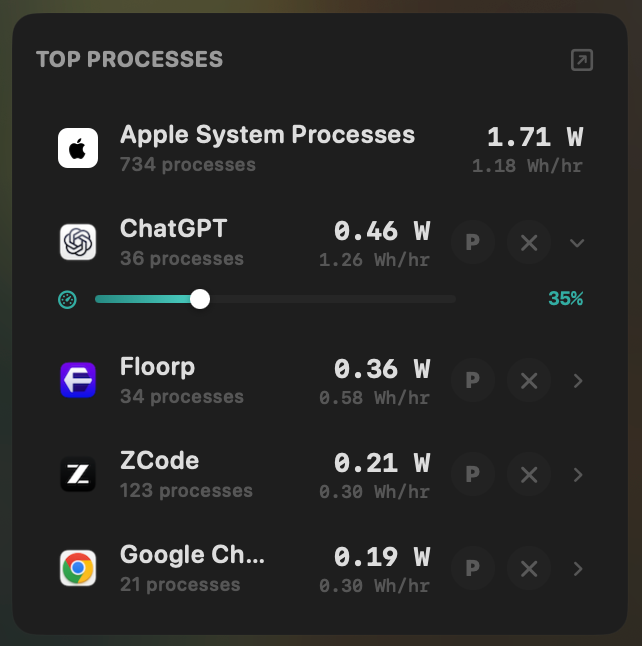
- Yes:Live per-app power draw · Process-level, real-time
- Yes:Hidden-workload detection · Docker, cloudflared, launchd
- Yes:Per-app CPU throttle · 10% to 100% slider
- Yes:E-core offload · Per-app toggle
- Yes:One-click kill · Runaway apps + subprocesses
Amphetamine- No:Live per-app power draw
- No:Hidden-workload detection
- No:Per-app CPU throttle
- No:E-core offload
- No:One-click kill
Seeing where the power goes
Amphetamine shows no power figures. MacBookBatteryMonitor shows the live system total in watts, split into CPU+GPU, RAM, display, and USB.
MacBookBatteryMonitorWinner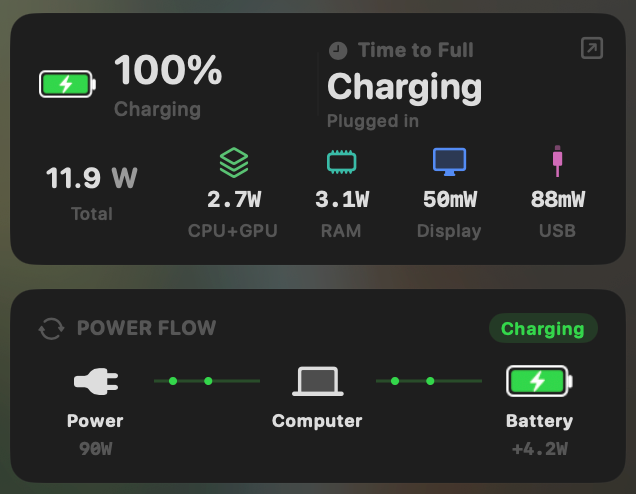
- Yes:System total power draw · Live, in watts
- Yes:Power breakdown by component · CPU / GPU / RAM / Display / USB
Amphetamine- No:System total power draw
- No:Power breakdown by component
Charge limit and Sailing Mode
Amphetamine has no charge control. MacBookBatteryMonitor sets a 50% to 100% charge limit over SMC, sails to it while plugged in, and switches on Low Power Mode by itself.
MacBookBatteryMonitorWinner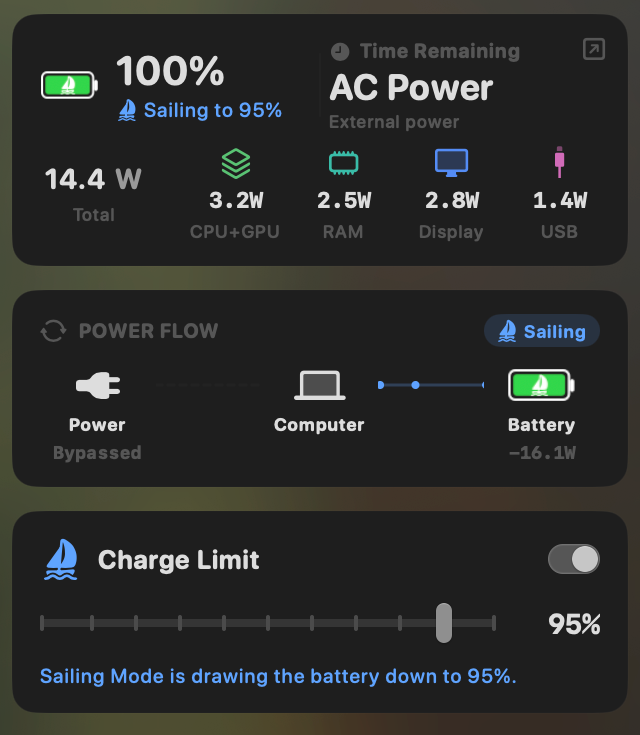
- Yes:Charge limit · 50% to 100% via SMC
- Yes:Sailing mode · Discharge while plugged in
- Yes:Low Power Mode automation · Auto below a threshold
Amphetamine- No:Charge limit
- No:Sailing mode
- No:Low Power Mode automation
Battery health
Amphetamine shows no health, cycle count, or temperature. MacBookBatteryMonitor shows all three, with cycles against the design limit and a condition label.
MacBookBatteryMonitorWinner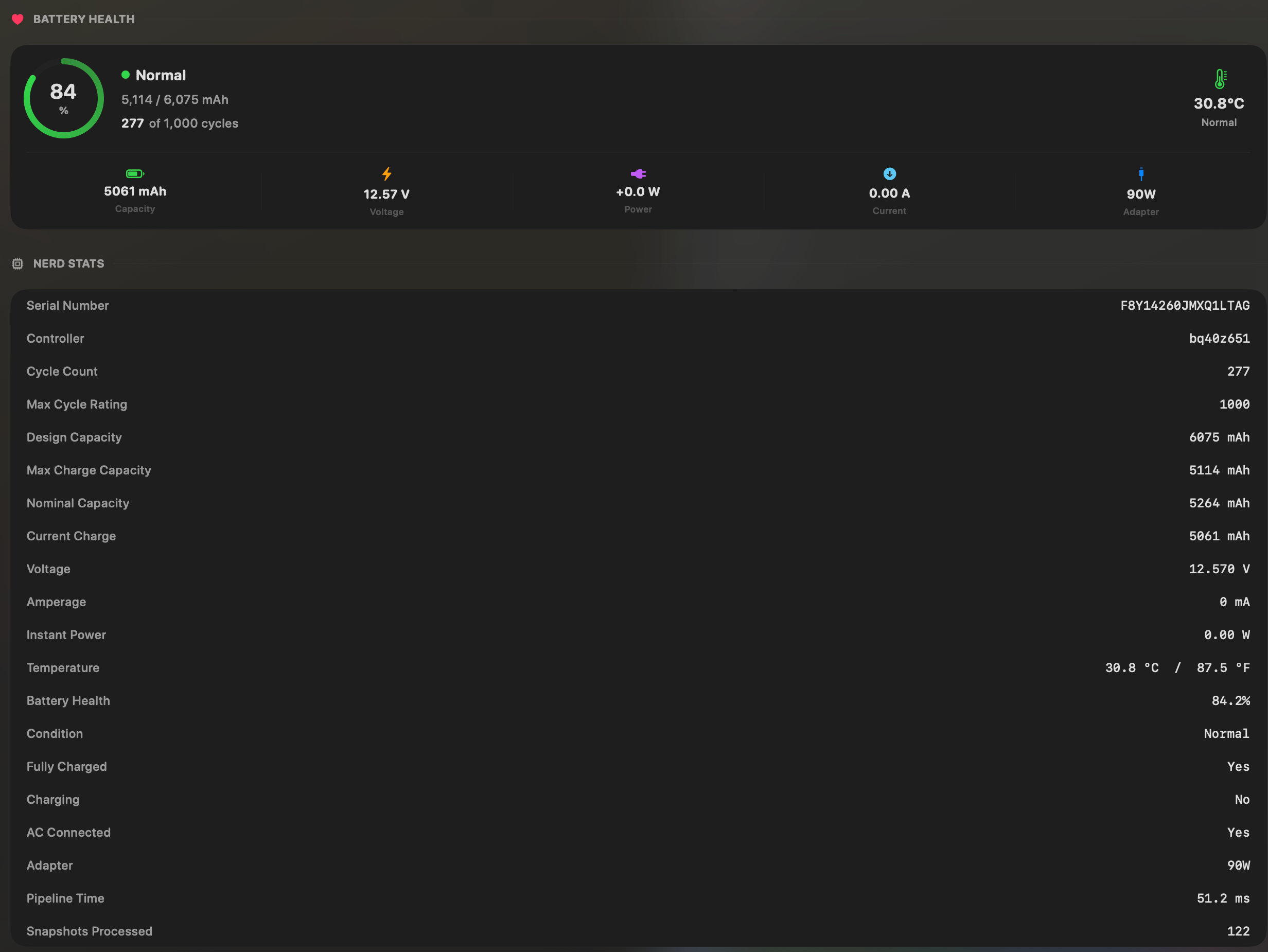
- Yes:Battery health % · Health % + condition label
- Yes:Cycle count · Cycles + design cycle count
- Yes:Battery temperature · °C / °F with status label
Amphetamine- No:Battery health %
- No:Cycle count
- No:Battery temperature
Menu bar and history
Both live in the menu bar. Amphetamine's dropdown starts and stops keep-awake sessions. MacBookBatteryMonitor's opens the power popover, with a battery level history from 1 hour to 7 days behind it.
MacBookBatteryMonitorWinner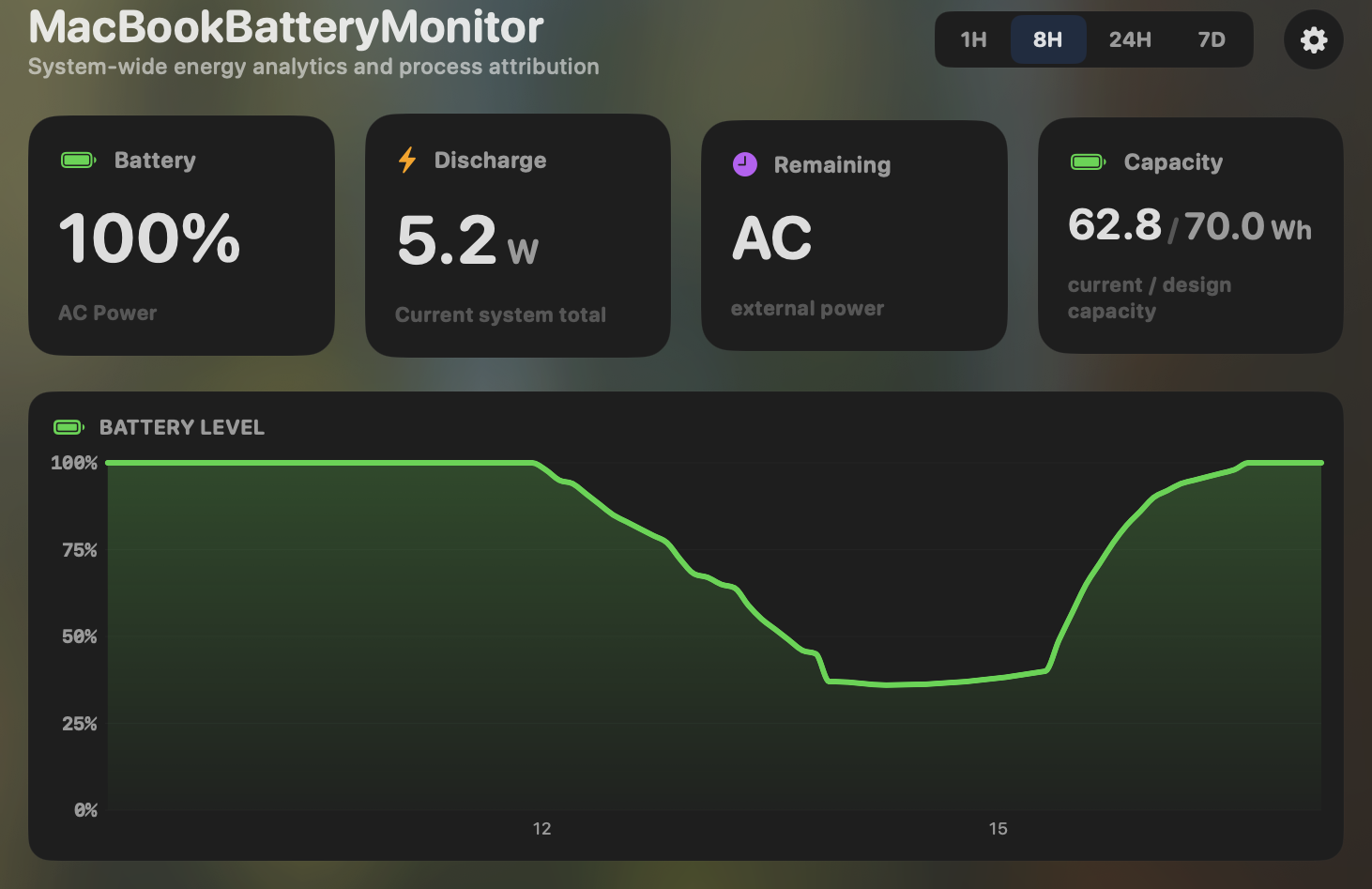
- Yes:Menu-bar first · Native, configurable icon
- Yes:History charts · 6h / 24h / 7d + per-app
Amphetamine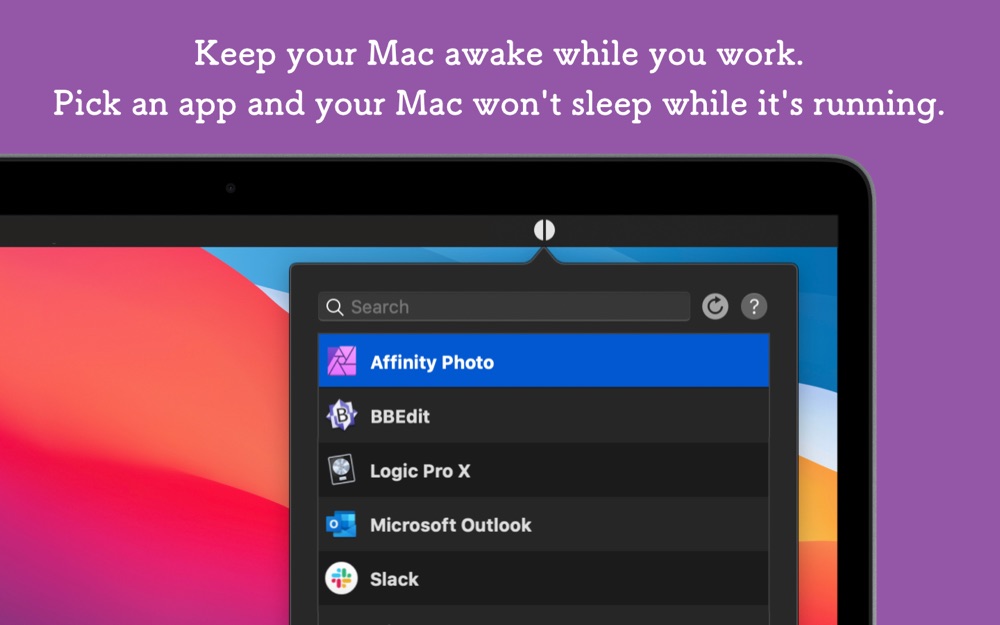
- Yes:Menu-bar first · Session status
- No:History charts · Keep-awake session log only
Feature comparison
 MacBookBatteryMonitor
Why consider MacBookBatteryMonitor
See the drain, then do something about it
Amphetamine keeps the Mac awake. MacBookBatteryMonitor shows what that costs in watts, per app, and lets you cap charging while plugged in.
What Amphetamine does
Amphetamine, by William Gustafson, is a free keep-awake and anti-sleep utility, and the category leader. A session keeps your Mac or display awake indefinitely, for a duration, until a time, or while a file downloads. It has roughly fifteen trigger types for auto-activation: an app running or frontmost, an external display, a USB or Bluetooth device, charging state or a battery threshold, a power adapter event, an IP address, a Wi-Fi network, a VPN, audio output in use, a mounted volume, CPU utilisation, or idle time. It supports closed-display mode with a fail-safe for Apple Silicon, exposes an AppleScript API, and has a free companion Enhancer app. Its battery interactions are limited to using charge state as a session trigger. It does not show battery percentage, health, cycle count, per-app power, charge control, or any telemetry at all. It has been on the App Store since 2014, runs on macOS 10.13 and up, Intel and Apple Silicon, and is fully free.
What MacBookBatteryMonitor does
MacBookBatteryMonitor does not prevent sleep. Its entire surface is the battery: real per-app power draw in watts, a component breakdown, health and cycle count against the design limit, hidden drain from Docker, cloudflared, and launchd, a 50% to 100% charge limit, Sailing Mode, automated Low Power Mode, and per-app actions including a CPU throttle, an E-core offload toggle, and a one-click kill. The only real overlap is that MacBookBatteryMonitor’s one-click kill and automated Low Power Mode can help with the same runaway processes that sometimes keep a Mac running hot and unwilling to sleep.
Which one should you pick?
These are different categories. Amphetamine is the right tool, and an excellent free tool, if you want to stop your Mac sleeping on triggers or schedules. MacBookBatteryMonitor is the right tool if you want to understand and manage your battery. They do not substitute for each other. Run Amphetamine if you need keep-awake, run MacBookBatteryMonitor if you need battery instrumentation.
Related guides
Frequently asked questions
Does Amphetamine show battery health or cycle count?
No. Amphetamine is a keep-awake app. It has no battery telemetry at all. The only way it touches battery is as a trigger condition for a keep-awake session, such as "while charging".
Can Amphetamine limit charging?
No. Amphetamine has no charge control, no Sailing Mode, and no Low Power Mode automation. It does the opposite job of preventing sleep.
Do these apps overlap at all?
Barely. Amphetamine stops your Mac sleeping. MacBookBatteryMonitor shows and controls its battery. The only sliver of overlap is that MacBookBatteryMonitor can kill runaway apps that keep a Mac running hot, which is adjacent to the sleep problem but not the same thing.
Sources
Feature and pricing claims on this page come from Amphetamine’s own documentation and Apple’s published guidance.