Troubleshooting
Why Is My MacBook Charging Slowly? Check These 5 Things
- Published
- Last edited
A MacBook can charge slowly because macOS is deliberately pausing charging, the adapter is delivering less power than expected, or the Mac is using most of that power while you work. The checks below separate those situations without guessing.
Quick answer
Start with the battery menu. If it says Charging On Hold or Charged to Limit, slow or paused charging is intentional. Otherwise, check the wattage macOS is actually receiving in System Information. Then test a direct wall connection, a known-good cable, and a lighter workload. Do not assume that the number printed on a charger is reaching the Mac through a dock or cable.
1. Read the charging status first
Click the battery icon in the menu bar before changing anything. The wording tells you which path to take.
2. Check the wattage delivered to the Mac
Hold Option and open the Apple menu, choose System Information, select Power, then find AC Charger Information. Read the Wattage (W) value. Apple recommends using an adapter with at least the wattage that came with your Mac for the best charging experience.
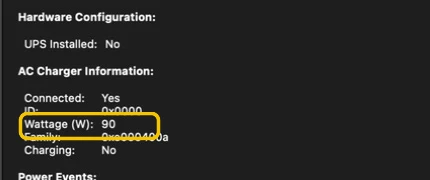
If the reported wattage is unexpectedly low, connect the charger directly to the Mac and wall outlet. A dock may divide its total power across several ports, and a cable can limit the power available to the computer. Check Apple's power adapter guidance or the technical specifications for your exact Mac before buying a replacement.
3. Test the cable, port, and power source
- Remove any dock, monitor, hub, or extension from the charging path.
- Use a known-good USB-C or MagSafe cable rated for the power your adapter provides.
- Try another charging port on the Mac, then another wall outlet.
- With power disconnected, inspect the connectors for damage or visible debris. Follow Apple's cleaning guidance and keep liquids away from ports.
Recheck the wattage in System Information after each change. That turns a vague cable swap into a result you can compare.
4. Check whether your workload is using the available power
The adapter powers the running Mac first; the remaining power can charge the battery. A demanding export, game, virtual machine, or compilation can leave little power for charging. The battery can even discharge while plugged in if the connected source cannot cover the current load.
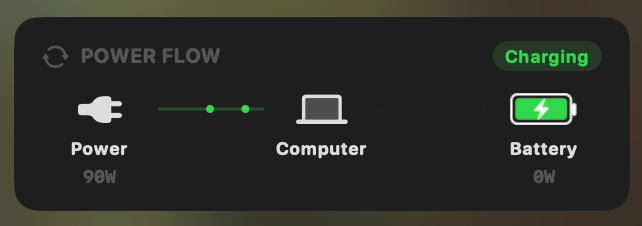
Close demanding apps for ten minutes and compare the result at the same battery percentage. If charging speeds up, the charger may be working correctly and the workload was consuming the difference. Activity Monitor can rank apps by Energy Impact. MacBookBatteryMonitor adds live system power, adapter power, battery charge or discharge watts, and per-app watts so you can see the power budget directly. For the app-level diagnosis, compare the best Mac power monitor apps.
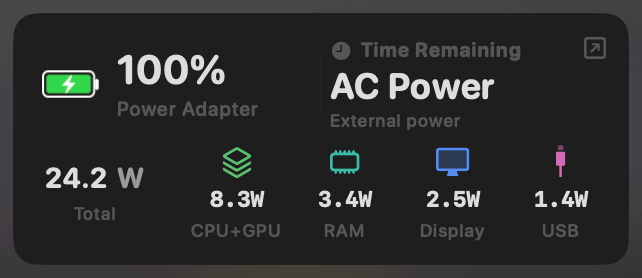
For a repeatable test, record the battery percentage and charging watts, close the highest-use app, wait a few minutes, then measure again. Keep the screen brightness and adapter connection unchanged.
5. Check battery health and hardware
Open System Settings > Battery, then click the information button beside Battery Health. If macOS reports Service Recommended, or if a known-good recommended charger and cable still produce the wrong result, arrange service. Also stop using a cable or adapter that is damaged, hot, discoloured, or intermittently disconnecting.
Supported MacBook models can fast charge to around 50% in about 30 minutes with a compatible adapter and cable, but the required combination depends on the exact model. Use Apple's MacBook fast-charge compatibility list instead of a generic wattage chart.
What your result means
- The status says charging is on hold: the Mac is protecting battery lifespan; no repair is indicated by that status alone.
- Delivered wattage is low: isolate the adapter, cable, dock, port, and outlet.
- Charging improves when apps close: the workload was using most of the available power.
- Charging remains abnormal with a known-good setup: check Battery Health and arrange hardware service.
Frequently asked questions
Why is my MacBook charging slowly?
First check the battery menu for Charging On Hold or Charged to Limit. If neither appears, check the wattage macOS says the adapter is delivering, connect directly instead of through a dock, try a known-good cable, and repeat the test with demanding apps closed.
Why is my MacBook charging slowly past 80%?
macOS may intentionally pause charging near 80% to reduce battery aging. The battery menu identifies this as Charging On Hold or Charged to Limit. Charging also naturally changes with battery state, temperature, workload, and available adapter power.
Can a lower-wattage charger damage my MacBook?
A compatible lower-wattage USB-C power adapter can charge a MacBook more slowly. It may fail to keep up with a demanding workload, but the Mac controls how much power it draws. Apple recommends an adapter with at least the wattage supplied with the Mac for the best charging experience.
Why does my MacBook lose charge while plugged in?
The Mac can use battery power while plugged in when the connected adapter, cable, dock, or port does not deliver enough power for the current workload. Check the delivered wattage in System Information and test again with the recommended adapter connected directly.
How do I see the charger wattage my MacBook is receiving?
Hold Option and open the Apple menu, choose System Information, select Power in the sidebar, then read Wattage under AC Charger Information. This is more useful than relying only on the number printed on an adapter or dock.