Looking for the app? See the MacBook battery monitor.
Reviews
 Reviews
Battery Toolkit Review: Archived, Unnotarized and Blocked on macOS 27
- Published
- Updated
Is Battery Toolkit still worth using?
No. Battery Toolkit was a good free charge limiter for Apple silicon Macs, and 2,455 people starred it on GitHub. Its developer archived the project on 21 March 2026, the last release is from August 2025, and the app was never notarized by Apple.1,2
When we downloaded version 1.8 and opened it on macOS 27.2, macOS refused to run it and offered to move it to the Bin. Getting past that means overriding a malware warning for an app nobody maintains, so we stopped there.
Battery Toolkit at a glance
Battery Toolkit
v1.8 · Apple silicon only · archived
Verdict: do not install it in 2026. It is archived, unnotarized and blocked by macOS 27.
- YesFree and open source under BSD-3-Clause
- YesUpper and lower charge limits, plus a switch to cut the adapter
- NoRepository archived on 21 March 2026
- NoNot notarized, so macOS 27.2 blocked it
- NoApple silicon only, no Intel support
- NoNo per-app power readings
Archived
21 Mar 2026
The repository is read-only. No fixes, no new releases.
Last release
Aug 2025
Version 1.8 added fixes for macOS 15.7 and macOS 26.
Notarized by Apple
No
Signed with an Apple Development certificate, which Gatekeeper rejects.
Open issues
15
Left open when the project was archived, including "App is not working".
We tried to install it on macOS 27.2
On 10 November 2026 we downloaded Battery-Toolkit-1.8.zip from the project's GitHub releases page, followed the README and moved the app to Applications on a 14-inch MacBook Pro (2021, M1 Max) running macOS 27.2. Then we opened it.7,3
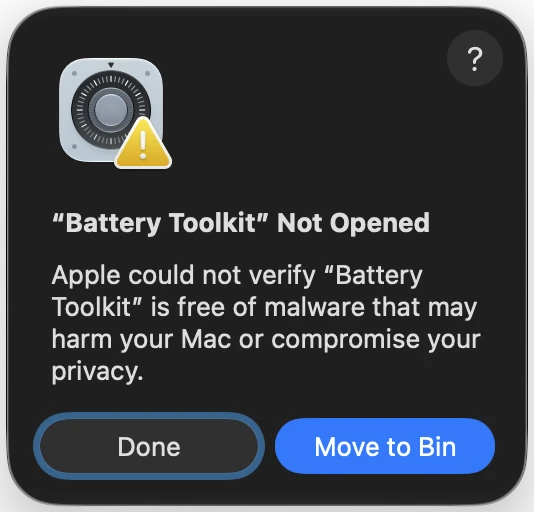
That dialog has no way to open the app. To run Battery Toolkit, you close it, go to System Settings > Privacy & Security, find the line saying the app was blocked, click Open Anyway, confirm, enter your password, and then approve a background helper that takes control of charging.5
Battery Toolkit's README explains the warning itself: the developer did not notarize the app because of the Apple Developer Program membership fee. That was a reasonable call for an active hobby project. For an archived one, it means you are approving a privileged helper that will never get another security fix.3
Signed for testing, not for release
We checked the signature on the download with Apple's own tools and ran the same check on MacBookBatteryMonitor for comparison.7
Authority=Apple Development
spctl: rejected
Signed with a certificate meant for testing on the developer’s own devices.
 MacBookBatteryMonitor
Authority=Developer ID Application
spctl: accepted, Notarized Developer ID
Signed with a Developer ID and checked by Apple’s notary service.
An Apple Development certificate is what a developer uses to run their own builds on their own Macs. Apple does not check those builds for malware. A Developer ID signature plus notarization is what lets an app downloaded from the web open normally.
Archived on 21 March 2026
The project's GitHub page now opens with a banner saying the owner archived it. Nobody can file new issues or merge fixes.1


- Yes
4 Oct 2024
Version 1.5 released
- Yes
5 Mar 2025
Version 1.6 released
- Yes
19 May 2025
Version 1.7 released
- Partly
11 Aug 2025
Version 1.8, fixes for macOS 15.7 and macOS 26. The last release
- No
21 Mar 2026
Repository archived and made read-only
- No
10 Nov 2026
macOS 27.2 refuses to open version 1.8
Four of the issues left open describe the app failing or clashing with other software. They stay open for good.4
- No
#150 App is not working
Opened 17 Sep 2025, still open
- No
#161 App appears non-functional, no battery draining nor Commands
Opened 10 Oct 2025, still open
- No
#173 Power state conflict between Google Drive for Desktop and Battery Toolkit v1.8
Opened 3 Feb 2026, still open
- No
#174 Conflicts with PD USB docks?
Opened 11 Feb 2026, still open
What Battery Toolkit does
For a free app, Battery Toolkit covered more than the basic cap. Its README lists these controls.3
Upper limit
Charging stops at a level you set, as low as 50%
Lower limit
Charging starts again below a level you set, as low as 20%
Adapter off switch
Cuts the power adapter without unplugging, so the battery drains
Menu bar commands
Charge to full, charge to the limit, or stop charging now
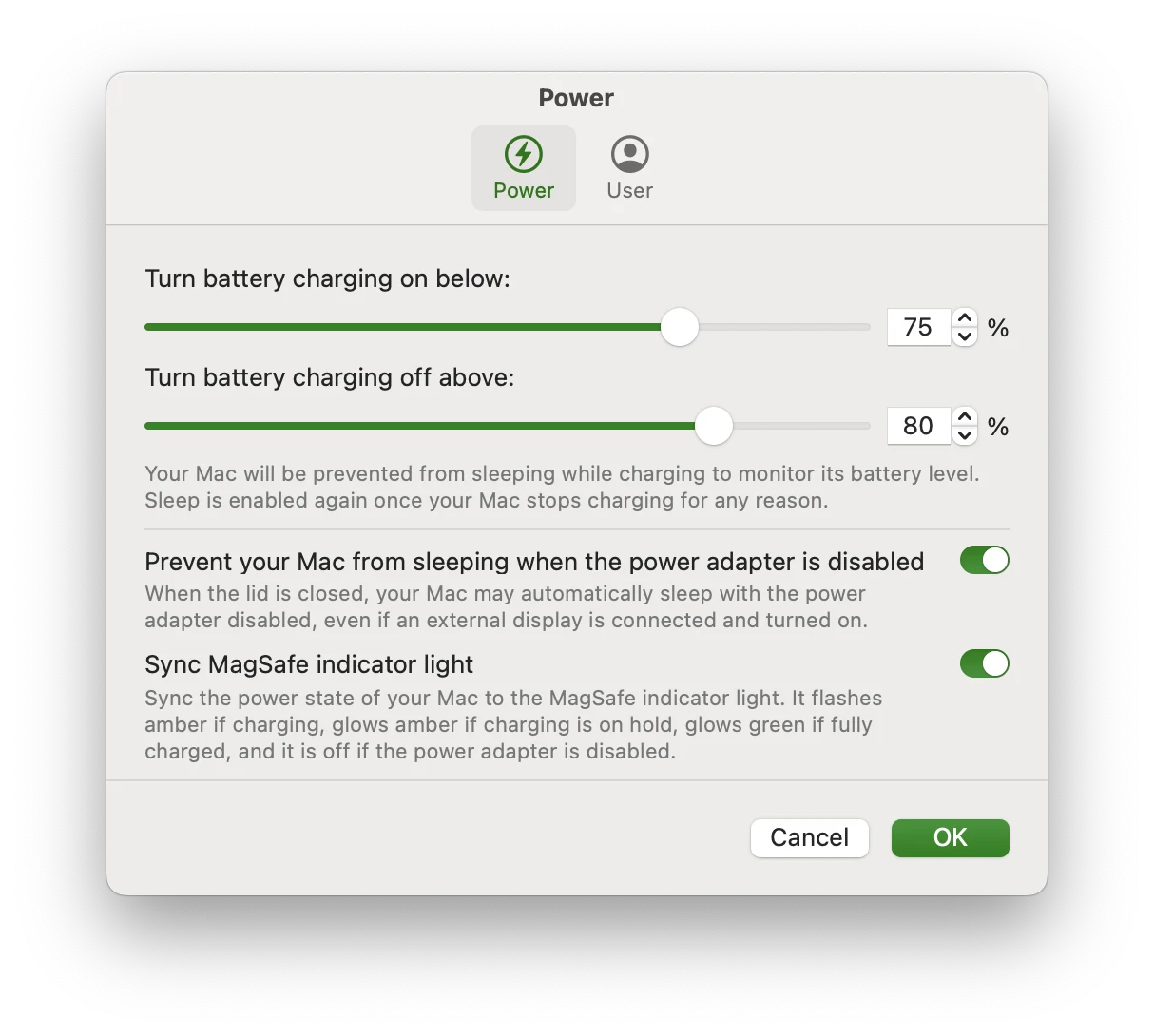
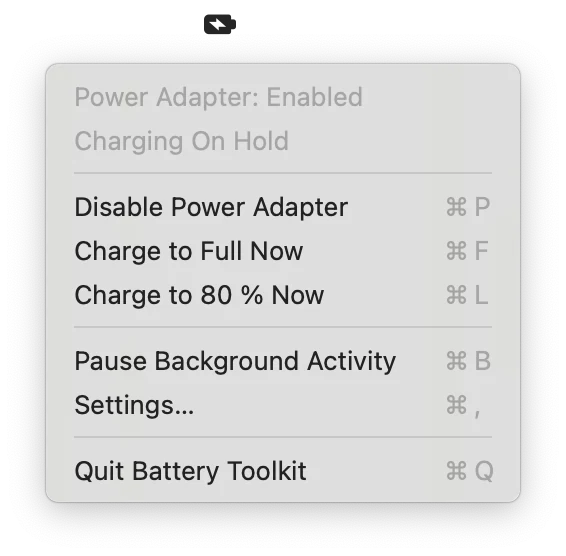
Two limits come from the platform, not the app. A Mac that is shut down on the charger charges to 100%, and the lower limit resets after a reboot. Battery Toolkit also keeps the Mac awake while it charges so it can stop charging at the limit.3
Is Battery Toolkit safe?
The code is open under BSD-3-Clause, so anyone can read it, and nothing we found suggests it is malicious. The problem is the package around it. The app is not notarized, its helper runs with privileges to control charging, and the archive means any bug or security hole found from now on stays in the app.1,3
The README also suggests installing through Homebrew with the --no-quarantine flag to skip the Gatekeeper prompt. That removes the warning without removing the reason for it.
Battery Toolkit alternatives that still work
If all you want is to stop at 80%, macOS Tahoe 26.4 and later has a Charge Limit built in for Apple silicon Macs, from 80% to 100%, under System Settings > Battery.6
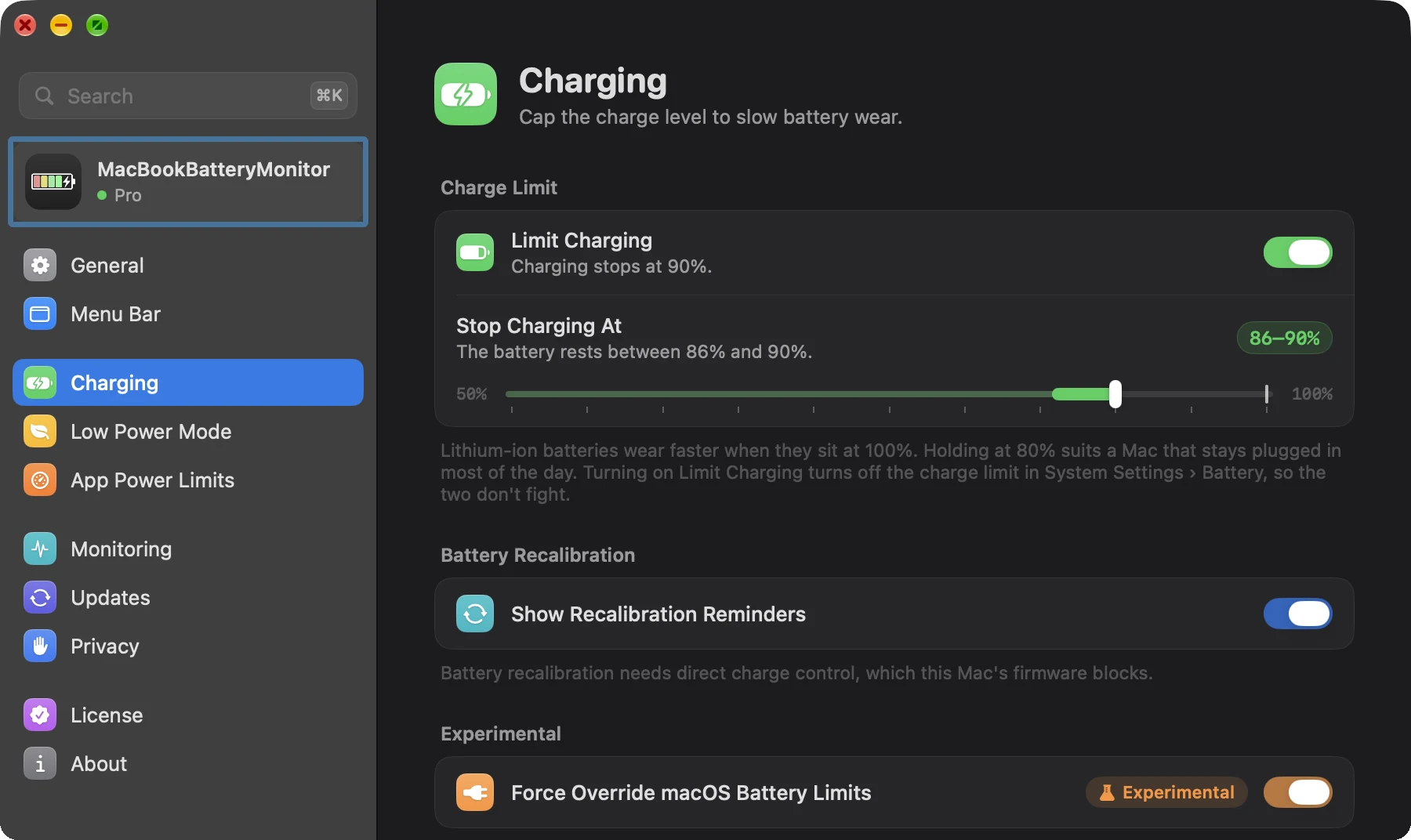
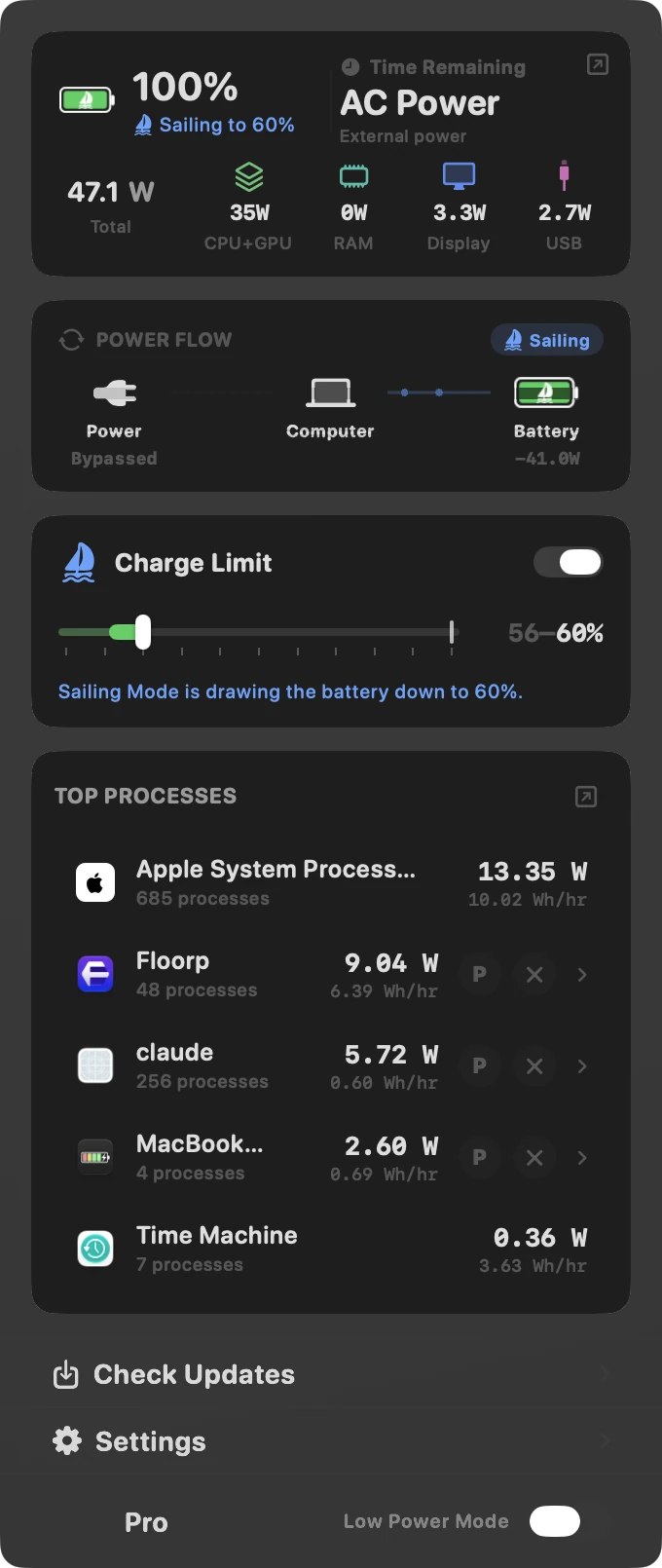
If you used Battery Toolkit for lower limits or to drain the battery while plugged in, MacBookBatteryMonitor covers both and opens normally on macOS 27. Its limit runs from 50% to 100%, Sailing Mode runs the Mac from the battery down to the limit while the charger stays connected, and every running app is shown in watts. It is signed with a Developer ID, notarized by Apple, and costs $9 once with a 7-day free trial.
Battery Toolkit vs macOS Charge Limit vs MacBookBatteryMonitor
Swipe sideways to see every feature →
| App | Price (USD) | Maintained | Notarized | Opens on macOS 27 | Charge limit | Discharge while plugged in | Per-app watts |
|---|---|---|---|---|---|---|---|
| Mac | $9lifetimeFree trial | Activev1.0.8, Nov 2026 | YesDeveloper ID | YesRan on 27.2 | Yes50% to 100% | YesSailing Mode | Yes |
| mac | Free | ActivePart of macOS | YesPart of macOS | Yes | Partial80% to 100% | No | No |
| Battery ToolkitApple silicon only | Free | ArchivedArchived Mar 2026 | NoApple Development cert | NoBlocked by Gatekeeper | Yes50% to 100% | YesAdapter off switch | No |
For a longer head-to-head with AlDente, read AlDente vs Battery Toolkit. For every charge limiter still worth installing, see the best Mac charge limiter apps.
Our verdict
Battery Toolkit earned its 2,455 stars. It was free, small and gave Apple silicon owners real control over charging before Apple shipped its own limit. In 2026 it is archived, unnotarized and blocked by macOS 27 on first launch, and every fix it will ever get has already shipped. Uninstall it if you still have it, and do not override Gatekeeper to install it fresh.
A simple 80% cap
macOS Charge Limit
Free and built into macOS Tahoe 26.4 and later
Any limit from 50% to 100%
MacBookBatteryMonitor
Sailing Mode, per-app watts, notarized, $9 once
Nothing in 2026
Battery Toolkit
Archived, unnotarized and blocked by macOS 27
FAQ
Is Battery Toolkit still maintained?
No. Its developer archived the GitHub repository on 21 March 2026, which makes it read-only. The last release, version 1.8, came out on 11 August 2025, and its 15 open issues will not be fixed.
Does Battery Toolkit work on macOS 27?
macOS 27.2 refused to open it. When we launched Battery Toolkit 1.8 on 10 November 2026, macOS showed "Battery Toolkit Not Opened" with only Done and Move to Bin buttons. Its last release added fixes for macOS 15.7 and macOS 26, and no release since has targeted macOS 27.
Is Battery Toolkit safe?
Its source code is public under the BSD-3-Clause licence, but the app itself is not notarized by Apple. Version 1.8 is signed with an Apple Development certificate, which Gatekeeper rejects, and it installs a privileged background helper that controls charging. Because the project is archived, no security fixes will follow.
Why does macOS say Battery Toolkit is not opened?
Battery Toolkit is not notarized. Its README says the developer skipped notarization because of the Apple Developer Program membership fee. macOS blocks unnotarized apps downloaded from the internet until you approve them in System Settings > Privacy & Security.
Is Battery Toolkit free?
Yes. Battery Toolkit is free and open source under the BSD-3-Clause licence.
Does Battery Toolkit work on Intel Macs?
No. Battery Toolkit supports Apple silicon Macs only. The 1.8 app contains Apple silicon code alone.
Does Battery Toolkit keep the limit while the Mac is shut down?
No. Its README says apps cannot control charging while the Mac is shut down, so a MacBook left on the charger while off charges to 100%.
How do I uninstall Battery Toolkit?
Open Battery Toolkit, choose Disable Background Activity from its menu so the helper stops, then move the app to the Trash.
What is the best Battery Toolkit alternative?
For a simple 80% cap on macOS Tahoe 26.4 or later, use the Charge Limit built into macOS. For a limit anywhere from 50% to 100%, Sailing Mode and per-app power in watts, MacBookBatteryMonitor is signed with a Developer ID, notarized by Apple and costs $9 once.
Sources
- GitHub: mhaeuser/Battery-Toolkit The archive banner dated 21 March 2026, 2,455 stars, the BSD-3-Clause licence and 15 open issues. Checked 10 November 2026.
- GitHub: Battery Toolkit releases Version 1.8 on 11 August 2025 with fixes for macOS 15.7 and macOS 26, and the earlier 1.5 to 1.7 release dates. Checked 10 November 2026.
- Battery Toolkit README Features, the 50% and 20% limit floors, Apple-silicon-only support, the notarization note, install and uninstall steps, and the shutdown limitation. The two Battery Toolkit screenshots in this review come from it. Checked 10 November 2026.
- GitHub: Battery Toolkit open issues Issues #150, #161, #173 and #174. Checked 10 November 2026.
- Apple Support: Safely open apps on your Mac How Gatekeeper treats apps that are not notarized, and the Open Anyway button in Privacy & Security. Checked 10 November 2026.
- Apple Support: About Optimized Battery Charging and Charge Limit on Mac The 80% to 100% Charge Limit in macOS Tahoe 26.4 and later on Apple silicon. Checked 10 November 2026.
- MacBookBatteryMonitor test, 10 November 2026 Battery Toolkit 1.8 downloaded from its GitHub release, checked with codesign and Gatekeeper, and launched on a 14-inch MacBook Pro (2021, M1 Max) running macOS 27.2. Checked 10 November 2026.