About
What is BetterBatteryMonitor and why does it exist?
macOS tells you your battery percentage. It does not tell you which app just cost you twenty minutes of charge, or that your battery has degraded to 84% of its original capacity, or that Chrome has been pulling 8 watts for the last hour. We built BetterBatteryMonitor to make that stuff obvious.
The problem
MacBooks have great batteries. Apple Silicon machines in particular can last a full workday on a charge, if you are using it right. But when you really use your device your battery can drain incredibly quickly, macOS gives you almost no way to figure out why or if this is normal.
You can open Activity Monitor, switch to the Energy tab, and sort by Energy Impact — a vague number with no unit that does nothing to really tell whats going on. You can open System Settings and see your battery percentage and a small undetailed graph showing you nothing useful. You can check your battery health, again in a small subsection of System Settings. None of it is connected, real time, understandable. None of it lives in a place you can check without going out of your way and by the time you think to check you have already blasted though 50% of you battery.
The result is that people live with faster drain than necessary because they do not know which app is causing it, and they replace batteries earlier than they need to because they are going through many more battery cycles as a result. Often its not the app you have open thats chewing through your battery but something random in the background that you forgot about.
What BetterBatteryMonitor does
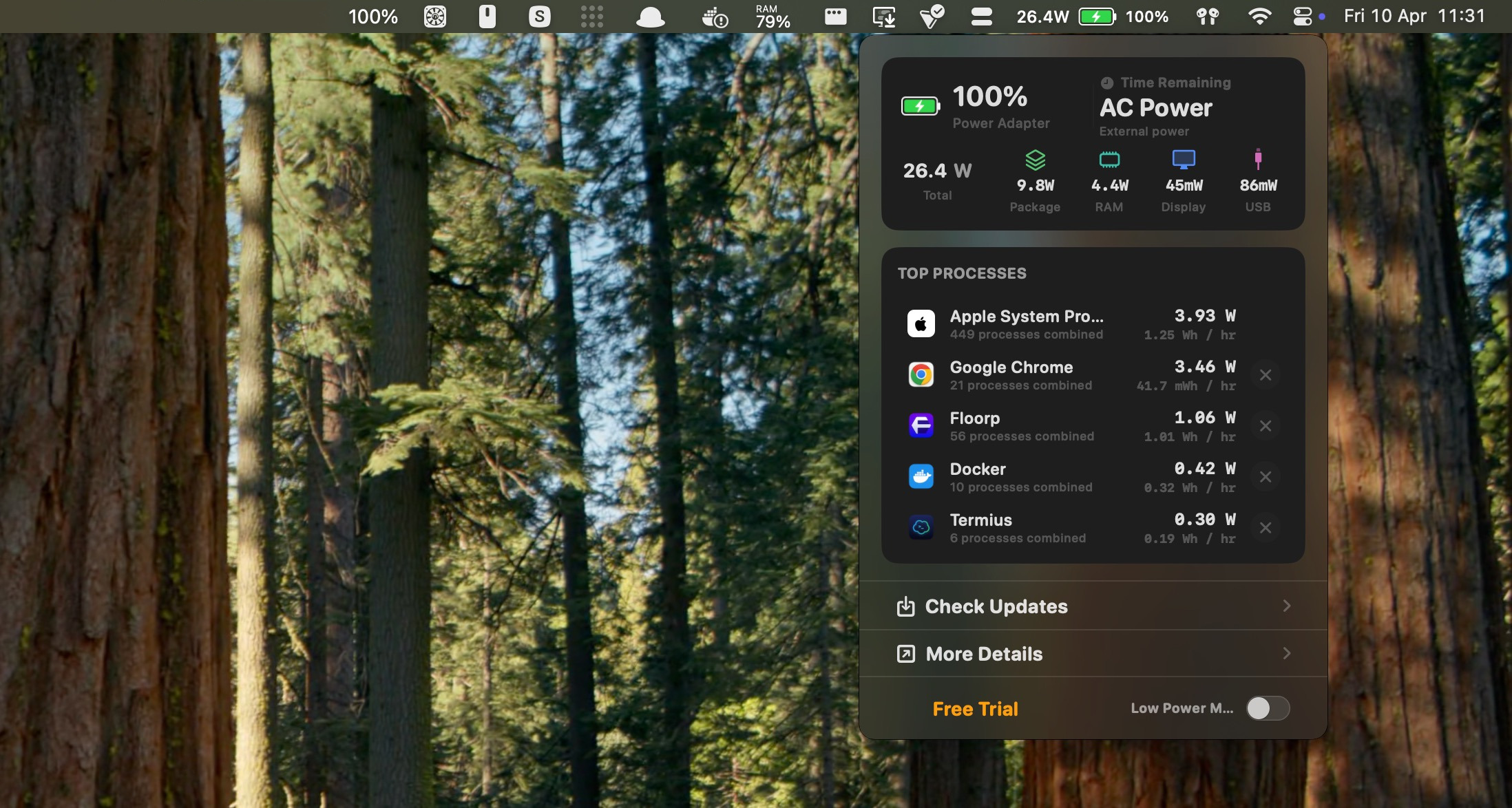
BetterBatteryMonitor is a native Mac app that lives in your menu bar, it gives you:
- Live power draw in watts — the actual wattage your Mac is consuming right now, updated in real time. If it spikes, you can see at a glance.
- Per-app power usage — a list of every app drawing power, sorted by impact, with a quit button next to each one. You can see that Chrome is pulling 6 watts and kill it without switching windows.
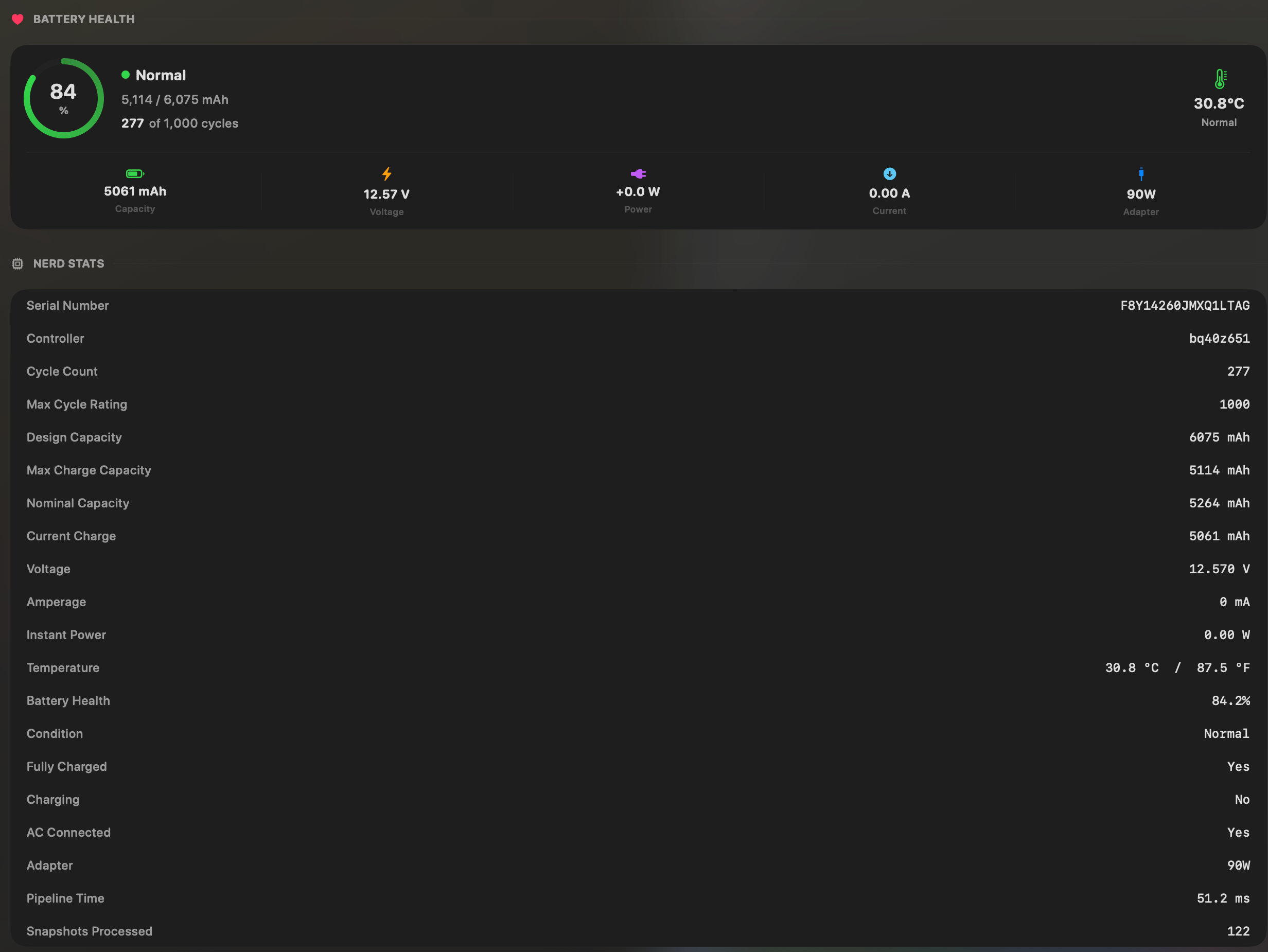
- Battery health details — maximum capacity percentage, cycle count, and condition. No digging through System Settings.
- Energy history— charts that show your power draw and battery level over time. Spot patterns like “every afternoon at 3pm my power spikes because Slack starts syncing.”
- One-click Low Power Mode — toggle it from the menu bar instead of hunting through settings.
It is a native Swift app. Not some bullshit vibe coded cross platform app. It launches fast, uses minimal resources, and stays out of your way until you need it.
Why native matters
BetterBatteryMonitor does power attribution per app, this is actually quite resource intesive and we need to optimize it heavily. As such building it natively has resulted in accurate, fast and reliable power tracking without draining your battery heavily. Sure we could have cut corners and built it with something simpler but that would defeate the point, its meant to be seemless and a smooth experience for everyone.
BetterBatteryMonitor is built with Swift and AppKit. The menu bar item uses almost no CPU and support various scan times from 1s up to 30s so you get to choose how frequently it checks. The popover renders natively. When you quit the app, it is gone — no background process, no helper daemon, nothing hanging around eating watts.
If you are trying to figure out why your battery is draining, the last thing you need is another app making it worse. Native was the only honest choice.
Why it exists
I built this because I was frustrated. My 14-inch MacBook Pro would last about 2 hours on a charge instead of the 10 Apple advertised! I knew something was wrong, but I could not figure out what. Activity Monitor showed me a number called “Energy Impact” with no unit. I wanted to know watts. I wanted to know what percentage my battery health was actually at. I wanted to see my drain over time so I could figure out the pattern.
None of that existed in a single place. So I built it.
Once I built it I really understood why my battery was only lasting 2 hours, screen brightness maxed out was pulling 15W of power alone let alone the other apps I had left in the background sitting there 'idling'. I genuinely didn't realise how much power an idle app could use, especially because it turned out to be specific apps rather than every app.
The free tier is enough for most people
The free tier shows live power draw, the menu bar popover, a Low Power Mode toggle, and basic battery info. If you just want to know “how many watts am I using right now” and “which app is burning the most,” that is covered.
The paid plans add energy history charts, per-app power breakdowns over time, and updates. It is a one-time purchase — no subscription. $15 for a year of updates, or $40 for lifetime updates. The free tier never expires.
Try it yourself. Download BetterBatteryMonitor for free and see what is actually draining your battery. Most people find the culprit within the first five minutes.
What we are working on next
We are adding support for setting charge thresholds directly in the app so you can choose how much you charge your battery by default, as well as GPU power attribution (we currently have CPU and RAM but are missing GPU). If there is something you want to see, let us know.